



Topaz Video for Mac v1.7.2 AI Video Enhancement Tool Activated Version Download
Topaz Video is a professional-grade AI video enhancement tool built by Topaz Labs. Leveraging over a dozen purpose-trained neural network models, it delivers core processing capabilities such as video super-resolution upscaling, intelligent noise reduction, image stabilization, frame rate enhancement, and SDR-to-HDR conversion. It can precisely restore low-resolution old footage, shaky handheld shots, and compression-distorted videos, outputting cinema-quality high-definition smooth visuals. The software supports both standalone operation and use as a plug-in for editing software, seamlessly integrating into video post-production workflows. It is a commonly used tool for film and television creators, video restoration enthusiasts, and professional post-production personnel.
Installation and cracking method:
1. After the software download is complete, open the downloaded dmg format software package as shown above, double-click the software “TopazVideo-1.7.0.pkg” to install the software, and simply click Next, Next to install by default.
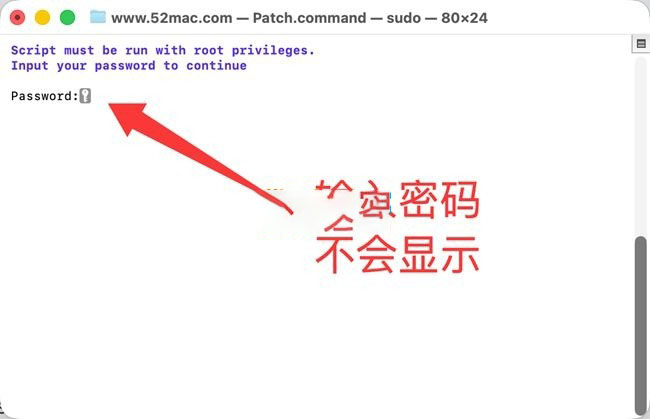
2. After the software installation is complete, do not open the software first. Drag Patch.command (activation tool) from the software package to the desktop, double-click Patch.command on the desktop, and Terminal will open automatically, as shown below. Enter your computer password (the password will not be displayed when entering, just enter the password and press Enter).
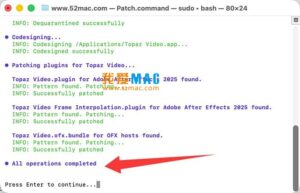
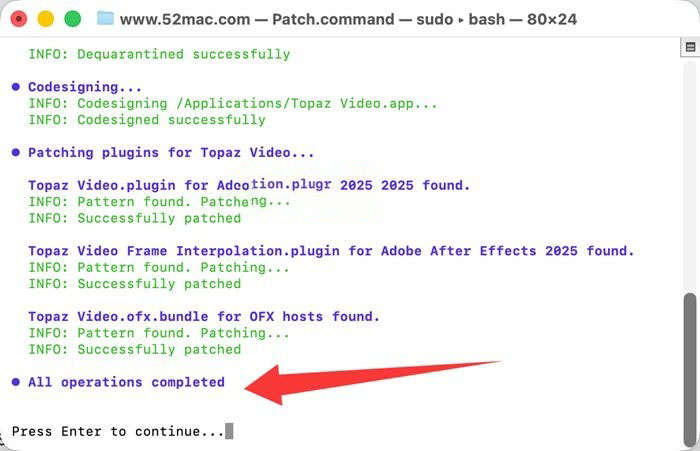
3. As prompted below, wait about 1 minute. When the blue text “All operations completed” appears at the end, the cracking is complete and the software is ready to use.
—————————————————————–[Divider]———————————————————————–
Features:
– Multi-scenario AI image quality restoration
Built-in AI model matrix covering different types of footage, including Nyx for noise reduction while preserving details in high-definition footage, the Rhea series for 4x fine upscaling, Artemis for both noise reduction and de-aliasing, Proteus for deep restoration of low-quality footage, and Iris specifically optimized for facial details. You can flexibly choose a solution based on the source video quality to eliminate noise, compression artifacts, and edge aliasing while preserving natural textures and avoiding distortion from over-processing.
– Lossless super-resolution upscaling
Supports up to 16x resolution enhancement, allowing SD and 1080P footage to be losslessly upscaled to 4K, 8K, or even 16K specifications. AI learns from massive video data to supplement real details, replacing the blurry effect of traditional interpolation algorithms while eliminating inter-frame flicker and color shift. It is suitable for various scenarios such as old film restoration, footage upscaling, and large-screen display.
– Intelligent frame interpolation and smooth slow motion
Equipped with multiple frame interpolation models such as Apollo, Chronos, and Aion, it can increase low-frame-rate videos to up to 120fps and also create silky, natural slow-motion effects. AI accurately recognizes motion trajectories in the picture and generates coherent intermediate frames, avoiding ghosting, double images, and stuttering, making high-speed motion scenes smoother. It is suitable for film and television frame rate conversion, game screen recording optimization, and sports footage restoration.
– Professional-grade image stabilization
The AI stabilization function intelligently counteracts image shake and jelly effects caused by handheld and moving shots, restoring smooth and steady camera movement. It can also repair motion blur caused by slow shutter speeds while preserving the sharpness and details of the main subject, producing professional-quality footage without professional stabilization equipment.
– SDR-to-HDR color upgrade
Equipped with the Hyperion series HDR conversion models, it can convert ordinary SDR videos into high dynamic range HDR images, intelligently expanding the color gradation and detail expression of highlights and shadows, enhancing the contrast between highlights and shadows, making the picture more transparent and three-dimensional, and adapting to the playback needs of HDR display devices.
– Flexible adaptation to multiple workflows
It can be used as standalone software to batch process multiple video files, and also supports integration as a plug-in into mainstream post-production software such as Adobe Premiere Pro, DaVinci Resolve, and After Effects. You can directly call AI enhancement functions within the editing timeline without switching back and forth between software, seamlessly integrating into existing workflows.
– Batch processing and custom presets
Supports batch rendering of multiple video queues, allowing unified setting of enhancement parameters, greatly improving the processing efficiency of large batches of footage. Built-in multiple scenario-based presets, and you can also save custom parameter combinations to apply to similar footage with one click, reducing repetitive operations. It also supports basic editing functions such as cropping and encoding format adjustment, completing video optimization in one stop.
– Local rendering and hardware acceleration
Deeply adapted to hardware performance, fully utilizing chip computing power to improve rendering speed. All AI computations are completed locally on the device without uploading to the cloud, ensuring the privacy and security of footage, and不受 network conditions限制, allowing processing to start at any time.
Version 1.7.2 Update Contents:
1. Model capability optimization and upgrade
– Upgraded the Hyperion 2.5 SDR-to-HDR model, optimized shadow detail restoration and color transition performance, fixed occasional ghosting and halo issues, making the conversion effect more natural and realistic.
– Optimized the rendering efficiency of the Starlight Precise 2.6 model, significantly improving processing speed, and corrected image misalignment issues at specific resolutions.
– Added a first-launch model manager guide, allowing intuitive management and download of required AI models, simplifying the model configuration process.
2. Functional experience optimization
– Added a stabilization preview switch, which can disable the pre-analysis process as needed, improving the efficiency of clip editing and parameter adjustment, and adapting to fast editing workflows.
– Added an export watermark function, supporting custom text watermarks to meet copyright protection needs for content distribution.
– Added a hardware decoding switch option, allowing manual control of whether hardware-accelerated decoding is enabled, solving read errors for some specially encoded videos.
– Optimized export metadata configuration, allowing more source video metadata information to be retained and supporting custom export parameters.
– Upgraded the panel interaction experience, making timeline editing and rendering switching smoother, and fixed rendering misalignment issues when switching between multiple sequences.
3. Bug fixes and stability improvements
– Fixed thumbnail display abnormalities and color shift issues for .mov format footage.
– Fixed the issue where LUT color profile files failed to load.
– Fixed queue stuttering and unexpected program crashes during batch processing, improving multi-tasking stability.
– Fixed path errors and frame loss issues during image sequence export.
– Optimized compatibility with Premiere and DaVinci Resolve plug-ins, solving plug-in hang and unresponsive issues in some versions.
– Fixed image offset and track stacking issues when exporting vertical videos.
– Optimized the logic for batch applying presets, and HDR presets are adapted to more footage scenarios.
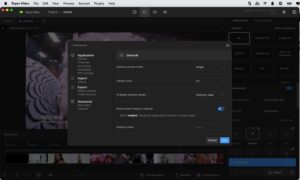
Software screenshots:

QLab Pro for Mac v4.6.5 为现场表演创建媒体序列 中文激活版下载 | 爱上MAC
下载次数:1316 | 2026-02-28

Movavi Video Editor Plus 2022 for Mac v22.2 中文激活版下载 | 爱上MAC
下载次数:3522 | 2026-02-28

Submerge 3 for Mac v3.8.2 快速字幕制作软件 中文激活版下载 | 爱上MAC
下载次数:1036 | 2026-02-28

Compressor for Mac v4.6.3 FCPX辅助导出编码工具 中文激活版下载 | 爱上MAC
下载次数:730 | 2026-02-28


评分及评论
4.6
(满分5, 共34用户评价)
来评个分数吧