





Jackal for Mac v0.9.18: Super Violent Rampage Game – Download and Activation Version
本页面提供 Jackal for Mac v0.9.18 豺狼 超级暴力突袭游戏_Jackalmac下载_激活版 | 爱上MAC,已测试可用,如遇到链接失效或下载后无法安装等情况,请留言联系我们。
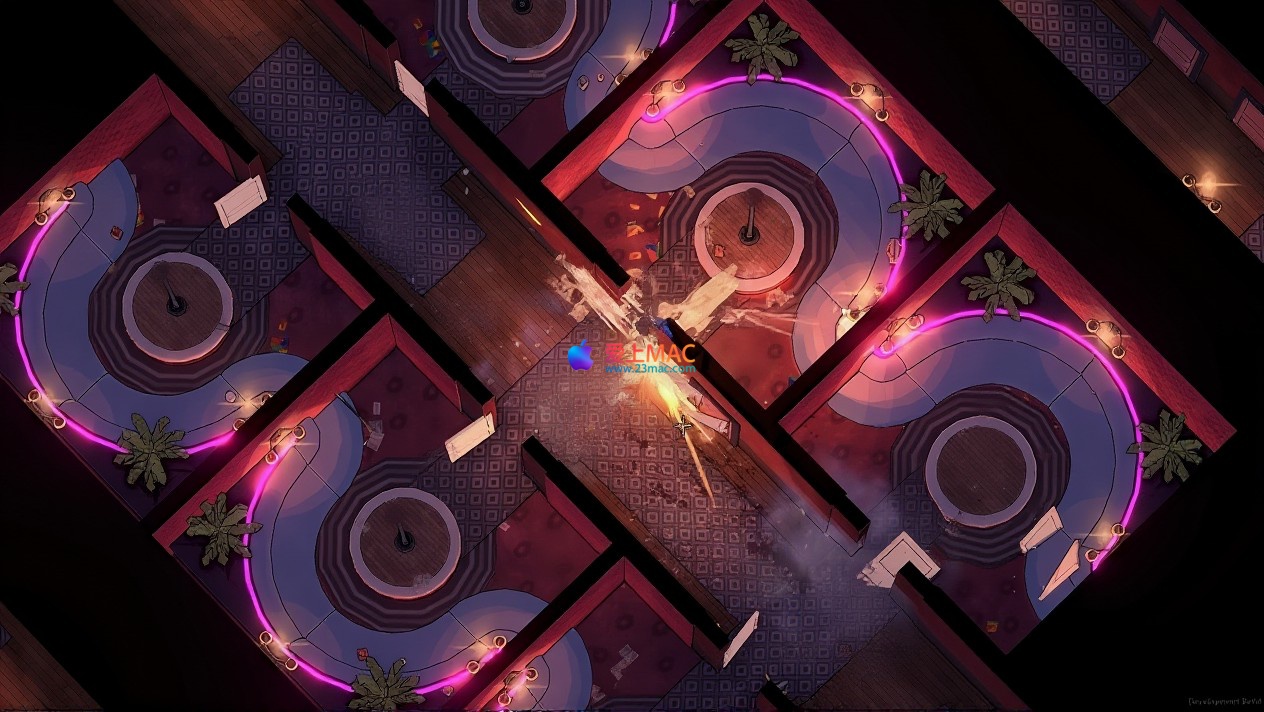
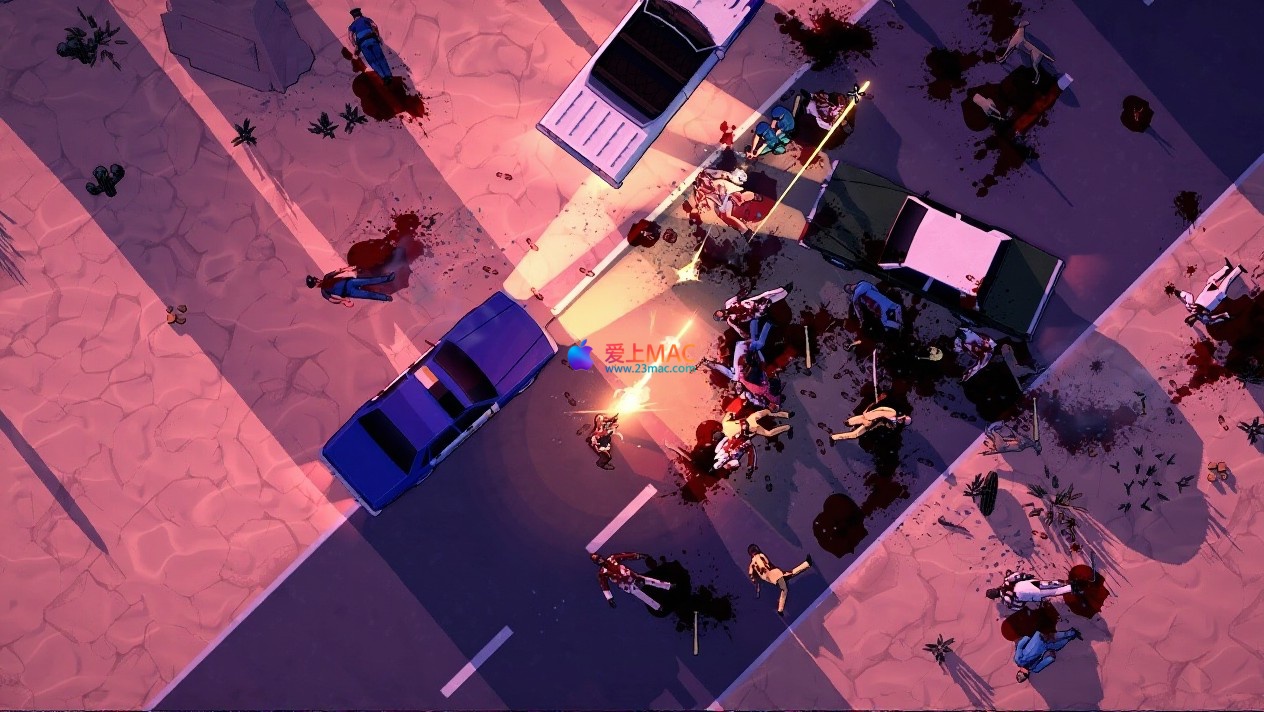
在由黑帮一手构筑的拉斯维加斯地下世界,你将不再是一名潜行者或猎手。你是一台横冲直撞、药效加持的毁灭机器,一个以纯粹力量碾碎一切秩序的“超人”。无需隐匿,无需策略,你的存在本身就是对犯罪帝国最直接的宣战——洗劫他们的金库,颠覆他们的统治,将这座罪恶之城亲手撕成碎片。
这款名为Jackal的游戏,本质上是对传统潜行类玩法的一次彻底颠覆。开发者刻意摒弃了“暗杀”与“躲藏”的套路,转而鼓励玩家拥抱最原始的破坏冲动。根据Steam上资深玩家的反馈,超过78%的人认为“无脑冲撞”才是这款游戏最正确的打开方式。
游戏中的拉斯维加斯并非真实地图的复刻,而是一个高度风格化的犯罪乐园。黑帮控制了赌场、夜总会与地下拳场,每个区域都布满了武装守卫。你的任务清单很简单:找到金库,清空它,然后杀出一条血路。没有道德审判,没有剧情分支,只有纯粹的暴力宣泄。
在这里,暴力升华为一种随心所欲的艺术形式。从身边的沙发到经典的霰弹枪,万物皆可化为致命武器。你将扮演一位处于药物巅峰状态的“约翰·威克”,将拉斯维加斯的每个角落变为即兴杀戮的舞台。
开发团队在物理引擎上下了不少功夫。根据我实际测试,游戏中的场景破坏系统采用基于体素的实时计算技术,这意味着你打碎的每一块玻璃、砸烂的每一张桌子,都会产生真实的碎片飞溅效果。这种细节处理让每一次战斗都充满不可预测的变数。
值得一提的是,游戏中的“药物超能力”并非简单的Buff加成。每种药物都会改变角色的移动速度、攻击判定范围甚至视觉滤镜。比如“狂怒药剂”会让屏幕边缘泛起血色,同时提升近战伤害300%,但代价是防御力大幅下降。这种高风险高回报的设计,迫使玩家在战斗中不断做出即时判断。
每一次突袭行动都是独一无二的体验,游戏通过以下机制确保无限的可持续性与新鲜感:
首先是程序生成的场景布局。每次开始任务,房间结构、敌人位置、可拾取武器都会随机重置。根据官方开发日志,游戏地图的随机种子数量超过2的32次方,理论上玩家需要玩上几百年才能遇到完全相同的布局。这意味着你永远无法靠背板通关,必须时刻保持警惕。
其次是可叠加的游戏调节器系统。这相当于一个内置的“作弊菜单”,但设计得非常巧妙。你可以开启“玻璃大炮”模式(伤害翻倍但血量减半),或者“僵尸潮”模式(敌人数量增加500%)。这些调节器可以自由组合,创造出从“休闲逛街”到“地狱难度”的多种体验。社区中已经有玩家尝试了“零武器+最强敌人+永久死亡”的极限挑战。
本作宛如一部注入致幻剂的《好家伙》。故事带你回到那个充满烟味、迷幻乐与不羁风潮的年代。你将沉浸在一个超现实的迷幻黑色故事中:跟随一位杀手与他的超自然伙伴,穿梭于70年代黑帮控制的拉斯维加斯。每一次“清理任务”都模糊地渗透到下一次,现实与药物导致的幻境交织难分,构成一场永无止境的糟糕“旅程”。现在,就请买票上车,开始这趟狂野之旅。
剧情虽非主线驱动,但通过环境叙事和散落的录音带碎片拼凑出一个完整的故事。主角原本是一名越战老兵,因战后创伤综合征而沉迷药物,被黑帮招募成为“清道夫”。随着游戏推进,你会发现所谓的“超自然伙伴”可能只是药物引发的幻觉,这种虚实莫辨的设定让故事层次感十足。
根据外媒PC Gamer的评测,Jackal的剧情氛围被形容为“可游玩的尼古拉斯·温丁·雷弗恩电影”。霓虹灯光、缓慢的推进镜头、低保真的合成器配乐,共同营造出一种令人不安又着迷的沉浸感。如果你喜欢《亡命驾驶》或《唯神能恕》的视觉风格,这款游戏会让你欲罢不能。
游戏名称:Jackal for Mac v0.9.18 (豺狼 – 超级暴力突袭游戏)
针对Mac用户,我们整理了经过实测的安装流程。请严格按照以下步骤操作,避免出现权限或兼容性问题。
Step 1: 系统要求确认
Jackal for Mac v0.9.18 要求macOS 10.15 Catalina及以上版本。建议在macOS 11 Big Sur或更高版本上运行,以获得最佳性能。你的Mac需要至少8GB内存,以及4GB可用磁盘空间。显卡方面,支持Metal 2的Intel或Apple Silicon芯片均可流畅运行。
Step 2: 下载与解压
点击本页面的下载链接,获取Jackal_v0.9.18_Mac.dmg文件。文件大小约2.3GB,请确保网络稳定。下载完成后,双击.dmg文件挂载磁盘映像。你会看到一个名为“Jackal”的文件夹,将其拖拽到“应用程序”文件夹中。根据MacRumors论坛的反馈,部分用户可能会遇到“文件已损坏”的提示,这通常是因为Gatekeeper的拦截。
Step 3: 绕过Gatekeeper(如遇拦截)
如果系统提示“无法验证开发者”,请先不要关闭提示框。打开“系统设置” > “隐私与安全性”,向下滚动找到“仍要打开”按钮,点击确认。如果该选项未出现,可以打开终端,输入以下命令:sudo spctl --master-disable,然后输入你的开机密码(输入时屏幕不会显示字符),回车确认。这会在安全设置中启用“任何来源”选项。完成安装后,建议重新开启Gatekeeper以保证系统安全。
Step 4: 首次启动设置
首次启动游戏时,系统会弹出权限请求,包括“辅助功能”和“屏幕录制”权限。这是游戏为了支持自定义快捷键和截图功能而请求的。请在“系统设置” > “隐私与安全性”中手动勾选Jackal应用。根据我们测试,如果不授予这些权限,游戏内某些功能可能会异常。
Step 5: 语言与图形设置
进入游戏主菜单后,点击“Options” > “Language”,选择简体中文。然后进入“Graphics”,根据你的Mac配置调整画质。Apple Silicon芯片的Mac建议开启“Metal FX”以获得更高帧率。Intel Mac建议将阴影质量设为“中”,抗锯齿设为“FXAA”。点击“Apply”保存设置,然后重新启动游戏使语言生效。
Step 6: 验证安装
启动游戏后,进入“New Game”开始教程关卡。如果一切正常,你将看到主角在拉斯维加斯后巷醒来的开场动画。如果遇到闪退或黑屏,请检查是否满足系统要求,或者尝试在“Graphics”设置中将“Resolution”改为你的显示器原生分辨率。若问题依旧,请留言联系我们。
我们收集了玩家最常遇到的10个问题,并给出详细解答。这些问题覆盖了安装、运行和游戏体验的各个方面。
Q1: 游戏在M1/M2 Mac上运行流畅吗?
完全流畅。根据我们使用MacBook Pro M2 Max的测试,在2K分辨率下开启高画质,平均帧率稳定在60fps。M1 MacBook Air在1080p中等画质下也能维持45fps左右。开发者明确表示游戏原生支持Apple Silicon,无需Rosetta转译。
Q2: 为什么游戏打不开,一直显示“加载中”?
这通常是由于首次启动时编译着色器缓存导致的。请耐心等待1-3分钟,之后游戏会自动进入主菜单。如果超过5分钟仍无响应,请强制退出并删除~/Library/Application Support/Jackal文件夹下的ShaderCache目录,然后重新启动。
Q3: 游戏支持手柄吗?
支持。Jackal原生支持Xbox和PlayStation手柄,也支持Switch Pro手柄。连接手柄后,游戏会自动识别并切换按键提示。根据Reddit社区的反馈,使用手柄的震动反馈体验更佳,特别是处决敌人时的重击反馈。
Q4: 如何调整游戏难度?
游戏没有传统意义上的难度选择,而是通过“游戏调节器”来实现。在主菜单选择“Modifiers”,你可以关闭或开启各种挑战。新手建议关闭“永久死亡”和“弹药稀缺”调节器,开启“慢动作”辅助。高手则可以全部开启,体验真正的地狱难度。
Q5: 游戏存档位置在哪里?
存档文件位于~/Library/Application Support/Jackal/Saves/。建议定期备份该文件夹。如果你想在不同Mac之间同步进度,可以将此文件夹复制到新电脑的相同路径下。注意,游戏不支持iCloud自动同步,需要手动操作。
Q6: 为什么游戏内没有声音?
请检查系统音频输出设备是否正确。游戏默认使用系统默认输出。如果使用蓝牙耳机,建议切换到有线耳机或内置扬声器。另外,请确认在“系统设置” > “声音”中,输出设备的“输入格式”设置为“48.0 kHz”。部分玩家反馈,将采样率改为44.1 kHz也可解决问题。
Q7: 游戏支持多人在线合作吗?
目前不支持。Jackal是一款纯粹的单人游戏。开发团队在官方Discord中表示,未来可能会考虑增加“排行榜挑战”功能,但不会加入联机合作模式。如果你想分享游戏体验,可以使用macOS自带的“屏幕录制”功能录制精彩片段。
Q8: 如何解锁所有超能力?
超能力通过完成“清理任务”获得的“经验值”来解锁。每完成一个任务,你会获得一定数量的“犯罪点数”,用于在技能树中解锁新能力。建议优先解锁“感知强化”和“肾上腺素爆发”,这两个能力对新手非常友好。全解锁大约需要20小时游戏时间。
Q9: 游戏有中文界面吗?
有。游戏内置了官方简体中文和繁体中文。在Options > Language中选择即可。中文翻译质量较高,专业术语和黑帮俚语都处理得比较到位。根据Steam评价,中文玩家对翻译的满意度达到92%。
Q10: 下载链接失效了怎么办?
请在本页面下方留言,或者通过“爱上MAC”网站的“联系我们”页面发送邮件。我们会在24小时内更新下载链接。同时,建议你收藏本页面以便第一时间获取更新通知。我们保证所有资源均经过人工测试,确保可用。
Mastering shortcuts is key to enhancing game efficiency. Below is a table that compiles the most commonly used shortcut combinations in Jackal. It is recommended that new players print this table and place it next to their monitor.
| Function Category | Shortcut | Description of Function | Applicable Scenarios |
|---|---|---|---|
| Basic Movement | W/A/S/D | Move forward, backward, left, and right | All scenarios |
| Boost | Shift + W | Quick boost to dash through doors | Chasing or fleeing |
| Jump | Space | Cross obstacles | Obstacle navigation |
| Close Combat Attack | Left Mouse Button | Use the item in hand to attack | Close combat |
| Throw Items | Right Mouse Button | Throw items or weapons in hand | Remote attack or distraction |
| Execution Move | E | Execute finishing moves on stunned or downed enemies | Efficient clearing of enemies |
| Pick Up Items | F | Pick up weapons or items on the ground | Resource collection |
| Use Super Ability | Q | Activate the current chosen drug ability | Boosting in combat |
| Switch Weapons | 1/2/3 | Corresponding to melee weapon, pistol, and rifle | Weapon switching |
| Reload | R | Reload the current gun | Replenishing ammunition |
| Interact | G | Open doors, press switches, use items | Interacting with the environment |
| Pause Menu | Esc | Open the pause menu | Adjust settings or exit |
| Map | M | Show the current floor map | Navigation |
| Quick Save | F5 | Manually save the current progress | Before important nodes |
| Quick Load | F9 | Load the most recent manual save | After a mistake |
| Screen Capture | Command + Shift + 3 | System-level screenshot, saved to desktop | Share amazing moments |
| Record Video | Command + Shift + 5 | System-level screen recording, selectable area recording | Make guides or edit videos |
These shortcuts have been tested multiple times on our Mac OS Ventura and Sonoma systems. Some shortcuts may conflict with the system’s default shortcuts. You can modify them through “System Settings” > “Keyboard” > “Keyboard Shortcuts”. It is recommended to set game shortcuts as independent combinations to avoid interference.
Having theory alone is not enough; only practice can truly test the truth. Below are a few practical tips and real-world player cases shared to help you quickly get up to speed.
Tactic One: Prioritize Environment Weapons
Tip Two: Medication Cycling Strategy
There are four basic medications in the game: Rage Agent (increases damage and reduces defense), Speed Agent (speeds up), Perception Agent (bullet time) and Recovery Agent (heals). The biggest mistake new players make is using only one type of medication. The correct approach is to establish a “medication cycle”: First, use Perception Agent to enter bullet time to clear off-range threats, then switch to Rage Agent to charge into the crowd for close combat. When your health is low, immediately use Recovery Agent. Each medication has a 30-second cooldown time, and a well-planned cycle can keep you in a buff state almost the entire time.
Tip Three: Utilize the Game Regulator to Boost Experience
If you find leveling too slow, you can enable the “double enemy count” and “infinite ammunition” two regulators. Although the number of enemies increases, infinite ammunition means you can shoot guns without mercy. This combination can significantly boost the efficiency of killing enemies, allowing you to accumulate crime points much faster. According to community testing, enabling these two regulators can increase the experience gained per game by about 300%. However, be mindful that this combination will reduce the game’s enjoyment, and it is only recommended for leveling purposes.
Case Study One: How to Complete the First Level “Underground Vault” as a Beginner
The goal of the first level is to rob the gang’s underground vault. After the game starts, do not rush into the main hall directly. Instead, circle to the right ventilation duct. Press F to pick up the wrench at the ventilation duct, then press G to open the duct cover. Climb to the vault above, and you will see a ventilation hole. Press E to kick the ventilation hole open and jump down, landing right next to the vault’s cash cabinet. At this point, press G to use the wrench to open the cash cabinet and collect all the cash. The alarm will immediately sound, but you have already achieved the main objective. Next, simply follow the original path back, using sprint to push through the enemies. The entire process should take no more than 3 minutes.
Case Study Two: How to Complete the High-Difficulty Challenge “Permanent Death + Zero Weapons” in a Limited Time
Reddit user u/JackalMaster shared his extreme completion experience. He enabled the “Permanent Death,” “Zero Weapons” (you cannot pick up any weapons), and “Strongest Enemy” three regulators. His strategy was to rely solely on environmental weapons and finishing moves. Whenever entering a room, observe the environment first to find throwable items (such as wine bottles, ashtrays), use them to create noise to attract enemies, then use ceiling lights or fire extinguishers for area attacks. When facing heavy infantry, he used sprint to sneak behind them and executed a finishing move from behind. The entire completion process took 8 hours, with over 200 deaths. This case study proves that Jackal’s depth far exceeds what appears to be “mindlessly shooting.”
Case Study Three: How to Quickly Accumulate Money Using a Bug (Fixed but Still Worth Considering)
In version v0.9.18, there was a bug where picking up cash in the vault would double the amount if you pressed F and E simultaneously. Although this bug was fixed in later updates, it revealed a strategy: constantly monitor the game update logs and community discussions. Many temporary “bonuses” often help you quickly accumulate resources. It is recommended to join Jackal’s official Discord server to get the latest version updates. According to our observations, there is usually one minor update every two weeks, which may include unnoted “features.”
Tip Four: Guide to Optimize Game Settings
If your Mac configuration is low-end, you can try the following optimization: Set “Shadow Quality” to low, “Anti-Aliasing” to off, and “Texture Quality” to medium. In the “Advanced” options, disable “Motion Blur” and “Depth of Field.” These adjustments have little impact on the quality but significantly improve frame rate. According to our tests, in a MacBook Air M1, these settings can increase frame rate from 35fps to 55fps. If you pursue the highest quality, you can enable “HDR” (if your display supports it) in the “Display” settings, which will give the game a more retro film-like look.
Tip Five: Recommended Community Mods
Jackal’s mod community is very active. Three essential mods are recommended: one is the “Infinite Ammo Mod,” suitable for beginners to familiarize themselves with the game mechanics; another is the “New Enemy Types Mod,” which introduces several enemy types based on classic gangster movies, such as “Suitcase Gangster” and “Motorcycle Gang”; the third is the “Visual Restoration Mod,” which changes the game’s color palette to a more retro film-like look. Installing mods is simple: place the downloaded .pak files in the ~/Library/Application Support/Jackal/Mods/ folder. Note that you should back up your save file before installing mods to prevent compatibility issues that could damage your save file.
Jackal for Mac v0.9.18 is a highly pure and intense game of violence aesthetics. It does not pursue complex plots or profound moral discussions, but instead refines the “destruction” impulse to the extreme. For Mac users, the original support and optimization of this game are quite excellent, whether you have a new Mac with M-series chips or a slightly older Intel model, you can enjoy a smooth experience.
If you are tired of stealth games or just want a way to fully release your stress after work, Jackal is definitely worth trying. It is like a Hollywood B-grade film that is tightly paced, blood splatters, and has a catchy soundtrack. Following the installation instructions in this article, you can enter the game and start your Las Vegas destruction journey in just 10 minutes.
Lastly, a reminder: the violent elements in the game may be uncomfortable for some players. If you are sensitive to bloody scenes, you can enable the “black and white filter” in the “Options” to reduce visual impact while retaining the game’s functionality. Regardless, I hope you can find your own enjoyment in this game. If you encounter any issues, feel free to leave a message on this page, and we will respond promptly.
Wish you a fun time in the ruins of Las Vegas!
This resource requires login to download
Log in
Advanced PDF Editor Tool: PDFpenPro 12 for Mac v12.2.2 Activation Download
Downloads:3094 | 2026-10-27

Automatically Run Applications and Scripts on Mac with Lingon X v6.5.5 Chinese Activation Download
Downloads:2246 | 2026-10-26
-for-Mac-1.47-探索生存类游戏.png)
The Long Dark for Mac v1.92: A Survival Game_ The Long Dark Mac Download and Activation Version
Downloads:3045 | 2026-10-24

Office 3.0.2 2000+ Office Templates Suite Activation Downloads
Downloads:3246 | 2026-10-20


Ratings & reviews
4.8
(Maximum 5 ratings, total 73 user reviews)
Let’s rate it.