


Advanced Graphics Manager for Mac v4.2.2 Chinese Activation Version Download
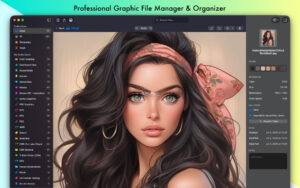
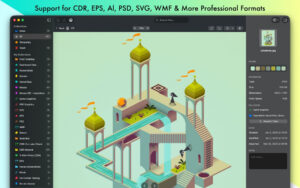
| On Mac, open and preview CorelDRAW, EPS, SVG, DXF, and other professional vector/raster files natively. Organize your design library with the Smart Collections.
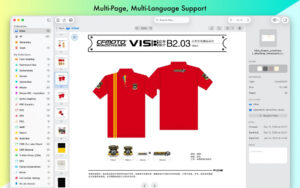
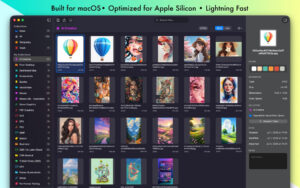
VectorView: The professional graphics file manager for Mac Say goodbye to incompatible file formats. VectorView provides native support for CorelDRAW, EPS, PS, SVG, AI, PSD, WMF, DXF, and other professional vector files on your Mac. Open files other software can’t open – CorelDRAW (CDR/CMX/WPG) – Native support for CorelDRAW files, the standard format for print design and signage – Encapsulated PostScript (EPS/EPSF/EPSI) – Perfectly renders EPS files from Adobe Illustrator and other professional tools – Adobe Illustrator (AI) – Preview AI files without Creative Cloud – PostScript (PS) – Handle PS files from professional printing workflows – Autodesk (DXF) – Import and export Drawing Exchange Format files – Photoshop (PSD) – View layered Photoshop documents – Windows Metafile (WMF/EMF/EMZ) – Seamless opening of Windows vector graphics – Templates (VSD/VSS/VSDX/VSSX) – Microsoft Visio templates – And: Supports PDF, SVG, PNG, JPEG, TIFF, and all standard image formats – RAW cameras: Sony, Canon, Nikon, Olympus, Fujifilm, Samsung, Panasonic, Pentax, Epson, Minolta, Sigma Designed for professionals VectorView is tailored for designers, print shops, and creative professionals to meet their needs for handling files from multiple sources. Whether you receive CDR files from clients, manage EPS graphics, or organize design assets, VectorView handles it with ease. Smart organization – Smart Collections – Organize files by project, client, or any category you need – Color-coded organization – Visual system with custom icons and colors – Quick preview – Instant preview without opening large design applications – Batch operations – Efficiently handle multiple files – Search and filter – Quickly find files throughout the library Professional export (Pro version) – High-quality export – Export to SVG, PNG, JPG, PDF, or TIFF formats – Custom DPI – Set precise resolution for print or web use – Custom size – Set precise dimensions for any use case – Ready for production – Professional output quality Native performance VectorView is built entirely on macOS and SwiftUI, with an experience that mirrors macOS: – Native Mac design – Follows macOS design guidelines – Fast performance – Optimized for Apple Silicon and Intel Macs – Low memory usage – Efficient resource utilization – macOS integration – Seamless collaboration with Finder, Spotlight, and Quick Why choose VectorView? – No conversion – Directly view files without export/import processes – Choose one-time purchase or affordable subscription plans – Professional quality – Used by design studios and print shops – Regular updates – Add new features regularly – Privacy-first – All processing happens locally on your Mac Perfect for: – Designers managing client files – Print shops handling various file formats – Creative professionals working across platforms – Users needing to open CDR, EPS, PostScript, and large PSD files on Mac – Design teams managing asset libraries Software Screenshot:
|
This resource requires login to download
Log in
PullTube for Mac v1.8.6.20 Video Download Tool Chinese Activation Version Download
Downloads:2353 | 2026-10-26

PhotoMill X for Mac v1.5.0: Metadata Editor Browser Activation Download
Downloads:1271 | 2026-10-21

Mac Lecture Recorder 3.1.2 Calendar Recording Tool Activation Version Download
Downloads:732 | 2026-10-20

Redis Desktop Manager for Mac v2020.2.100 Redis Database Management Activated Version Download
Downloads:329 | 2026-10-17


Ratings & reviews
No rating
Let’s rate it.