| Topaz Gigapixel Pro is a flagship AI image super-resolution magnification software developed by Topaz Labs for professional photo studios, commercial design teams, and other professionals. It is the professional version of the Gigapixel series, based on deep convolutional neural networks and generative AI technology. It retains all the image magnification capabilities of the consumer version while unlocking an output limit of ten billion pixels, full commercial usage rights, team seat management, and higher cloud rendering quotas. It is designed for heavy production scenarios such as large-scale printing, commercial visuals, and professional image restoration, and is considered the industry standard tool for image resolution enhancement by creative teams worldwide.
Installation and Crack Method:
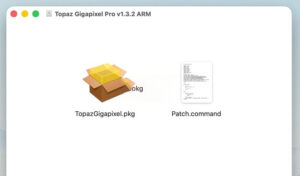
1. After the software download is completed, open the downloaded dmg format software package as shown in the image above, and double-click the software “TopazGigapixel.pkg” to install the software.
2. As shown in the image below, when installing to the second-to-last step, the AI model is very large by default, and the software package does not contain it (40GB, you need to leave enough disk space). You need to download it while installing.
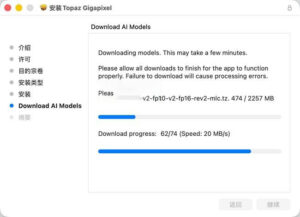
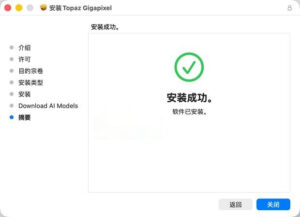
3. After the software installation is complete, do not open the software yet. Drag the software package’s Patch.command (activation tool) to the desktop, and double-click the Patch.command on the desktop. It will automatically open the terminal, as shown in the image below, enter your computer password (the password will not be displayed, just enter the password and press the Enter key).
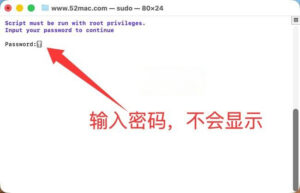
4. As shown in the image below, the crack is completed, and you can use the software.
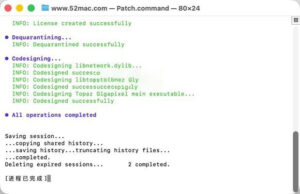
—————————————————————–[Divider]———————————————————————–
Core Function Features:
### One: Ten Billion Pixel-Level Super Resolution Without Loss
– **High Multiplication Rate and Pixel Limit**: Supports up to 6x no-loss magnification, with a maximum output width of 32,000 pixels per image, and a maximum file support of 10 billion pixels (1 Billion Pixels), which can directly meet the extreme size requirements of 80×60-inch posters, outdoor banners, satellite imagery, etc.
– **True Detail Reconstruction**: Different from traditional interpolation algorithms, the AI model learns from millions of high-definition images to intelligently identify image textures, edges, material features, and precisely supplements natural pixel details, resulting in a magnification effect that is highly similar to the original high-resolution shooting.
– **True Original Image Restoration**: Based on the core logic of “restoring original information,” it maximally retains the original image’s lighting, color, and composition style, avoiding the addition of false details, ensuring the authenticity and professionalism of the image.
### Two: 10+ Professional AI Model Matrix, Precise Adaptation for All Scenarios
The software comes with over 10 differentiated AI models, tailored to different image types, image quality foundations, and usage scenarios to provide the best magnification solutions, covering the entire spectrum of image quality from high-definition photography to low-quality old photos:
1. **Standard (Standard Model)**: A balanced model suitable for most daily photos, achieving the best balance between detail enhancement and naturalness.
2. **Standard MAX (New Standard Model)**: A new generation of standard magnification model, with enhanced accuracy and naturalness, and processing speed improved by a hundredfold compared to the initial diffusion model.
3. **High Fidelity (High-Resolution Model)**: Designed specifically for high-resolution original images, maximizing the retention of original image details and color layers, suitable for professional photography post-processing.
4. **Low Res (Low-Resolution Model)**: Optimized for small image sizes and heavily compressed images, effectively recovering visible details and edge clarity.
5. **Wonder 3 (All-Round Miracle Model)**: A one-click integration of magnification, noise reduction, and sharpening capabilities, without the need for complex parameter adjustments, capable of saving low-resolution, low-quality images with detailed information.
6. **Text & Shapes (Text and Shape Model)**: Optimized for scanned documents, drawings, and text images, enhancing edge sharpness and aiding in removing dust, scratches, and other scanning damages.
7. **Art & CG (Art and CG Model)**: Suitable for non-photo images such as digital illustrations, hand-drawn images, and 3D renderings, respecting the characteristics of the artist’s brushstrokes and graphic edges, avoiding over-sharpening distortion.
8. **Recover v2 (Repair Model)**: A generative AI repair model optimized for 1MP or lower low-quality old photos, with repair speeds improved by five times compared to the initial model, excelling at restoring the details of blurry, out-of-focus, and damaged images.
9. **Redefine Real Mode**: A generative re-drawing model that, based on the premise of faithfully restoring the original image, reconstructs the structure of severely degraded images, restoring clear images in areas where the original image logic is missing.
10. **Redefine Creative Mode**: Supports text prompts to guide generation, allowing for customizable texture, style, and detail expression, and adjustable creativity levels to meet both magnification and creative optimization needs.
### Three: Advanced Image Quality Enhancement Capabilities
– **Face Repair Gen 3**: A third-generation face optimization algorithm, significantly improving the recognition accuracy of side faces and hidden faces, optimizing skin texture, teeth, and glasses details, and achieving natural and realistic facial restoration for low-resolution portraits, while preserving the features of the person’s face without distortion.
– **Pre-Downscaling (Pre-Downscaling)**: A technique for “low information density” pseudo-high-definition images (such as low-quality enlarged images or low-quality scanned documents), where the AI magnification is executed after the pixel density is compressed intelligently, providing three levels of strength adjustment, significantly improving the final image quality.
– **Fine-Tuned Parameter Adjustment**: Built-in independent sliders for noise reduction, sharpening, and texture strength, allowing for fine control of the balance of image quality during the magnification process, adapting to different topics’ professional needs.
– **Autopilot (Automatic Mode)**: A one-click intelligent analysis of image content and quality, automatically recommending the most suitable AI model and parameter combination, making it easy for beginners to achieve professional results.
### Four: Gigaprint Professional Printing Optimization Engine
– **Precise Crop Control**: Supports manual adjustment of the cropping area, allowing for vertical/horizontal rotation of the cropping frame, precise matching of the print size and layout requirements.
– **Print Light Optimization**: Includes a dedicated brightness and contrast slider for pre-optimizing the color performance of the print medium, avoiding issues like grayness and dullness in the final product, achieving a “export ready” printing effect.
– **Smooth Preview Navigation**: The Navigator panel supports non-loss zoom previews of local details, allowing for quick viewing of the magnification effect without needing to re-render, significantly improving the efficiency of parameter adjustments.
### Five: Dual Rendering Modes for Local and Cloud, Balancing Security and Efficiency
– **Local Offline Rendering**: All processing is completed locally, with files not uploaded to the network, perfectly suited for handling commercial secrets, copyright materials, and sensitive content, ensuring data security.
– **Unlimited Cloud Rendering**: Pro version unlocks unlimited cloud image rendering, automatically synchronizing the latest AI models, and not limited by local hardware performance; supports up to 4 concurrent cloud processing tasks, significantly improving batch task efficiency.
– **Large Image Cloud Support**: Cloud rendering supports up to 256MP image output, breaking through the local hardware computing bottleneck for ultra-large projects.
## High-Performance Workflow and Full-Format Compatibility
### Batch Processing Capabilities
– Supports dragging and dropping folders to batch import images, setting unified magnification parameters and output rules, and exporting them in a single batch, suitable for high-production environments.
– Supports uniform scaling based on the longest side, standardizing the size of different proportions of images, efficiently handling batch materials for e-commerce and catalogues.
– Provides single-image, split comparison, and side-by-side comparison preview modes, allowing for intuitive comparison of the quality differences before and after magnification.
### Format and Plugin Support
– **Supported Import Formats**: JPG, PNG, TIFF, DNG (Canon CR3, Nikon NEF, Sony ARW), HEIC/HEIF, WEBP, PPM/PGM/PBM/PNM.
– **Supported Export Formats**: JPEG, PNG, TIFF (RAW/DNG files exported as TIFF format).
– **Color Space**: Complete support for sRGB, Adobe RGB, ProPhoto RGB professional RGB color spaces, preserving all color information.
– **Professional Plugin Integration**:
– Adobe Photoshop plugin: Can be directly called from PS for processing, returning the original image after processing without any loss.
– Adobe Lightroom Classic plugin: Supports parameter往返 editing, seamlessly integrating into the photography post-processing workflow.
– Independent application mode: No need to rely on other editing software, can be used as a standalone desktop application throughout the process.
Version 1.3.2 Update Content:
## One: Core Update Overview
This version focuses on stability improvements, format compatibility expansion, and core model repairs, adding support for the JXL format, and fixing issues related to Mac installation deployment, HEIC/HEIF format processing, and face repair rendering, enhancing overall reliability and installation smoothness.
## Two: New Features
1. **New JXL Format Import Support**: Officially supports reading JPEG XL (.jxl) format images, expanding the professional imaging format compatibility range.
2. **Renewal Information Pop-up Window Optimization**: Updated the renewal prompt interface, making the information clearer and reducing the understanding cost.
## Three: Problem Fixes
### Mac Platform-Specific Fixes
– Fixed occasional pauses and slowdowns in the decompression of Wonder series AI models during Mac installation.
– Fixed occasional program crashes during thumbnail generation.
– Fixed issues with the merging of multiple instances, improving the stability of batch processing.
### General Function Fixes
– Fixed program crashes caused by importing multiple HEIC/HEIF format files.
– Fixed the face rendering artifacts in the Face Recovery v3 (third-generation face repair) model, improving the naturalness of the face restoration.
– Fixed issues with incorrect naming of temporary files in the cloud upload, avoiding anomalies in cloud rendering tasks.
– Fixed issues with incorrect display of login error interfaces in the renewal pop-up window.
– Fixed issues with non-ASCII path compatibility, occasional crashes, and model download timeouts in the Windows installation program (cross-platform synchronization fixes).
## Four: Underlying Component Upgrades
– Upgraded the OpenImageIO image read/write library, improving the stability and decoding performance of format parsing.
– Updated the ImageAI core engine, optimizing the efficiency and accuracy of AI model calls.
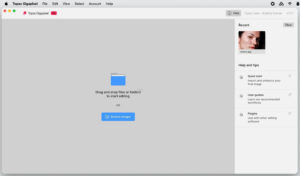
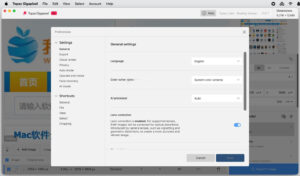
Software Screenshots:
|




Ratings & reviews
No rating
Let’s rate it.