Adobe Photoshop(简称PS) is a globally leading professional bitmap image processing software, since its release in 1990, it has become the industry standard in digital image processing, with a market share exceeding 90%. It is renowned for its powerful image editing, compositing, effect creation, and design capabilities, widely applied in photography post-processing, graphic design, e-commerce graphic design, UI/UX design, digital painting, and film and television special effects, among others.
Installation and crack method:
Installation preparation: By default, the computer should enable the “Any Source” option in the “Security and Privacy” section, which must be enabled first. For detailed methods, refer to the tutorial here. The new version of PS is incompatible with the old version, so please uninstall the old version of PS before installation.
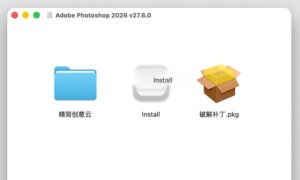
1. After the software download is completed, open the dmg format package as shown in the image above.
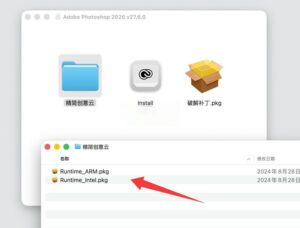
First, open the Simplified Creative Cloud folder, and choose the ARM version for M1-M5 chip computers, and the Intel version for older chip computers, according to the instructions in the image below. Follow the prompts to proceed with the installation.
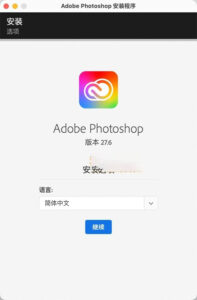
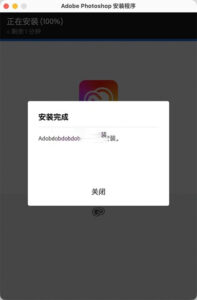
2. Now, return to the image package, double-click on the “Install” to start installing the PS software, as shown in the image below. Follow the prompts to proceed with the installation, and installation can be done without being connected to the internet, and installation is faster when disconnected from the internet.
3. Crack the software.
Return to the image package, double-click on the “Crack Patch.pkg” file, and follow the prompts to install it. This will automatically crack Adobe Photoshop 2026, and you can use it after the installation is complete.
Note: This version does not support AI intelligent fill, and the Neural Filters feature is also not supported during testing.
Common issues and solutions:
Issue 1: When installing with the Installer, an error message appears: “Error The installation cannot continue as the installer file may be damaged…”
Solution:
Issue 2: When opening the software, a prompt appears: “Adobe Photoshop 2026 wants to access the keychain item in your keychain.”
Solution: Enter your computer password, and click the first button “Always Allow” to proceed. You may need to enter the password multiple times (about 3 times, after which it won’t prompt again).
—————————————————————–[Separator]———————————————————————-
Core features and functions:
### 1. Powerful layer system
– Non-destructive editing: All operations can be performed on independent layers without damaging the original image.
– Rich blend modes: Provides 27 blend modes such as Multiply, Screen, Overlay, and Soft Light, to achieve various creative effects.
– Layer masks: Control the visibility of layer areas using black, gray, and white tones, a core tool for抠图, compositing, and local color adjustments.
– Adjustment layers: Supports 16 adjustment methods including Curves, Levels, Hue/Saturation, Color Balance, and Selective Color, allowing for real-time parameter modifications.
– Smart objects: Retains original image data, supports non-destructive scaling, rotation, and filter application.
### 2. Precise selection and masking tools
– **AI Subject Selection**: Automatically identifies and selects people, animals, objects, and sky in images with high precision.
– **Quick Selection Tool**: Quickly selects similar colors and textures using the paint tool.
– **Pen Tool**: Creates precise vector paths suitable for complex edge objects.
– **Magic Wand Tool**: Selects regions based on color similarity, suitable for background-only images.
– **Select and Mask Tool**: A professional tool for fine-tuning edges, especially for handling hair and other complex edges.
### 3. Professional color adjustment functions
– Comprehensive color adjustment tools: Curve, Levels, Hue/Saturation, Color Balance, and Selective Color.
– Camera Raw filter: Professional RAW format processing tool, supports exposure, white balance, detail, and lens correction.
– Color grading: Adds color to shadows, midtones, and highlights to achieve film-like color grading.
– Color matching: Automatically matches the tone and brightness of two images to achieve a more natural composite effect.
– Color gamut warning: Displays color regions that exceed the print color gamut in real-time.
### 4. Rich painting and drawing tools
– Hundreds of preset brushes, supports custom brush shapes, textures, and dynamic effects.
– Pressure sensitivity for brushes: Perfectly supports Wacom tablets and Apple Pencil (via Sidecar).
– Symmetrical painting: Supports horizontal, vertical, and radial symmetry modes.
– Gradient tools: Offers linear, radial, angular, and symmetrical gradient types.
– Shape tools: Includes basic shapes like rectangle, circle, and polygon, with support for custom shapes.
### 5. Image repair and optimization tools
– **Spot Healing Brush**: Removes spots, blemishes, and pimples from photos with a single click.
– **Patch Tool**: Samples from other areas of the image to repair, preserving texture and lighting.
– **Patch Tool**: Moves large areas of imperfections.
– **Red Eye Tool**: Automatically removes red-eye effects from photos.
– **Liquefy Filter**: Precisely adjusts facial features and body shapes, or applies creative deformation.
### 6. Text and typography functions
– Supports TrueType, OpenType, and variable fonts.
– Complete control over text formatting: Font, size, color, kerning, and line spacing.
– Path text: Text arranged along any path.
– Paragraph text: Supports multi-paragraph layout, first-line indentation, and project symbols.
– Text styles: Saves and applies text styles to improve layout efficiency.
### 7. 3D and video editing functions
– Supports importing and editing 3D models, adding materials, lights, and shadows.
– Video timeline: Supports simple video editing, color correction, and effects creation.
– Frame animation: Creates GIF animations and frame-by-frame animations.
– Export to video formats: Supports MP4 and MOV formats.
Version 27.6.0 Update Content:
### Workflow
1. **AI Layer Auto Organization**: Smartly detects and deletes empty layers, automatically renames layers to easily understandable names, and organizes complex layered files. It supports lossless preview and can be fully undone.
2. **Enhanced Action Panel**: Adds natural language search, intelligent action recommendations, and real-time preview of the canvas. Users can browse built-in actions, customize recorded actions, and simplify repetitive photo editing processes.
3. **Photoshop and Firefly Canvas Seamless Integration**: Allows sending images to Firefly for creative inspiration organization, and then importing the edited JPG/PNG files back into Photoshop for further editing.
4. **Optimized Context Menu**: Displays commonly used operations based on the selected content, improving editing efficiency.
### Editing Tools
1. **Enhanced Removal Tool**: Adds an “Auto Detect Interfering Objects” feature, which can intelligently identify and remove wires, pedestrians, and other objects in the scene, with preview and fine-tuning capabilities.
2. **Dynamic Text Adaptation to Shape Paths**: Text automatically adapts to circular, arc, and bow-shaped paths, and automatically adjusts layout when the text is moved.
3. **Photo Reflection Removal**: Removes unwanted reflections from glass shots, generating clearer final images with customizable quality settings and reflection detail parameters.
4. **Filter Gallery with Dual Color Picker**: Supports independent foreground and background color selection, enhancing the creative control of dual-color style filters.
5. **Brush Transparency Independent Control**: Adds a dedicated preference to disable the transparency adjustment panel for brushes, allowing for size adjustments without affecting transparency parameters.
### Performance
Special optimization for **AMD Zen4 and later processors**, significantly improving the performance of high-load image processing workflows.
### File Format Support
Expands compatibility with new image formats for web and HDR content creation, making workflows more efficient and compatible.
## User Feedback and Issue Fixes
1. The curve adjustment preset cannot be saved after adjusting the green channel in RGB mode.
2. A dedicated preference to disable transparency adjustments when changing brush size when using shortcut keys to adjust brush size.
3. The Filter Gallery supports a foreground/background color picker for new dual-color style filters, streamlining the process.
4. The gradient tool works abnormally when using blend modes on layer masks.
5. CMYK images cannot create selection areas using the “Subject Selection” feature.
6. The floating tags document automatically moves to the top when saving.
7. Color temperature and natural saturation adjustments do not update in real-time when adjusting the canvas.
8. On Windows, Photoshop crashes when logging out of the Creative Cloud desktop app.
9. Certain computer configurations cause the system to freeze when using style effects.
10. Some AI models have incorrect credit deductions.
11. The credit deduction pop-up message is displayed incorrectly.
12. Some AI model introductions are truncated.
## Crash Fixes
1. Program crashes and restarts after changing the system language.
2. The program crashes when opening sample templates like the Retro TV screen.
3. The program crashes when canceling during the material generation process.
4. On Windows, the program crashes when rotating and scaling images.
5. The program crashes when opening the layer organization dialog box when the layer limit is reached.
6. The program crashes in certain scenarios when using the Filter Gallery.
7. The program crashes when applying filters to layers with deformation effects.
## UI Fixes
1. The action panel name and description input fields display extra line breaks when the text exceeds 255 characters.
2. The AI model selector and legal agreement pop-up window overlap on the first startup.
3. The attribute panel font size display is incorrect.
4. The layer thumbnail size indicator is offset.
5. The attribute panel thumbnail selection state is inverted.
6. Panels have inconsistent padding and margin layouts.
7. Panel undo operations do not correctly restore the previous step.
8. Panels have extra white space margins.
## Other Important Fixes
1. JSON parsing errors occur when renaming text layers containing special characters.
2. Locked layer groups can be modified by the layer organization feature.
3. The status of offline layer organization is displayed incorrectly.
4. The completion prompt text is inconsistently named.
5. The color temperature and natural saturation adjustment panels have misaligned dropdown selectors.
6. The exception handling mechanism for Creative Cloud desktop app installation errors is optimized.
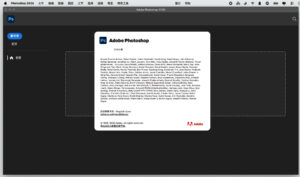
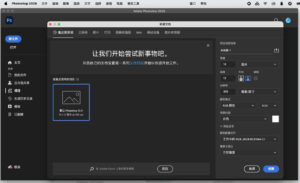
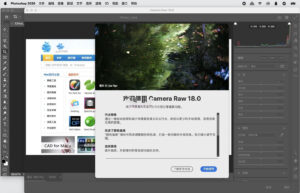
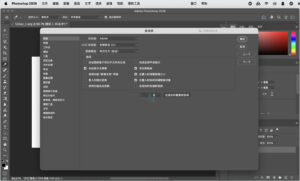
Software Screenshot:
| 





Ratings & reviews
No rating
Let’s rate it.