Axure RP 11 for Mac is a professional-level interactive prototype design tool for UX/UI designers, product managers, and front-end developers. It enables the creation of prototypes from low-fidelity wireframes to high-fidelity interactive ones without writing code, covering design scenarios for web, mobile, and desktop products. It is a core production tool for validating product requirements, implementing user experience, and facilitating cross-disciplinary team collaboration.
Installation and Crack Method:
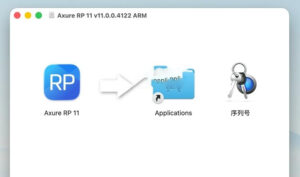
Note: When downloading the software, make sure to distinguish between the ARM version and the Intel version. Download the ARM version for Macs with M1-M5 chips, and the Intel version for older Macs.
1. After the software download is completed, open the downloaded dmg format software package as shown in the image above, and drag the software “Axure RP 11” to the Applications folder for installation.
2. After the installation is complete, open the software “Axure RP 11”. If prompted with a damaged message, please select “Still Open” in the System Settings – Privacy & Security – Security section, as shown in the image below.
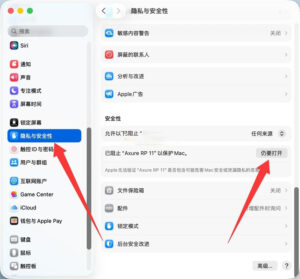
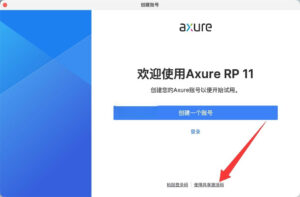
3. After opening the software, as shown in the image below, click on “Share Activation Code”.
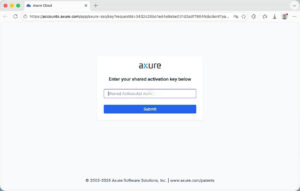
4. As shown in the image below, it will automatically redirect to a browser page, prompting for activation. We can move it to the side for later use.
5. Open the serial number file in the software package and copy the sequence number inside.
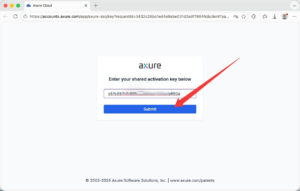
6. Paste the sequence number into the browser page that was opened previously, as shown in the image below. Click the “Submit” button.
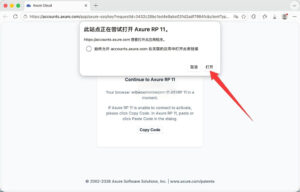
7. A prompt will appear in the browser, asking to open the Axure software. Click “Open” as shown in the image below.
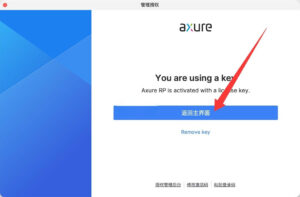
8. Finally, click “Return to Main Interface” as shown in the image below, and the software can be used.
Reminder: Do not update or upgrade the cracked version.
—————————————————————–[Divider]———————————————————————–
## I. Efficient Prototype Design and Layout Capabilities
1. **Rich Element and Component System**
The software comes with a comprehensive native element library, covering buttons, form controls, navigation bars, pop-ups, and other general UI elements. It supports the encapsulation and reuse of custom components and the import of third-party element libraries. Elements can be quickly assembled into page frameworks through drag-and-drop operations. In addition to interactive prototypes, it can also be used to draw product flowcharts, information architecture diagrams, and functional diagrams.
2. **Flexible Container Layout (Core Upgrade in Version 11)**
Axure RP 11 introduces a flexible container layout feature consistent with frontend development standards, replacing the complex solution that relied on dynamic panels for responsive design. Designers can directly set the arrangement direction, line-breaking rules, spacing allocation, and scaling strategies for elements. The layout logic of the prototype aligns closely with the actual code implementation, significantly improving the efficiency of responsive design and bridging the gap between design and development.
3. **Smart Layout and Precise Placement**
The software adds automatic grid layout, element spacing distribution, and quick exchange of positions features. Combined with pixel-level alignment guides and size controls, it can efficiently complete the layout of organized pages. The software comes with an adaptive view mechanism, supporting multi-terminal size adaptation configurations within a single page, allowing for one-click switching to preview different device effects.
4. **Quick Operations and Global Navigation**
Pressing the keyboard shortcut “/” can summon a global search box, allowing for quick insertion of elements, jumping to pages, and applying styles in bulk. This significantly reduces the need for menu clicks. A new Gallery view is added, displaying all pages and master pages within the project in thumbnail format, supporting search and double-clicking to navigate. This significantly enhances the efficiency of navigating through large projects.
## II. Advanced Interactivity and Logic Capabilities Without Code
1. **Visual Interaction Logic Editor**
The integrated interaction panel supports the creation of If-Else conditional logic through a visual interface, covering 50+ trigger events such as mouse clicks, touch swipes, and keyboard inputs, and 30+ interaction actions. This allows for the quick implementation of basic interactions like page jumps, pop-up switches, and form validations, as well as the creation of complex multi-branch business processes, fully replicating the product operation loop.
2. **Dynamic Content Simulation with Multiple States**
The dynamic panel component enables the creation of multi-state interfaces, supporting effects such as pop-ups, sliders, tabbed interfaces, and swipeable screens on mobile devices, as well as scrollable regions. Settings like fixed positioning, layer management, and fixed positioning can be used to accurately replicate the interaction feel and visual appearance of real products.
3. **Data-Driven Prototypes**
The repeater component supports the batch generation of tables and lists, with optimizations in multi-condition filtering, sorting, and data binding capabilities in version 11. This allows for the conversion of ordinary elements into repeater components, making it easy to build data-driven pages such as data dashboards, product lists, and backend management tables. This accurately simulates the data interaction effects of real products.
4. **Dynamic Styles and Animation Effects**
Supports element transformations such as zooming, panning, and rotation, with the addition of multiple easing curves and transition effects. The software also allows for dynamic modification of element styles, such as color, font, and transparency, and introduces new styles like element blur and background blur, enhancing the depth and focus of the interface, and improving the immersion and refinement of the prototype.
5. **Variables and Advanced Logic Extensions**
Supports a global variable and local variable system, with the addition of variable change trigger events in version 11. This enables cross-page parameter transmission, data calculations, and state memory, meeting the needs of enterprise-level systems and complex business processes.
## III. Collaboration and Delivery with Cross-Tool Compatibility
1. **Multiple Format Output Options**
The software supports exporting standard HTML format prototypes, allowing for complete preview of interactive effects in the browser. It can also generate interactive annotated product specifications, supporting export in Word, PDF, and image formats, suitable for various scenarios such as requirement reviews, development delivery, and user testing.
2. **Team Collaboration and Cloud Management**
Axure Cloud cloud services support online sharing, commenting, and version tracking of prototypes, allowing for team sharing of component libraries and project files. Multiple users can collaborate on maintaining design standards and element assets, suitable for remote work and cross-team collaboration processes.
3. **Cross-Tool Ecosystem Compatibility**
The software supports importing output files from visual design tools such as Sketch and Figma, seamlessly connecting the visual design and interactive prototype stages. It also supports exporting standardized assets for frontend development, bridging the entire product, design, and development workflow.
|




Ratings & reviews
No rating
Let’s rate it.