

Dropzone 5 for Mac v5.0.8 Menu Bar Efficiency Tool Chinese Activation Version Download
Dropzone is the ultimate productivity app for the menu bar, offering a customizable drag-and-drop grid to instantly access applications, folders, and efficient time-saving operations.
Dropzone 5 is a major update that thoroughly redesigns the app and fully supports macOS Tahoe and Liquid Glass.
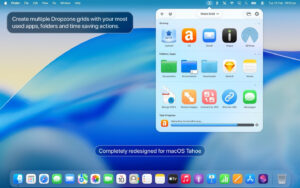
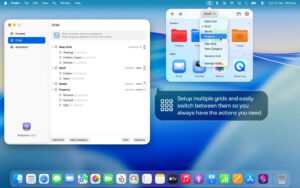
The new multi-grid support makes Dropzone even stronger. Keep your most frequently used applications, folders, and operation collections, and easily switch between them.
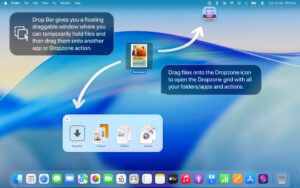
Dropzone also includes Drop Bar—a place to store files that you need later. Simply place files on the Drop Bar icon in the grid, and they will remain there until you are ready to use them. With multi-grid support, you can create multiple drop-down bars to organize files into different collections.
Features:
– Fully updated and optimized for macOS Tahoe.
– Use the new file icons with colors, symbols, or emojis for custom folders.
– Set multiple grids for different applications, folders, and operation collections.
– Pop the Drop Bar to a floating file drawer that stays at the top, allowing you to drag files to where you need them.
– Open applications, move, and copy files faster than ever.
– Use TinyURL to instantly shorten any URL. Select a URL, press Ctrl+Option+Cmd+S, and the shortened link will be copied to your clipboard.
– Send files and folders to nearby Macs that support built-in AirDrop.
– Upload images to Imgur and get a shareable link in a few seconds.
– Convert images between PNG, JPEG, TIFF, etc.
– Resize images to preset dimensions with a single drop.
– Upload files to Amazon S3 (Dropzone Pro feature).
– Upload files to your SFTP server (Dropzone Pro feature).
– Execute multiple tasks simultaneously and track the progress of each task through the grid’s status area.
– Monitor task progress with an animated menu bar icon.
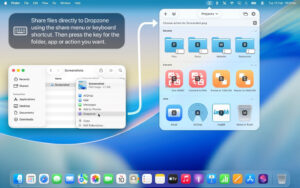
– Start actions with customizable keyboard shortcuts (Dropzone Pro feature).
– Add applications, folders, or actions to the grid by dragging them to the “Add to Grid” area.
Software Screenshot:
This resource requires login to download
Log in
Vibe Island for Mac v1.0.34 AI Programming Assistant Chinese Activation Version Download
Downloads:0 | 2026-10-27

Powerful Image Editor Software: Pixelmator Pro for Mac v3.3.10 Chinese Activation Download
Downloads:3629 | 2026-10-21

Capture One 23 Pro for Mac v16.2.3 Chinese Activation Download
Downloads:2537 | 2026-10-21

Mac Yoink v3.5.2 File Drag and Drop Clipboard Tool Chinese Activation Version Download
Downloads:3087 | 2026-10-20


Ratings & reviews
No rating
Let’s rate it.