

ON1 Photo RAW MAX 2026.4 for Mac Chinese Activation Version Download
ON1 Photo RAW MAX is a professional-grade RAW image processing and photo editing software designed for Mac users, offering a one-stop photography solution that integrates file browsing, RAW processing, layer editing, and effect application within a single application. Compared to the standard version, the MAX version provides additional support for Adobe plugins and cloud synchronization features, making it an ideal choice for professional photographers and creative individuals.
### Function Features:
1. Integrated Workflow
No import required: directly browse and edit photos stored on the hard drive without creating directories or import processes
Native RAW support: compatible with over 800 camera models, preserving maximum detail and color information
Non-destructive editing: all operations do not modify the original file, allowing for adjustments or reversals at any time, ensuring safety
2. AI-powered editing tools
Super Select AI: intelligent recognition and selection of subjects for quick and precise adjustments
Sky Swap AI: one-click sky replacement, with natural and realistic effects, supporting intelligent blending and light matching
NoNoise AI: revolutionary noise reduction technology, maintaining clarity even with high ISO shots
Resize AI: AI-driven super-resolution magnification, allowing the creation of large posters without distortion, with two new AI models added in version 2026 (high-quality and standard modes)
Auto Distraction Removal: automatically detects and removes sensor dust, wires, and background interference elements, saving time during retouching
3. Professional-grade layers and compositing
Complete layer support: providing full-function non-destructive layer editing not available in Lightroom, supporting layer blending, masks, and adjustments
Photo stack: grouping related photos for display, keeping the workspace tidy, without creating additional folders
Composite effects: easily creating double exposure, HDR composites, and panoramas, without requiring third-party plugins
Text and graphic tools: adding titles, watermarks, and custom graphics, supporting advanced typography and styles
4. Advanced color correction and effects
Brilliance AI: one-click optimization of tone, color, and sky, while noise reduction, with effects媲美专业调色师
Hundreds of presets and filters: including dynamic contrast, HDR effects, film texture, texture overlay, etc., supporting custom and stacking usage
Local adjustment tools: gradient masks, radial filters, brush masks, etc., for precise control of adjustment ranges
Advanced color management: supporting ICC profiles and professional color spaces, ensuring consistency between print and display colors
5. Photo management and organization
Fast browsing engine: high-performance preview loading, even for large files, quickly displaying
Metadata editing: batch adding keywords, copyright information, and ratings
Smart filtering: quickly searching for photos based on EXIF data, tags, and ratings
Lightroom migration assistant: seamlessly importing Lightroom catalogs, settings, and metadata, making the workflow easy to switch
Version 20.4.0 Update Content:
### 1. New MAX-exclusive “Restore AI” module
This core feature of this update allows for one-click photo restoration, requiring no additional points or tokens:
– Automatic repair of physical damage: removing dust, scratches, wrinkles, tears, etc.
– AI intelligent enhancement: restoring blurry details, natural coloring of black and white photos, and correcting fading and color shifts
– Text prompt guidance: optimizing coloring, restoration, or addition of text, and blurring backgrounds, etc., through text instructions
– Face-specific optimization: accurately identifying faces and restoring facial details, preserving the recognizability of the person
– Batch and cloud processing: supporting batch restoration of scanned photo albums, and complex tasks can be called upon cloud computing power
– Integration management: supporting film conversion, album organization, metadata editing, and one-click export and sharing
### 2. Interface and experience optimization
– New homepage module: set as the default startup page, providing quick access to opening or importing photos, recent editing entries, and integration of update announcements and product training content
– Improved performance of the browsing module: new folder thumbnails load instantly, scrolling is smoother; optimized number of single-screen thumbnails displayed, and simplified right-click context menus
– Improved performance of the deep stack: smooth operation of sliders and brushes during large-scale local adjustments, with significant reduction in memory usage
### 3. Compatibility and stability
– Added/Improved 20+ lens profiles for Canon, Fujifilm, Nikon, Sony, and Tamron, covering mainstream brands
– Fixed multiple known bugs, significantly improving application stability
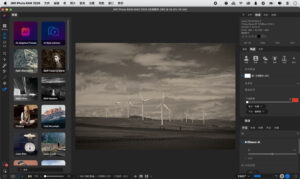
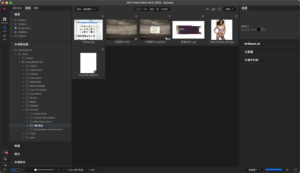
Software Screenshot:
This resource requires login to download
Log in
DaVinci Resolve Studio for Mac v21.1 Chinese Activation Edition Download
Downloads:0 | 2026-10-27

Final Cut Pro X for Mac v10.6.5 Chinese Activation Version Download
Downloads:2828 | 2026-10-24

Lite Browser for Mac v2.0.7 Activation Download
Downloads:1893 | 2026-10-21

Xliff Editor for Mac v2.9 XLIFF File Editor Activated Version Download
Downloads:3469 | 2026-10-17


Ratings & reviews
No rating
Let’s rate it.