

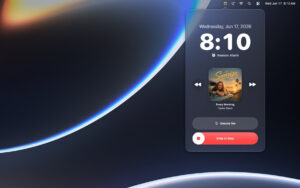




Mac Awaken v7.1 Menu Bar Alarm Tool Chinese Activation Download
Awaken is a beautiful alarm clock that resides in the Mac menu bar. It wakes you up with Apple Music, soothing sounds, and stunning clock faces. It also includes a sleep timer and countdowns.
Awaken transforms your Mac into a beautiful and reliable alarm clock right in the menu bar.
Whether you want to wake up with your favorite Apple Music playlist, with the sound of waves, or with a beautiful full-screen clock on your desk, Awaken makes every moment feel special. There’s no clutter, no distractions—just a carefully designed clock that’s always within reach.
Choose from 8 different clock styles—digital, flip, segment, neon, bulb, blueprint, constellation, and bloom. Add 18 background themes to match the calm of the morning to the quiet of the night, and even Synthwave and Vaporwave retro styles. Display the date, seconds, and blinking separators, or keep it as simple as possible. A single keyboard shortcut lets you enter full-screen mode, turning any Mac into a bedside clock.
Wake up in your preferred way
Create one-time, recurring, or date-specific alarms and add custom tags. Then precisely choose how you want to be woken up:
– Apple Music—select any song, album, artist, or playlist from your library or full catalog
– From 30+ original sound effects in categories like Classic, Vital, Fun, Natural, and Selection
– Read—have Awaken read your custom message in your chosen voice
– Gradually fade in the volume and screen brightness to start the morning smoothly
Flexible Snooze allows you to set the duration and number of snooze attempts, so you can wake up at your own pace.
Sleep Timer
Fall asleep to music, and let Awaken handle the rest. Set a countdown to play any Apple Music selection, fading out and stopping when the time is up. Albums and playlists can be randomly played with a single tap.
Quick Timers
Save your frequently used timers—like making tea, working out, or focusing—using custom names and start, pause, continue, or restart them with ease.
Designed specifically for Mac
– Quietly reside in the menu bar—on-demand, off-demand
– Optional full-screen clock window for always-on display
– “Log in to open” ensures your alarm is always reliable
– “Keep Screen On” mode for uninterrupted bedside experience
– Automatically dim the screen when idle, avoiding harsh glare at night
– Wake up with your Mac and automatically sync your alarms
– Full-screen ringing experience with album covers, track info, play controls, snooze, and slide stop
Touching details
The main volume control, configurable fade-in duration, and system reminders ensure your alarm wakes you up even when life is busy. Every interaction strives for calm, speed, and perfect native to Mac.
Software Screenshot:
This resource requires login to download
Log in-for-Mac-v1.46-宇宙探索游戏.png)
The Long Journey Home: A Cosmic Exploration Game for Mac v1.46 – Download and Activation Version
Downloads:1663 | 2026-10-23

Sketch for Mac v67.1 Mobile UI Design Software Chinese Activation Version Download
Downloads:3327 | 2026-10-22

Tools for Writing Papers – Activation Version Download for Mac v8.1.2
Downloads:1391 | 2026-10-20

GoodTask for Mac v5.7.0 Project Management Tool Chinese Activation Version Download
Downloads:328 | 2026-10-20


Ratings & reviews
No rating
Let’s rate it.