



SideNotes for Mac v1.6: Sticky Notes Activation Download
SideNotes is a Mac-exclusive screen-side resident note-taking tool, instantly accessible without disrupting workflow, supporting quick recording, rich text editing, to-do tasks, folder categorization, and iCloud synchronization. Highly customizable, it’s an ideal choice for efficient随手记.
Tip: You must disable SIP for the software to function properly in this version.
Designed specifically for quick notes: tasks, ideas, phone numbers, links, references, screen captures, code snippets, recipes, vocabulary, colors.
SideNotes is a quick and lightweight note-taking app that opens from the screen side.
Click on the Open Bar, move the cursor to the edge (Hot Side), or use keyboard shortcuts—then start typing.
No need to create files or switch applications.
Just open SideNotes, press the plus sign (+), and write.
Whether you’re working, designing, coding, learning, or talking—SideNotes lets you quickly capture:
– Ideas, tasks, inspirations
– Links, references, resources
– Phone numbers, to-do lists, shopping lists
– Markdown notes and code snippets
– Colors (type #rrggbb to preview and copy)
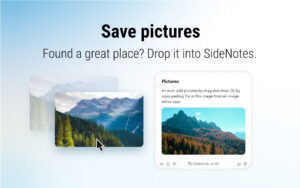
– Screen captures or images (just drag and drop)
– Recipes, vocabulary, creative drafts
Key Features:
– Instantly open from the screen edge
– Save text, links, images, color codes
– Drag screen captures into notes
– No clutter: notes stay outside the screen until needed
– Folders, note colors, keyboard shortcuts
– Highly customizable: fonts, layout, behavior
– iCloud synchronization
– Markdown support
– Works with ThemeEdit—free tool for creating and modifying themes
Version 1.6 Updates:
SideNotes 1.6 is one of our largest version updates, adding multiple core features and completing numerous detail optimizations.
– Fold notes to tidy up the interface
– Pin notes and folders to keep important content at the top
– Revamped settings window design
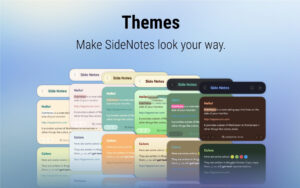
– Added default theme
– Support for full font customization
– Re-designed note menu with move to recent folder feature
– Added quick formatting toolbar for more efficient text editing
– Added text formatting options: underline, horizontal line
– Can delete completed tasks
– Updated bottom bar on note details page
– Added bottom bar on note list page
– Optimized note color picker experience
– Improved content pasting from ChatGPT
– Option to open folders with a single click
– Fold/expand notes with pinch gestures (applies to all notes in settings)
– Added right-click menu to menu bar icons
– Added translations: Simplified Chinese, French, German, Italian, Japanese, Korean, Polish, Spanish
– Optimized first-time setup guide
– Numerous application interface details optimized
## Bugs Fixed
– Fixed the issue where the side吸附 function to close was ineffective
– Fixed the issue where the bottom bar disappeared when the share popup appeared
Software Screenshots:
This resource requires login to download
Log in-for-Mac-v28-2D平台动作游戏.png)
Rogue Hero (Fury Unleashed) for Mac v1.0.2: Action-Shooting Game – Fury Unleashedmac Download and Activation Version
Downloads:1258 | 2026-10-23

Topaz AI Photo Enhancer v3.0.0 Activation Download
Downloads:487 | 2026-10-21

Money Pro for Mac v2.5.14 Financial Management Software Chinese Activated Version Download
Downloads:1786 | 2026-10-17

Xliff Editor for Mac v2.9.8 XLIFF File Editor Activated Version Download
Downloads:2379 | 2026-10-17


Ratings & reviews
No rating
Let’s rate it.