


Dato for Mac v5.8.0 Menu Bar Clock Activation Download
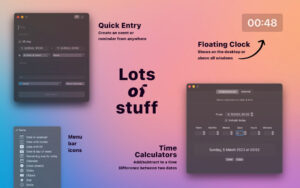
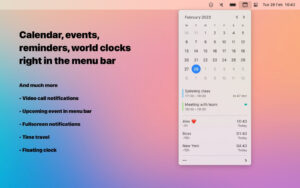
Dato for Mac provides a local clock, date, multiple world clocks, and upcoming events in the menu bar. When you click on the Dato in the menu bar, you see a menu containing the calendar, calendar events, and world clocks. All of these are highly customizable.
Features:
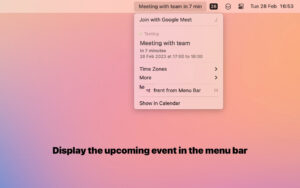
– Clearly see upcoming events
– Customize the number and days of events to display
– Support for HTML-formatted notes
– Quickly display events in your default calendar app
Calendar:
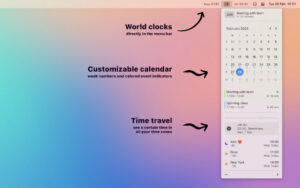
– Weekly view
– Event indicators
– Highlight specific dates in a week
World Clocks:
– Display in the Dato menu or menu bar
– Customize names
– Offline search for 15,000 cities
– Time Travel (see future/past times)
And more!
– Display upcoming events in the menu bar (such as Fantastical, Meeter, and MeetingBar)
– Quickly join meetings using customizable global keyboard shortcuts (Zoom/Meet/Teams)
– Create events (even with global keyboard shortcuts)
– Support for all calendar services supported by macOS (iCloud, Google, Outlook, etc.)
– Customizable format for date and time in the menu bar
– Zoom, Google Meet, and Microsoft Teams integration (display an icon to quickly join events)
– Many customizable menu bar icons (such as calendar dates, like Itsycal)
– Widgets: Date and Time, Calendar, and World Clocks
– Display seconds in the menu bar clock or menu
– Open/Close application using global keyboard shortcuts
– Many advanced user keyboard shortcuts within the app
– Open Google Calendar events directly from Google Calendar on the web
– Customizable color for date and time in the menu bar
– Chimes at the hour
– Large text mode – Delegate Calendar
– Date and time calculator
– Fully customizable
Version 5.8.0 Update:
– The app now requires **macOS 26**, you can download the last compatible version for **macOS 15** from the official website.
– New setting to display the duration of free time between appointments.
Software Screenshots:
This resource requires login to download
Log in
Adobe Premiere Pro 2021 for Mac v15.1.0 Full Version Chinese Activation Download
Downloads:1209 | 2026-10-24

Lattice for Mac v1.8 LUT Editor and Viewer Activation Download
Downloads:2016 | 2026-10-20

Things 3 for Mac v3.15.18 Chinese Activation Version Download
Downloads:3121 | 2026-10-20

Ghost Buster Pro for Mac v2.2.2 Computer Cleaning and Optimization Software Activated Version Download
Downloads:3433 | 2026-10-17


Ratings & reviews
No rating
Let’s rate it.