

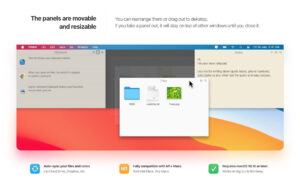
Clutter-Free for Mac v2.2.18 Desktop Organization Tool Chinese Activation Version Download
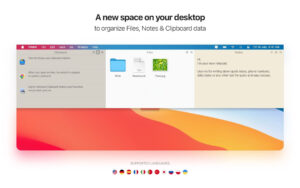
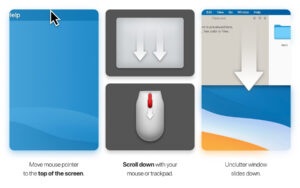
Unclutter is a one-stop productivity tool designed specifically for macOS, integrating clipboard history management, quick随手notes, and temporary file storage into a drop-down panel that can be easily summoned with a single click. It aims to address common pain points such as cluttered desktop, lost copied content, and inconvenient note-taking by providing a streamlined solution.
### Key Features:
### 1. Clipboard History Management (剪贴板历史管理)
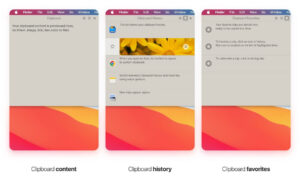
The software automatically records all copied content on your Mac, including text, images, links, code snippets, and file paths, ensuring that new content does not overwrite old ones.
– One-click restoration and reuse of clipboard history, allowing you to quickly revert to the system clipboard;
– Full-text search function for keyword-based quick access to a vast history of records;
– Favorites and quick switching between history and favorites lists via gestures;
– Persistent clipboard history even after restarting the Mac, eliminating the need for repetitive copying and the risk of content loss.
### 2. Quick Notes (随手笔记)
This feature allows you to quickly jot down thoughts, to-do lists, account passwords, meeting highlights, and common phrases without launching any separate text editors. It’s a lightweight tool for capturing ideas and information on your Mac.
– Quick and easy recording of temporary ideas, tasks, passwords, meeting notes, and common phrases;
– Multiple note management and full-text keyword search capabilities, ensuring that even large volumes of notes can be efficiently searched;
– Supports both plain text and Markdown formats, meeting basic formatting needs;
– iCloud synchronization for notes across multiple devices, allowing you to access your notes from anywhere.
### 3. Files Hub (文件暂存中心)
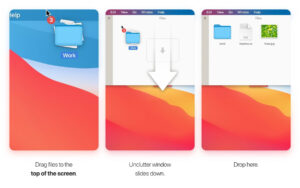
This feature serves as a “desktop file transfer station” for macOS, helping to declutter your desktop and streamline the process of managing files.
– Drag-and-drop functionality for quickly storing temporary files, common documents, and folder contents without navigating through Finder directories;
– Built-in file preview and search features, allowing you to view file contents directly from the panel without opening additional software;
– iCloud Drive compatibility for cloud synchronization of temporary files across multiple devices, ensuring seamless cross-device office work;
– As a cross-application file drop zone, this feature significantly improves file transfer and access efficiency in various office, design, and development scenarios.
Version 2.2.18 Update Highlights:
– Fixed: Unclutter settings window occasionally popping up unexpectedly.
Software Screenshots:
This resource requires login to download
Log in
ForkLift for Mac v4.7.3 Chinese Activation Version Download
Downloads:0 | 2026-10-27

Timemator for Mac v2.5.1 Auto Tracking Software Activation Download
Downloads:859 | 2026-10-27

DjVu Reader Pro for Mac v2.5.3 Activation Download
Downloads:3131 | 2026-10-20

Blocs for Mac v4.4.0 Visual Web Design Software Activated Version Download
Downloads:2240 | 2026-10-17


Ratings & reviews
No rating
Let’s rate it.