
Warning: Attempt to read property "slug" on null in /www/wwwroot/www_23mac_com/wp-includes/taxonomy.php on line 4763

Tab Launcher for Mac v3.1.2 Chinese Activation Version Download

  • Introduction
Download
Download now
Join VIP Free download

Description

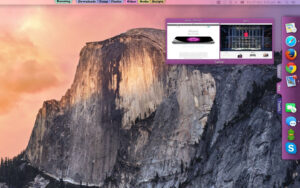
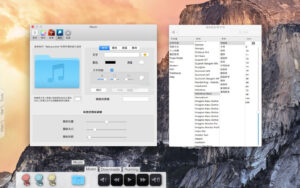
TabLauncher makes your favorite apps, files, folders, and web pages easily accessible — they’re organized in colorful tab pages, parked at any edge of the screen, ready to open with a swipe when you need them.

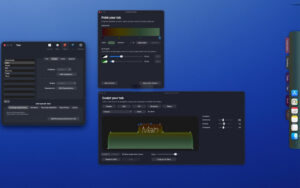
Version 3 is a complete visual makeover. The tabs are no longer static — they become living, organic shapes that you can sculpt to your heart’s content. Choose from the pre-installed Classic, Pill, or Wave, or open the Shape Studio to drag and curve your own shapes. Paint each tab with gradients and borders, watch everything animate — the tabs deform as they open and close, icons slide out of the way for drag-and-drop. The whole launcher comes to life.

Customize to your heart’s content
– Shape the tabs precisely: corners, shoulders, curves — every dot and tangent can be dragged.
– Gradient support with any number of stops, and ready-to-use recipes based on the tab color.
– Borders, shadows, transparency, fonts, and tab styles — blend in with the desktop, or stand out.
– Five carefully tuned shape presets as a starting point, and save and reuse your own presets.

Organized
– Place an unlimited number of tabs at any edge of any screen — remember their layout on each edge, including the gap for the new MacBook’s camera area.
– Special tabs: running apps, app windows, recently modified files, synced real folders, and music players playing local files and network radio.
– One-click import your Dock — apps, folders, web links, even separators.
– Hover over an app icon running to preview its window.
– Anything can be dragged in: apps, documents, folders, web pages.

Work the way you like
– Choose how the launcher opens: pointer stops, edge touches, hover over tabs, tap, or keep open.
– Choose how the launcher closes: after a delay you set, or on tap of a tab, icon, or any external location.
– Fully automatic hiding, leaving a graceful gradient trail where the tabs sleep.
– Any project can have global keyboard shortcuts, and each icon can have custom AppleScript, and system event triggers (wake, login, timer) to automatically launch or quit apps.
– Fully supports AppleScript scripting control.

Version 3.1.2 Update:

– Drag a file onto an app icon to open the file with that app; drag onto a folder icon to send the file to that folder — instead of just adding the file to the tab.
– In the “Window” special tab page options, “Use app icon for preview” won’t disappear due to a lack of screen recording permissions — this is the mode that doesn’t need that permission.

Software Screenshots:


Download info

This resource requires login to download

Log in
Note: This resource is for informational purposes. By using this resource, you agree that you accept full responsibility to the copyright holder. For questions, please contact us.

Ratings & reviews

No rating

Let’s rate it.

  • 5 stars
  • 4 stars
  • 3 stars
  • 2 stars
  • 1 stars

You may also like

More
×
Tab Launcher for Mac v3.1.2 Chinese Activation Version Download
iMac — One-stop Mac Software Download Platform
Social login
captcha
Social login