
Warning: Attempt to read property "slug" on null in /www/wwwroot/www_23mac_com/wp-includes/taxonomy.php on line 4763

3D-Coat for Mac v4.8.04: Digital Sculpting and 3D Modeling Software – Chinese Activation Version Download

  • Introduction
Download
Download now
Join VIP Free download

Description

3D-Coat for Mac is a professional 3D software designed specifically for game artists, focusing on the detail sculpting and texture painting of game models. It integrates real-time 3D model texture painting and detail sculpting tools to significantly optimize the detail design workflow, helping artists create richer and finer content in less time. The workflow is highly efficient: users simply import a low-polygon model, and 3D-Coat automatically creates UV maps and paints multiple textures such as normal maps, displacement maps, color maps, transparency maps, and glossiness maps in one go.

Core Software Features

  • Dynamic Clay Sculpting Tool (Live Clay): A new real-time clay sculpting tool that allows you to increase resolution only in the areas that need details, achieving ideal level of detail control without affecting the entire model.
  • Updated User Interface: Features a new style and iconic appearance, updated start dialog and shading preview, enhancing overall visual experience and ease of use.
  • Significantly Improved Performance: Overall performance is improved by 3 to 10 times, with significant improvements in Windows version, and corresponding performance boosts in Mac and Linux versions.
  • Enhanced Painting Features: Introduced emissive and colored specular painting features.
  • Pixel/Vertex Painting Mode: Added pixel and vertex painting options in the painting module, providing more flexible ways to create textures.
  • Added Tools and Options: Provided over 30 new tools and enhanced options, expanding creative possibilities.
  • Spline Drawing Mode: Added spline curve drawing functionality, facilitating the creation of complex curve structures.
  • Updated Texturing Bake Functionality: Improved texturing bake tool, enhancing baking quality and efficiency.
  • Fast Boolean Operations: Supports fast boolean operations in surface mode for creating sharp-edged hard surface models.
  • Specialized Tools for Product/Prototype Modeling: Provides a dedicated toolset for product design and prototype modeling.
  • Overall Optimization: The software has been significantly improved in terms of running speed, output quality, and system stability.

Key Features of 3D-Coat 4.8

Core Function Enhancements

  • Smart Material Layering: Now you can attach smart materials directly to layers, greatly simplifying the material management workflow.
  • Improved Curvature Calculation: Optimized curvature calculation algorithms to make smart materials look more realistic.
  • New Basic Bodies for Retopology: Added cylinders, rings, cubes, ellipses, and helixes as basic geometric shapes in the retopology room, making low-polygon modeling more convenient.
  • Dynamic Texture Resolution Adjustment: When changing texture resolution, the attached material will automatically resample, maintaining consistency.
  • Smart Material Usage History: Added smart material usage history feature, making it easier to trace and manage.
  • Integration with Renderman Rendering: Now supports direct rendering of Renderman scenes.
  • Proxy Detail Slider: A simple slider allows adjusting the detail level of proxy models.

Workflow and Tool Improvements

  • Bake Scan and Depth Drawing: Added “Bake Scan” feature, allowing the use of brushes to directly draw depth information, making it easy to define the depth impact of the brush strokes.
  • Support for 4K Displays: User interface elements and font sizes can automatically adapt to high-resolution screens (such as 4K displays).
  • Quick View Rotation Switch: Added quick rotation mode switch feature (rotating around the Y-axis or freely rotating), which can be set in the navigation panel.

Other Important Updates and Improvements

  • Fixed UV maps can now be assigned a fixed bump map, independent of the brush radius and depth settings.
  • Material/Mold library folders can now be presented as dropdown lists, making management easier.
  • Correctly visualizes displacement maps in Micro-Polygon (PPP) sculpting methods.
  • Improved displacement map import functionality to ensure correct scaling.
  • Added warnings for cache loss, preventing accidental data loss.
  • Angle increments when holding the SHIFT key are now set to 45 degrees (previously 90 degrees).
  • When highlighting UV islands in the UV preview window, pressing the CTRL key cycles through adjacent UV maps.
  • Support for storing camera view positions as presets.
  • Optimized the display logic of transformation controls (Gizmo), appearing even when only a single point of the transformation box is selected.
  • Reinstated the ability to set custom render size settings in the render space.
  • Full support for square Alpha channels, ensuring old files display correctly.
  • Users can now customize the interface font size in the “Preferences -> Theme” section.
  • The “File -> Import Multiple Objects” function now supports batch importing models in different ways.

Software Interface and Language Settings

Software Screenshot:

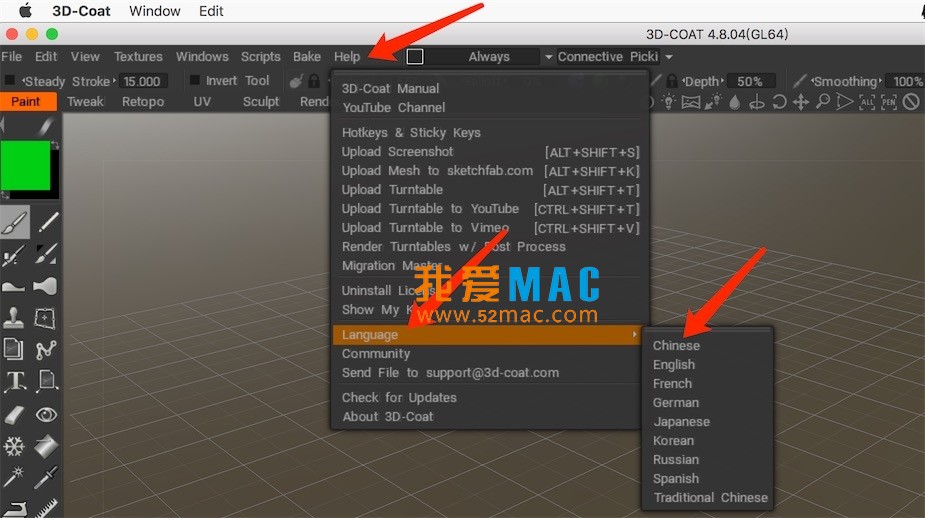
The default interface language of 3D-Coat for Mac is English. To switch to Chinese, follow these steps:

Steps: Click the top menu bar’s “Help (帮助)” -> Select “Language (语言)” -> Choose “Chinese (中文)”.

The process is shown in the following screenshots:

3D-Coat 语言设置界面截图3D-Coat 软件界面截图13D-Coat 软件界面截图23D-Coat 软件界面截图33D-Coat 软件界面截图43D-Coat 软件界面截图5

Download info

This resource requires login to download

Log in
Note: This resource is for informational purposes. By using this resource, you agree that you accept full responsibility to the copyright holder. For questions, please contact us.

Ratings & reviews

4.9

(Maximum 5 ratings, total 12 user reviews)

Let’s rate it.

  • 5 stars
    91.7%
  • 4 stars
    8.3%
  • 3 stars
    0%
  • 2 stars
    0%
  • 1 stars
    0%

You may also like

More
×
3D-Coat for Mac v4.8.04: Digital Sculpting and 3D Modeling Software – Chinese Activation Version Download
iMac — One-stop Mac Software Download Platform
Social login
captcha
Social login