| Sketch is a professional creation tool focused on digital product design, specializing in UI/UX interface design, icon design, and design system construction. It focuses on lightweight interactive experiences, systematic component management, and a complete design delivery pipeline, covering the entire design workflow from creative conception to development delivery.
### Features:
#### 一、专业矢量视觉设计能力
– Precise vector editing: Based on vector drawing, it supports detailed path editing, flexible Boolean operations, and multiple overlapping layers, enabling full-size designs from pixel-level icons to complete application interfaces. It maintains clear quality at any scale; it includes a mathematical formula calculator for quick size and coordinate adjustments, enhancing detail refinement efficiency.
– Rich visual styles: Supports multiple fill modes, gradient effects, inner and outer shadows, Gaussian blurs, and perceptual gradient and high-saturation gradient modes, resulting in more natural and gentle color transitions. Gradient color markers support centering and uniform distribution, optimizing color detail efficiency.
– Fine typography system: Fully supports variable fonts, OpenType advanced font features, and RTL from right to left languages, allowing for fine-tuning of font weights, widths, and slants, and pairing with global text style systems to ensure consistent and professional design layouts.
– Compatible with multiple design formats: Supports direct drag-and-drop import of PNG, JPG, HEIC, TIFF, WebP, SVG, EPS, PDF, AI, PSD, and other mainstream design formats, seamlessly integrating multi-source design assets, reducing cross-tool collaboration costs.
#### 二、标准化设计系统管理
– Reusable symbol components: Supports converting commonly used design elements into Symbols components, updating all instances with a single source component modification; supports nesting, attribute overrides, and intelligent layout adaptation, allowing the construction of standardized button, navigation, and card component libraries, completely eliminating repetitive modification work.
– Global shared style system: Provides color variables, text styles, and layer styles, unified management of brand colors, font specifications, and visual effects, synchronizing all instances with a single source style modification, efficiently maintaining visual consistency.
– Team shared resource library: Supports encapsulating symbol components, shared styles, and canvas templates into team-shared Libraries, enabling cross-project, cross-document invocation and synchronization updates; supports enabling corresponding resource libraries individually for each project, flexibly adapting to different business line design specification management needs.
#### 三、智能布局与高效排版
– Stack dynamic layout system: Based on elastic layout principles, Stack layout supports horizontal and vertical arrangements, customizable element spacing, container padding, and alignment rules, automatically adjusting layouts when adding or replacing elements, quickly constructing responsive components and page structures, significantly reducing manual layout work.
– Nested frame containers: Frames as foundational design containers support unlimited nesting, can be paired with Auto-Pin for fixed positioning and relative size settings for adaptive layouts; dedicated container supports equal scaling for icons and illustrations, facilitating unified management of visual resources.
– Efficient layer management: Supports batch layer renaming (with matching rules and placeholders), quick layer selection, pixel alignment, and layer flattening, practical operations; supports multiple paste capabilities, allowing for simultaneous execution of paste, overlay paste, and replace paste operations, automatically centering pasted objects within groups, aligning operations more intuitively.
– Infinite canvas and navigation: Equipped with an infinite canvas space, supporting parallel design on multiple canvases; built-in small map navigation function, enabling quick positioning and jumping to any canvas area, adapting to the management of large-scale design projects.
#### 四、原型交互与研发交付
– High-fidelity interactive prototype: Supports rapid construction of interactive product prototypes, including page-to-page navigation, scroll area settings, overlay pop-ups, page transition intelligent animations, and various interactive triggerers, accurately replicating real product usage experiences.
– Flexible slicing export: Supports independent slicing export rules for any layer or group, configuring multiple scale and format output parameters; supports the “only export group content” option within groups, precisely controlling export scope, avoiding unnecessary elements.
– Smooth development delivery: Design assets can generate web sharing links, developers can directly view annotations, obtain code snippets, and download sliced resources, bridging the design-to-development delivery chain, reducing communication costs and rendering discrepancies.
#### 五、团队协作与资产管控
– Real-time collaborative editing: Supports simultaneous work on the same design document by multiple users, with real-time content synchronization, and canvas comments and annotations for efficient design reviews, feedback submission, and iteration modifications.
– Role-based permissions: Supports different role settings such as editors and viewers, allowing viewers to browse documents, prototypes, and submit feedback via browsers without installing clients, facilitating cross-role collaboration among product, development, and customer teams.
– Version and file management: Automatically saves design history versions, enabling real-time retrieval and restoration of past solutions, ensuring design asset security; supports unified management of multiple documents, clearly organizing project file structures, enhancing design asset organization and retrieval efficiency.
#### 六、扩展生态与效率工具
– Rich plugin ecosystem: Offers a mature third-party plugin ecosystem, expanding data filling, automatic annotation, motion effect creation, resource management, and design specification checking capabilities, flexibly adapting to different teams’ personalized workflows.
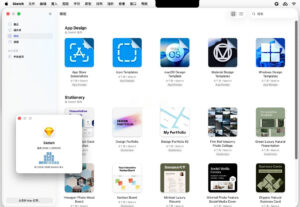
– Templates and preset resources: Includes a vast library of free design templates and popular device size presets, facilitating quick startup of various design projects; supports customizing canvas templates and incorporating them into the resource library, consolidating team-standardized design assets.
– Open file format support: Supports open file formats without plugins for automated operations, enabling integration with team automation workflows; supports encapsulating common operations into quick execution entry points, improving the efficiency of frequent operations.
Version 2026.2.1 Update Content:
– Now, the slice layers within any group (including canvases) can enable the “only export group content” option.
– Fixed issues:
1. Corrected layout issues and “component expired” prompts when inserting stacked components from external resource libraries.
2. Fixed Sketch crashing after pasting high-resolution images (e.g., from Keynote).
3. Fixed the issue where canvas dimensions changed during preview window closure and reopened preview window still used the old dimensions.
4. Fixed layer pixel shifts when pasting canvases to new pages, resulting in a 1-pixel increase in exported file size.
5. Fixed software crashes when layers are scaled to extremely small sizes.
6. Fixed the issue where Sketch crashes when exporting SVG files containing quadratic Bezier curves.
7. Fixed the issue where Sketch crashes when opening documents containing missing images and invoking the preview window.
8. Fixed the issue where the sidebar document list displays incorrectly after restarting the software with multiple unsaved files.
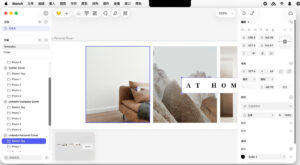
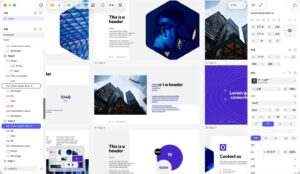
Software Screenshot:
|




Ratings & reviews
No rating
Let’s rate it.