| GraphicConverter is a comprehensive image processing tool developed by Lemke Software, boasting over 30 years of history since its inception in 1992. It has been recognized by media as the “Swiss Army Knife” for image processing on the Mac platform, offering features such as image browsing, editing, format conversion, and metadata management, catering to photographers, designers, and anyone needing efficient image processing for large volumes of images.
Key Features:
Extensive Format Compatibility
GraphicConverter supports over 200 image file formats, including common ones like JPG, PNG, HEIC, TIFF, PSD, as well as a wide range of professional and obscure formats. It can open nearly any image file source.
Wide Export Capabilities
GraphicConverter supports exporting images in over 80 formats, including popular and emerging formats such as JPEG, PNG, HEIC, PDF, WebP, JPEG XL, AVIF, among others. This versatility allows for handling various delivery and sharing scenarios.
RAW Format Support
GraphicConverter can directly decode RAW files from popular digital cameras, meeting the needs of professional photography workflows.
Batch Processing Engine
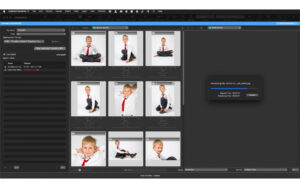
GraphicConverter features a multi-task batch processing engine, capable of simultaneously executing format conversions, size adjustments, renaming, color mode changes (e.g., RGB to CMYK), filter applications, and watermark additions to hundreds or thousands of images. This engine streamlines repetitive tasks.
Operation Recording and Reuse
GraphicConverter allows users to record multi-step editing processes as “actions” and save them for later reuse in other folders or projects, maintaining consistency in workflow.
Drag-and-Go Quick Conversion
Users can drag images directly into the conversion dialog to automatically execute preset conversions and operations without complex configuration.
Image Editing Tools
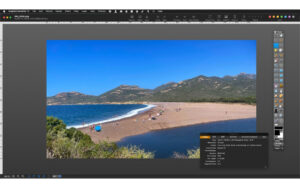
GraphicConverter includes basic adjustment tools such as brightness, contrast, saturation, luminosity, and curve adjustments, as well as basic operations like cropping, rotating, straightening, and scaling. It also supports multi-layer operations, including layer scaling, rotation, deformation, and visibility management.
Fixing and Enhancement Tools
GraphicConverter includes built-in repair brushes and stamp tools for removing imperfections and enhancing images. It also offers a rich filter library, including effects like blur, sharpening, and artistic styles, and compatibility with Adobe Photoshop plugins to extend editing capabilities.
Vector Objects
GraphicConverter supports creating vector graphics objects like lines, circles, and rectangles, with the ability to add shadows and save them in its proprietary format for future modifications.
AI Smart Selection
GraphicConverter leverages AI technology to automatically identify and select people and objects, facilitating quick tasks like retouching and masking.
Tear-Edge Effect
GraphicConverter offers a tear-edge effect, automatically adding shadows to simulate the irregular edges of torn paper, allowing users to drag and position the torn part freely.
Lossless Cropping
GraphicConverter preserves image quality when cropping JPEG and HEIC files by not re-encoding them.
Morphological Operations
GraphicConverter provides advanced morphological processing tools such as dilation, erosion, opening, closing, gradient, top-hat, and black-hat operations.
Metadata Management
GraphicConverter supports comprehensive metadata management, including reading and editing EXIF, IPTC, XMP, and GPS metadata. It also features a unique Metadata Juggler panel, allowing users to combine multiple editing steps and reuse them, such as batch clearing GPS location information, automatically writing dates to files, or copying IPTC field content to another field, all without re-saving the image and avoiding JPEG/HEIC format compression loss.
Metadata Update
GraphicConverter allows users to update only IPTC/XMP metadata without re-saving the entire file, preventing JPEG/HEIC format compression loss.
Image Browsing and Management
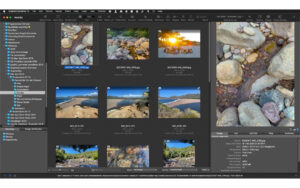
GraphicConverter includes an integrated image browser, providing a quick way to browse files and folders, with features like thumbnail previews, multiple sorting options (by name, date, rating, aesthetic score, number of people, etc.), and easy navigation through large collections of images.
Slide Show
GraphicConverter supports custom slide shows with transition effects and playback options, suitable for image presentation and filtering.
Face Recognition
GraphicConverter includes face recognition functionality, automatically detecting faces in images and supporting categorizing and cropping based on faces.
Aesthetic Scoring
GraphicConverter automatically calculates and displays the aesthetic score of images, helping users quickly filter high-quality photos.
Automation and Expansion
GraphicConverter supports AppleScript for automating image processing tasks and integrating with other macOS applications. It also includes support for macOS Shortcuts, Adobe Photoshop plugins, and TWAIN scanning.
Other Practical Features
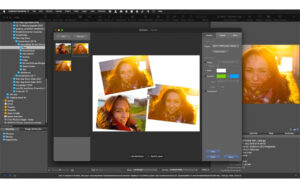
GraphicConverter supports ICC color management profiles, HDR and GainMap support for HEIC images, crosshair for precise positioning, and built-in collage and animation export features.
Version 12.5.4 Updates:
## New Features
– View Menu: HDR — Support for selecting dedicated dynamic range display in macOS Tahoe and above
– Action Menu: Merge to Source Folder
– Exif Menu: Learn Edit — Support for enabling/disabling new Exif 3.1 tags
– Batch Operations: Set Tags
– File Browser: Toolbar Directory Pop-up Menu — Support for saving to the same level as the folder
– Image Editing: Curve — Display saved curve presets for quick access
– Import: Support for mixed file format import
– Batch Operations: Draw Straight Line
– Batch Operations: Draw Rectangle
– Batch Operations: Draw Ellipse
– Batch Operations: Draw Filled Ellipse
## Function Improvements
– Enhanced detection capabilities for .tfw world map auxiliary files
– Support for Exif date renaming, including short year format
– New setting option in “Edit 2” under “General” to rotate lines with the line color
– Improved experience for undo/redo in text box editing processes
– Option to display the default path in the “Save As” dialog under “General” settings
– Support for adjusting the size of the auxiliary lines dialog in the View Menu
– Localized language updates
– Support for 7.0 version ABR brushes
– Support for Spotlight annotations with more than 255 characters
– Updated ExifTool component
– Support for modifying black compensation flags in batch operations to change color profiles
– Support for sorting Exif dates with time zone information in the File Browser
– Optimized handling of color profiles for icns format import/export
– Support for storing annotation information in PNG exports
– Support for automatically discarding damaged annotation information in PNG imports
– Support for a “Always Relative to First Click Position” option in the stamp tool
– Support for limiting movement to vertical or horizontal directions when holding Shift/Option keys
– Real-time preview in the stamp tool
– Support for accessibility attributes like alternative text (alt text) and extended description in IPTC/XMP editing
– Performance improvements for the plugin matrix filter
– Support for converting old drawing files to PDF
– Support for the “Rename” feature in the File Browser, which remembers the last used input field and automatically positions the dialog for the next use
– Display the name of the corresponding display under the “Display” setting
– Updated libDynaPDF library
– Support for reversing options in the curve tool
– The custom CoreImage kernel has been rewritten based on the Metal architecture
– Performance improvements for sorting large folders in the File Browser
– Performance improvements for accessing the system photo library in the File Browser
– A prompt for future system requirements is added after the application launches on macOS 10.13 to macOS 11
– Renamed “Plugin Filters” in the Effect Commands menu to “Matrix/Convolution Filters”
– Added “Save to Photos” option in the File Menu for images opened from the “Photos” app
– Modernized the code for batch conversion
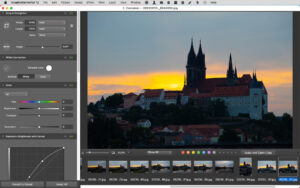
Software Screenshot:
|




Ratings & reviews
No rating
Let’s rate it.