

AiArt Image Enhancer for Mac v3.13 Activation Download
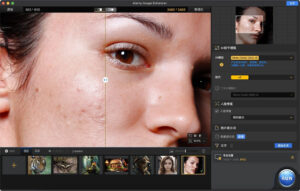
Aiarty Image Enhancer for Mac is a photo enhancement software driven by generative AI, capable of deblurring, noise reduction, repair, and magnifying images, generating realistic details using advanced AI models to provide superior clarity and sharpness.
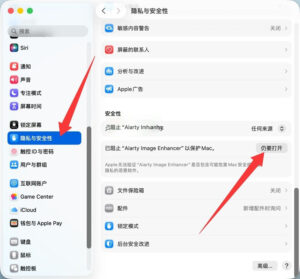
**Note:** Please enable “Open Anyway” in System Settings > Privacy & Security > Security, as shown in the image below.
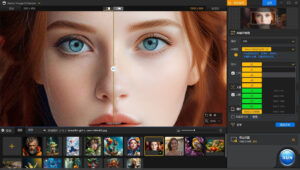
**Deblur:** Enhance blurry, grainy, pixelated, or soft images intelligently, while the AI generates clear and realistic details to restore the clarity and sharpness of AI-generated images and highly compressed photos.
**Noise Reduction:** Remove noise from photos using deep learning algorithms for various noise types encountered during capture or post-production. Improve clarity, sharpness, and overall visual quality.
**High-Quality:** Magnify AI-generated images and real photos up to 4K, 8K, or 32K without compromising quality.
**More Details:** Not only can the software retain and generate detailed images, but it also specializes in generating details for skin, hair, textures, and lines. The potential for improvement is greater when the image quality is lower.
**Supported Input and Output Formats:**
**Supported Input Formats:**
.jpg, .jpeg.jp2, .j2k, .jpf, .jpm, .jpg2, .j2c, .jpc, .jpx, .mj2, .png, .tif, .tiff, .webp, .bmp, .avif, and RAW formats (including .dng, .cr3, .cr2, .crw, .nef, .nrw, .arq, .arw, .sr2, .srf, .raf, .rw2, .orf, .ori, .pef, .ptx, .3fr, .fff, .iiq, .cap, .eip, .rwl, .srw, .erf, .mos, .mef, .mrw, .mdc, .dcr, .kdc, .dcs, .drf, .k25, .bay, .pxn, .r3d, and .rwz)
**Supported Output Formats:**
.jpg, .png (8-bit, 16-bit)
Version 3.13 Update Highlights:
**New Features:**
– Automatic association with Lightroom external editor: Configure the software automatically for quick invocation of Aiarty for deep enhancement in Lightroom, making the post-production workflow more seamless and efficient.
– “Face Repair” now supports intensity adjustments: Control the strength of repair and enhancement in facial regions to balance skin texture and natural texture retention.
– “Face Repair” now supports manual selection: Each face can be individually enabled or disabled for repair functionality.
– “Face Repair” introduces a two-pass mode: Fine-tune the optimization of repaired faces for enhanced detail presentation.
– “Face Repair” updates the blending mode: The Alpha mode better preserves original image colors while enhancing the face, suitable for faces with clear contours and higher resolution; the Gradient mode showcases the model reconstruction capabilities, suitable for faces with lower resolution and blur.
– Export to original folder: Enable this feature to automatically save enhanced images to the folder containing the original files, eliminating the need for manual path selection.
**Fixes:**
– Fixed issues such as crashes and lag in some scenes to improve overall software stability.
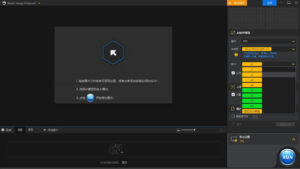
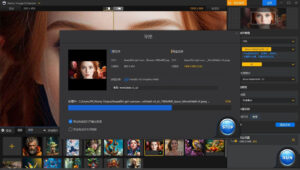
Screenshots:
This resource requires login to download
Log in
Essential Player for Mac v2.2.18 Installation必备 Download with Chinese Activation
Downloads:815 | 2026-10-24

Cat Quest III for Mac v1.4.5: Role-Playing Action Game – Cat Quest III for Mac Download & Activation Bundle
Downloads:1855 | 2026-10-23

DxO PhotoLab 6 for Mac v6.2.0 Chinese Activation Edition Download
Downloads:1243 | 2026-10-21

Navicat Premium for Mac 12.1.15 Database Management Software Chinese Localized Activated Version_Navicat Premium Mac Download
Downloads:1988 | 2026-10-17


Ratings & reviews
No rating
Let’s rate it.