| Final Cut Pro combines revolutionary video editing, powerful media management, and stunning performance to keep up with the speed of your thoughts. With Final Cut Pro, you can easily create and polish professional-quality video projects on a Mac. It is packed with numerous powerful intelligent features that help you turn frames into classic scenes.
Tip: The content library is unavailable!
Innovative Video Editing
– Magnetic Timeline uses advanced metadata and “clip connection” features for faster and more convenient editing
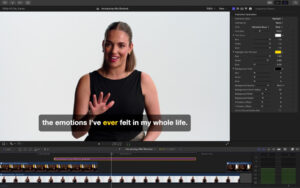
– “Transcribe to Subtitles” uses AI to generate hidden subtitles by analyzing spoken audio in the timeline
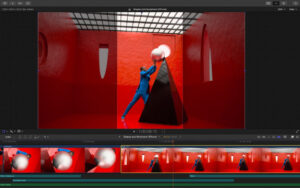
– Magnetic masks automatically track and separate any characters, objects, and shapes within the footage
– “Smart Trim” automatically converts projects into square or vertical formats for delivery
Powerful Media Management
– Organize your library to effectively manage media
– Apply custom keywords or personal collections during the selection of clip ranges
– “Smart Select” dynamically organizes content, allowing you to quickly find any shot with just a few clicks
Exceptional Performance
– Optimized for the latest Apple chips, bringing outstanding speed and efficiency
– Handles various formats, including ProRes, ProRes RAW, RED, XAVC, AVCHD, Avid DNxHR®, Avid DNxHD®, H.264, HEVC, etc.
Remarkable Customizable Effects
– Precise 2D and 3D subtitle animations, making customizing subtitles so simple
– Use intuitive controls to change the appearance of subtitles, transitions, and effects
– Choose plugins with custom interfaces from the third-party FxPlug ecosystem
Integrated Audio Editing
– Assign roles during import to easily track and organize projects
– Expand and edit multi-channel audio files directly in the timeline
– Apply audio effects and reduce background noise to highlight voices using technology from Logic Pro
Intuitive Color Grading
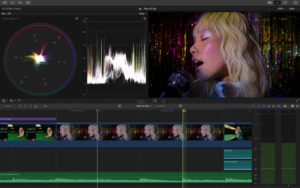
– Powerful color wheels and curves for precise adjustment of keying and masks
– Automatically map clips to match HDR or SDR color spaces
– Fully leverage ProRes RAW videos shot on iPhone 17 Pro or later models for higher color grading flexibility
One-Step Optimization for Output
– Quickly export for playback on Apple devices, as well as upload to platforms like Instagram and YouTube
– Export audio tracks and multiple versions of the final video with role metadata
– Import and export XML for workflows related to color grading and mixing
System Requirements: macOS 15.6 or later, 8 GB of RAM (recommended 16 GB), graphics card supporting Metal (only for Intel-based Macs), 7.2 GB of available disk space. Some features require a Mac with Apple chips. Some features require internet connectivity.
Version 12.3 Update Content:
Powerful Intelligent Features
– Quickly add translated subtitles using “Generate Subtitles” and easily customize their appearance for accessible, shareable content on social media and video platforms (requires a Mac with Apple chips; only available in American English)
– Automatically separate objects identified by the auto mask for easier color correction or optimization without manual tracking
– Use the new “Match Color” tool to match video colors across different cameras, lighting conditions, and film style, unifying the timeline appearance
– Analyze any rendered video with the “Edit Detection” tool and display its frame changes and automatically split into individual clips with a single click
Workflow Improvements
– Use always-visible dual-pane display for precise fine-tuning of edit points in the timeline, using keyboard shortcuts or the Precision Editor, which locks in the view
– Directly send any frame to Pixelmator Pro for streamlined workflows involving custom thumbnails and social media graphics
– Use new keyboard shortcuts for instant swapping of clips in the main storyline
– Copy and paste complex edit points across timelines with the option to simultaneously select main storyline clips and all connected media
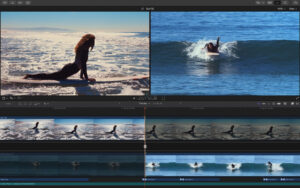
Software Screenshot:

 |



-for-Mac-v2.0.8-快节奏动作游戏.png)




Ratings & reviews
No rating
Let’s rate it.