

Proxyman for Mac v6.12.0 Network Debug Proxy Tool Chinese Activation Version Download
| Proxyman is a high-performance network debugging proxy tool specifically developed for the macOS system, built on Swift, deeply adapted to the macOS system architecture. It provides a comprehensive suite of network traffic capture, analysis, debugging, and tampering capabilities for developers, testers, and security operations personnel.
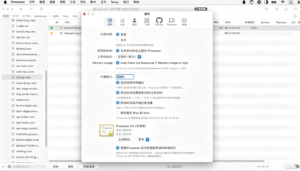
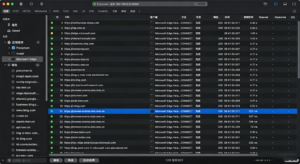
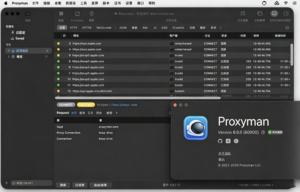
Proxyman natively supports real-time capture of traffic for HTTP/1.1, HTTP/2, HTTPS, WebSocket, gRPC, Protobuf, TCP, and other mainstream network protocols. It comes with mature SSL/TLS decryption capabilities, allowing for quick decryption of HTTPS-encrypted traffic with a single installation of the root certificate, and complete restoration of all dimensions of data, including request headers, request bodies, response headers, response bodies, cookies, status codes, and response times. Proxyman comes equipped with a comprehensive suite of debugging tools, enabling complex network debugging operations without the need for additional plugins. Core debugging tools include breakpoint functionality, allowing for interception and real-time modification of requests and responses without modifying business code, simulating various interface scenarios; local mapping functionality, allowing for direct mapping of online interface requests to local files, enabling quick replacement of online responses with local data, and zero-cost interface mocking and front-end debugging; and remote mapping functionality, allowing for redirection of specified requests’ source addresses to target addresses, seamlessly switching between testing, pre-release, and production environments without modifying client code. Proxyman offers advanced debugging capabilities, including script debugging, network throttling, and black/white list filtering. Script debugging supports the use of JavaScript to write custom logic for automated request/response modifications, traffic filtering, and complex scenario debugging, with a rich set of APIs and example templates. Network throttling functionality allows for simulating various network environments such as 2G, 3G, 4G, 5G, and Wi-Fi, with customizable bandwidth, latency, and packet loss rates, to test applications in weak network conditions. Black/white list functionality enables precise filtering of requests based on domain names to be captured or ignored, reducing interference from irrelevant traffic and focusing on core debugging objectives. Proxyman boasts robust multi-device cross-platform debugging capabilities, natively supporting network traffic capture for iOS and Android devices, including true devices and simulators. It provides a guide for installing mobile certificates and a one-click configuration tool, allowing for quick setup of proxy settings and certificate trust on mobile devices, enabling debugging of mobile applications, mini-programs, and H5 pages without complex operations; and supports remote debugging within the same local network, allowing other devices to quickly connect to the proxy for capturing and debugging traffic. Proxyman includes multi-format content parsing and visualization capabilities, automatically identifying and formatting JSON, XML, HTML, Form Data, images, videos, and compressed files, among other response content, supporting tree structure, source code, and preview views, and enabling intuitive viewing of data content without the need for additional tools. It supports the import and export of HAR and Proxyman Log v2 formats for traffic storage, sharing, and review, and is compatible with industry-standard packet capture tool data formats. Proxyman deeply integrates MCP (Model Context Protocol) and AI capabilities, supporting the creation, update, and deletion of debugging rules, certificate installation/uninstallation, terminal injection, and traffic export through AI proxies, significantly enhancing automated debugging efficiency. It also includes native AppKit rendering Markdown preview capabilities, supporting custom preview tabs to meet personalized debugging content viewing needs. Proxyman is developed on Swift, offering exceptional performance and system compatibility, with lower memory usage and faster traffic processing speeds compared to similar tools, ensuring smooth operation across all macOS mainstream versions, including Apple Silicon (M series) and Intel dual-chip architectures. It adheres to macOS system permission systems and security standards, allowing for stable operation without complex system permission modifications. Proxyman provides robust traffic management and auxiliary features, including multi-dimensional search and filtering of traffic based on domain, request method, status code, keywords, and response time, and supports request replay, batch operations, request collection, and annotation marking for easy repeat testing and issue retesting. It supports multi-window, multi-tab layouts, customizable interface themes and layouts, and adapts to different user preferences. Proxyman offers Standard and Setapp versions, catering to various user needs, with comprehensive official documentation, example tutorials, and active community support, ensuring continuous product updates and improvements, providing long-term stable technical support for users. Version 6.12.0 Update Highlights: ## New Features ## Function Improvements ## Bug Fixes Software Screenshot:
|
This resource requires login to download
Log in
Neural Mix Pro for Mac v1.0.3 Music Player Activation Download
Downloads:2948 | 2026-10-24

EdgeView 4 for Mac v4.9.4 Chinese Activation Version Download
Downloads:114 | 2026-10-21

GoodTask for Mac v7.2.0 Project Management Tool Chinese Activation Version Download
Downloads:1528 | 2026-10-20

Final Draft 12 for Mac v12.0.10 Screenwriting Software Activated Version Download
Downloads:598 | 2026-10-17


Ratings & reviews
No rating
Let’s rate it.