

SoundSource for Mac v6.1.0 Audio Control Software License
SoundSource is a one-stop audio control and management tool, and the acknowledged system audio capabilities supplement on the Mac platform. It achieves application-level fine audio control, intelligent routing of multiple devices, professional audio quality optimization, and scenario-specific quick configuration across all dimensions, from ordinary users’ daily audio entertainment and online meetings to professional creators’ audio workflows, all with minimal operations to fully control Mac audio, making it a must-have core tool for Mac users.
Core Function Features:
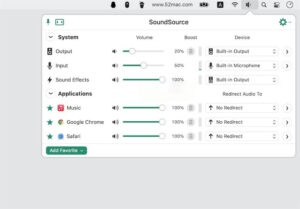
– Independent volume and balance adjustment for individual applications: Allows setting the volume size and left-right channel balance for any running application on Mac, supports muting, soloing, or setting the volume gain to over 100%, solving the original system’s only global volume adjustment issue. For example, during video conferences, you can lower the background music volume and silence specific applications to achieve audio parallel operation without disturbance.
– Application-specific audio output redirection: Precisely controls the destination of audio playback for individual applications, allowing different applications’ audio to be routed to different output devices. For instance, routing music application audio to high-end external speakers, video conferencing software audio to headphones, and system notification sound to the built-in speaker, to achieve fully customized audio routing solutions.
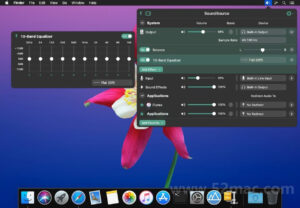
– Independent application-level audio effects: Adds audio effects and equalizer settings for individual applications, allowing different applications to have completely independent audio quality calibration schemes, without interfering with each other, meeting personalized auditory needs.
– Multi-device grouping and synchronized playback: Supports creating output device groups, merging multiple wired, Bluetooth, and AirPlay devices into a single audio output endpoint, to simultaneously play audio on multiple devices, addressing multi-room and multi-device audio synchronization needs.
– Deep native AirPlay adaptation: Optimizes AirPlay audio routing capabilities, allowing precise delivery of individual applications or system audio to one or multiple AirPlay devices, while keeping other applications’ audio playing on local devices, perfectly adapting to the AirPlay needs in live streaming, meetings, and home entertainment scenarios.
– Professional 10-band graphic equalizer: Built-in high-precision 10-band equalizer, providing a variety of original presets, and supports saving user-defined equalizer configurations, which can be applied to individual applications or global system audio, precisely tuning the high, mid, and low frequencies, adapting to different music styles and auditory habits.
– Exclusive headphone optimization EQ: Built-in dedicated equalizer presets for thousands of global headphone models, matching headphone models with a single click to optimize the frequency response, significantly enhancing the listening experience.
– Magic Boost 2 audio enhancement engine: Exclusive second-generation Magic Boost audio enhancement technology, specifically optimizing the sound output of Mac’s built-in speakers and small portable speakers, filling in the low and mid-frequency details, making small devices output more饱满 and layered sound quality.
– Quick Configs preset quick configuration: Supports saving all applications’ volume settings, device routing, effect configurations, and input/output device selections as presets, allowing for quick switching of audio configurations for different scenarios. For example, switching to “Office Meeting,” “Entertainment,” or “Live Streaming” preset configurations with a single click, without repeatedly adjusting manually.
– Automated scene triggers: Sets up preset trigger rules, such as automatically switching to the corresponding audio configuration, adjusting related application volumes, and switching input/output devices when a specified application starts, achieving fully automated audio scene adaptation.
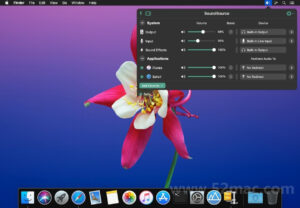
– Full-scenario quick access: The software remains in the Mac system menu bar, allowing a single click to instantly open the complete audio control panel, completing all audio operations without opening the main program or system settings; supports custom global keyboard shortcuts for quick panel, preset, and microphone muting operations; and supports window fixed floating mode, keeping the control panel always on top for frequent adjustments.
– Real-time audio level and activity monitoring: Displays real-time system output, input devices, and audio levels for each running application, providing a clear view of audio activity, quickly locating abnormal sound applications, monitoring microphone input status to avoid microphone issues during live streaming or meetings.
– Comprehensive input device management: Quickly switches input devices, adjusts input gain and channel balance, and globally mutes microphones with a single click, while supporting adding audio effects and noise reduction to input devices for online meetings and voice calls to improve microphone quality.
Version 6.1.0 Update Content:
– **Menu Bar Quick Config Icons**: In the “Manage Quick Configurations” panel, enable “Display Quick Configurations in Menu Bar” to directly access quick audio configuration schemes from the menu bar.
– **Menu Bar Volume Indicator Bar**: Upgrade the application menu bar volume indicator from a confusing dot style to a more visually appealing bar.
– **Bluetooth Device Improvements**: Enhance multiple Bluetooth devices, including:
– Multiple adjustments to reduce audio glitches and disconnections
– Update icons for multiple Apple and Beats devices, including AirPods 4 with noise-cancelling features and Beats Pill speakers
– No unnecessary clock drift correction, further reducing pops and glitches
– Show only “Connected” or “Connectable” Bluetooth devices in the menu bar, not all historical pairing devices
– **Audio Unit Plugin Enhancements**: Improve Audio Unit plugins, including:
– Immediately recognize new Audio Unit plugins after installation, without restarting the program
– Improve compatibility with Audio Unit v3 plugins
– Speed up loading parameters for complex Audio Unit plugins
– Enhance compatibility with plugins like Slate VSX and Sound ID
– Add host speed synchronization feature for plugins like Panflow, which requires synchronized BPM
– **AirPlay Function Improvements**: Improve AirPlay playback device features, including:
– Enhance AirPlay device reconnection stability when the Mac wakes from sleep or starts SoundSource
– Automatically reconnect AirPlay devices when network changes (e.g., connecting to a VPN)
– Optimize AirPlay device synchronization of audio and video
– **Audio Device Window Improvements**: Improve the “Audio Devices” window, including:
– Add a “Hide All” switch for AirPlay devices; large local networks can hide all devices with a single click, enabling or disabling them as needed
– Add “System Sounds” device option to the “Preferred Device Order” list
– Ensure hidden devices do not appear in the preferred device order list
– Synchronize the input level meter with other passive level monitoring panels when input devices are selected
– Upgrade ARK audio kernel to version 13.5, which updates the underlying engine responsible for audio processing. This update reduces CPU usage, decreases latency, and enhances audio link stability, reducing abnormal error messages.
– **macOS Game Mode Compatibility**: SoundSource can handle game audio in macOS’s “Game Mode” without audio distortion issues, thanks to optimized audio capture under the hood.
– **Interface Improvements and Fixes**: Improve the interface and fix various details, including:
– Correct the grayed-out dot on the volume slider when the application is muted
– Improve the contrast of the menu bar level indicator
– Fix the issue where the “FX Effects” interface is incorrectly highlighted
– Fix the truncation of text labels for generic Audio Unit plugins
– Fix the initial highlighting anomaly in the “Audio Devices” window’s channel menu
– Improve the transition between generic and custom Audio Unit plugin interfaces
– Consolidate and improve various UI layouts
– Fix the search bar visual anomaly in the “Add Effect” search
– Display a more prominent prompt text when Bluetooth devices are set to “Output Only”
– Support adjustable size for generic Audio Unit plugin windows with zoom borders
– Remove multiple unnecessary hover highlights
– Uniformly optimize global animation effects
– Replace the trial mode prompt with a sandglass icon
– Fix the color mismatch issue in the 10-band Lagutin equalizer popup window theme
Software Screenshots:

Professional Audio Production Software: Adobe Audition CS6 for Mac – Activation Version Download
Downloads:1941 | 2026-10-24

Pro PDF Editor for Mac v2.8.23 Chinese Activation Version Download
Downloads:3433 | 2026-10-20

iStudiez Pro for Mac 1.4.1 Study Schedule and Task Management Software Chinese Activation Version_iStudiez Pro for Mac Download
Downloads:3424 | 2026-10-20

iMap Builder for Mac v11.2.0 Chinese Activation Version Download
Downloads:1481 | 2026-10-19


Ratings & reviews
No rating
Let’s rate it.