



Folder Factory for Mac v7.7.0 Chinese Activation Version Download
Here is the page providing Folder-Factory for Mac v7.7.0 file folder icon tool Chinese activation version download | LoveMAC has been tested and available, if you encounter the link failure or download after installation cannot be installed, please leave a message to contact us.
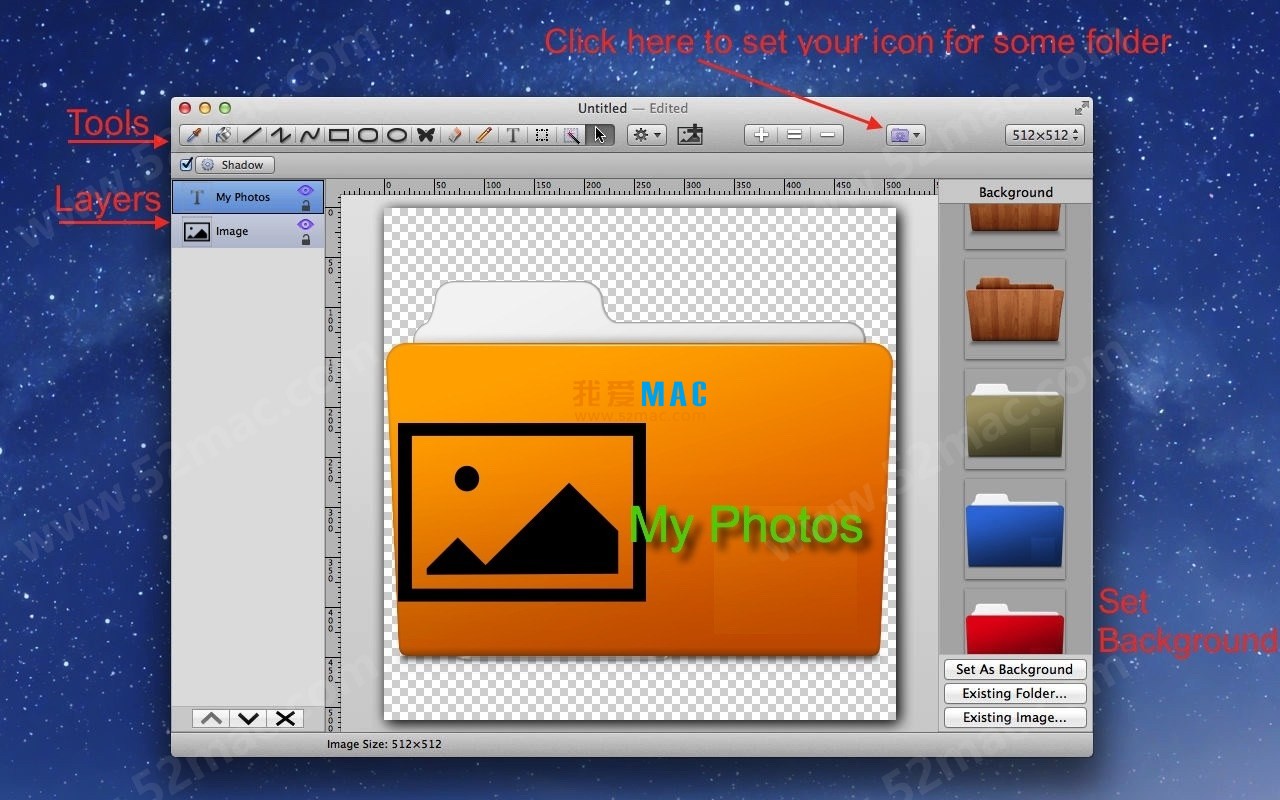
Folder-Factory is a custom icon tool designed for macOS, aiming to help users efficiently personalize, design, and enhance file folder icons. By combining images, text, sketches, and shapes with file folder icons, the tool not only significantly beautifies the system interface and achieves orderly file management, but also enhances efficiency through intuitive visual identifiers. Its user-friendly interface ensures the convenience and smooth experience of operations.
Before starting the installation, please ensure that your Mac runs on macOS 10.13 or higher version. It is recommended to reserve at least 200MB of disk space for the program and temporary files. Additionally, disable the Gatekeeper restrictions in the “Security & Privacy” settings under “General” to avoid blocking during the installation process.
Click the download button below to obtain the compressed Folder-Factory v7.7.0 package. After downloading, double-click the .dmg file to mount it. You will see a window containing the application icon, drag and drop this icon to the “Applications” folder to install.
Open the “Applications” folder, find Folder-Factory and double-click to launch it. If the system prompts “from an unidentified developer,” please go to “System Preferences” > “Security & Privacy” > “General,” and click “Open Anywhere.” Enter the provided activation code or serial number to complete the activation process.
After activation, the software will automatically open the main interface. You can try creating a simple file folder icon, such as dragging an image to the workspace, then exporting it as a .icns format. If everything goes smoothly, it means the installation is successful.
This is usually due to macOS’s security policy blocking unsigned applications. Please go to “System Preferences” > “Security & Privacy” > “General,” and click “Open Anywhere.” If the issue persists, try re-downloading the installation package.
Please confirm that there are no spaces or spelling errors in the activation code. If it is still invalid, please contact our customer service to obtain a new activation code. We guarantee that all download links have been tested and are available.
After designing icons in Folder-Factory, click the “Export” button, choose the .icns format. Then, right-click the target folder, select “Show Info,” and drag the exported icon to the top-left corner of the Info window to apply it.
Folder-Factory supports PNG, JPEG, TIFF, GIF, and SVG vector graphics. It is recommended to use transparent background PNG format for the best results, as this ensures smoother edges for the icon.
Please ensure your macOS version meets the requirements, and close other applications that consume a lot of memory. If the issue persists, try resetting the software preferences: delete the ~/Library/Preferences/com.folderfactory.plist file and restart the software.
可以。在 v7.7.0 版本中,新增了批量编辑功能。你可以在编辑菜单中选中多个对象,然后统一调整大小、颜色或特效,极大提升效率。
请确保在导出时选择了“视网膜显示”选项,并导出了 512×512 或更高分辨率的图标。低分辨率图标在高分屏上会显得模糊。
是的,Folder-Factory v7.7.0 完全支持中文界面。你可以在软件的偏好设置中切换语言为简体中文,所有菜单和提示都会变成中文。
软件会自动保存你的工作进度。你也可以手动将项目文件(.ffproj)复制到其他位置进行备份。建议定期备份,以防数据丢失。
如果遇到链接失效或下载后无法安装的情况,请在本页面留言联系我们。我们会在24小时内修复链接并回复你,确保你能顺利下载。
| 快捷键组合 | 功能说明 | 适用场景 |
|---|---|---|
| Command + Z | 撤销上一步操作 | 编辑图标时误操作后快速恢复 |
| Command + Shift + Z | 重做撤销的操作 | 需要恢复被撤销的修改时使用 |
| Command + C / V | 复制/粘贴选中的对象 | 快速复制图标元素或文本 |
| Command + X | 剪切选中的对象 | 移动元素到其他位置或图层 |
| Command + A | 全选所有对象 | 批量编辑或删除所有元素 |
| Command + D | 复制并粘贴对象 | 快速创建元素的副本 |
| Command + G | 组合选中的对象 | 将多个元素合并为一个整体,方便移动 |
| Command + Shift + G | 取消组合对象 | 需要单独编辑组合中的某个元素时 |
| Command + +/- | 放大/缩小视图 | 查看图标细节或整体效果 |
| Command + 0 | 适应窗口大小 | 让图标完整显示在画布中 |
| 空格键 | 临时切换到手形工具 | 在放大状态下平移画布 |
| Delete | 删除选中的对象 | 移除不需要的元素 |
| Command + S | 保存当前项目 | 定期保存以防意外丢失 |
| Command + Shift + S | 另存为 | 创建项目的备份副本 |
在 Folder-Factory 中,渐变和阴影是提升图标质感的关键。建议先为文件夹背景添加一个浅色到深色的线性渐变,再在图标底部添加一个柔和的阴影,这样能营造出立体感。根据苹果的设计规范,阴影的偏移量通常设为 (0, 2) 像素,模糊半径设为 4 像素,效果最自然。
For users who need to manage multiple projects simultaneously, a unified icon template can be created. For example, design a basic folder style, then use batch editing features to modify the colors or labels of all project folders at once. This way, in Finder, you can quickly distinguish different projects by color, significantly improving file retrieval efficiency.
Assume you are a photographer and want to design a unique icon for the “2024 Portfolio” folder. Start by importing a thumbnail of a representative work as the background. Then, use the pen tool to draw a simple camera outline overlaid on the image. Next, add text “Photo” and apply a rounded rectangle as the background. Finally, export as a .icns format and apply it to the folder. The entire process takes no more than 10 minutes, but the visual recognition is extremely high.
Folder-Factory v7.7.0 now supports the SVG format. If you need to create precise icons, consider exporting SVG files from Adobe Illustrator or Sketch and importing them. Vector graphics do not distort and support infinite scaling, making them ideal for high-resolution output scenarios, such as Retina displays.
For enterprise users, maintaining a consistent brand image is crucial. You can import the company’s Logo as an SVG and place it in the center of the folder icon. Adjust the Logo’s transparency to 80%, and add a subtle glow effect to blend it with the background. This way, all employees can quickly identify company folders through a unified brand icon, enhancing professionalism.
Folder-Factory for Mac v7.7.0 is a powerful and user-friendly icon customization tool. With the detailed installation tutorial, FAQ answers, and shortcut table provided in this article, you should be able to quickly master its usage. If you encounter any issues during installation or use, feel free to leave a message on this page, and we will assist you immediately. Remember, a well-designed folder icon not only beautifies the desktop but also enhances your productivity.

Vidmore Player for Mac v1.0.68 Chinese Activation Download
Downloads:3108 | 2026-10-24

ArchiCAD 27 for Mac v27.2.0 3D Architecture Design Software Chinese Activation Version Download
Downloads:3384 | 2026-10-22

Prime Styles for Mac 1.1 Professional Photography Presets License Download
Downloads:2182 | 2026-10-21

Notability for Mac v4.2.1 Chinese Activation Version Download
Downloads:346 | 2026-10-20


Ratings & reviews
4.8
(Maximum 5 ratings, total 70 user reviews)
Let’s rate it.