| Things is a highly acclaimed personal task management (GTD) software that integrates the inbox, agenda, project management, tagging, and archiving into a clear and coherent system, helping you focus on the present and progress toward your goals.
### Features:
#### 一、清晰完整的 GTD 管理体系
Things uses two main lines, “time” and “assignment,” to organize all tasks, making the structure clear:
– **Inbox (收件箱)**: Quickly jot down fleeting ideas and later categorize, schedule, or delete them.
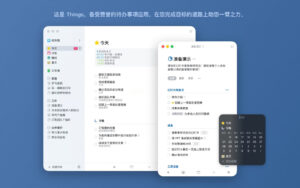
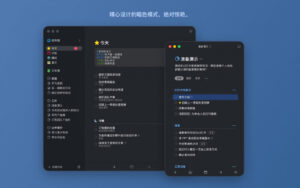
– **Today (今天)**: The core list for the day, containing only tasks that you truly commit to completing.
– **This Evening (今晚)**: Separate tasks that you only handle after returning home.
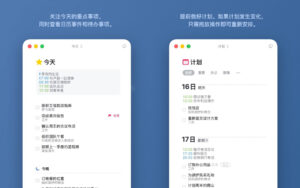
– **Upcoming (即将到来)**: Concentrated display of tasks, recurring tasks, deadlines, and calendar events for the next few days, making it easy to plan ahead and drag to reschedule.
– **Anytime (随时)**: Tasks that you want to do but don’t need to specify a date.
– **Someday (改天)**: Ideas that you don’t want to discard but haven’t started yet.
– **Logbook (日志簿)**: Automatically archives all completed tasks, making it easy to trace and review.
#### 二、层级化的目标与事务管理
– **Areas (领域)**: Divided by life categories, such as work, family, finance, health, and so on, to help you see the big picture when dealing with details.
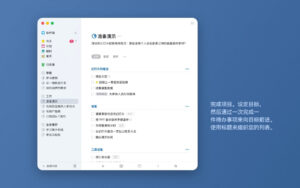
– **Projects (项目)**: Establish projects for clear-ended big goals, break down tasks, write notes, and set deadlines; complete projects can be archived as a whole.
– **Headings (标题)**: Use headings to divide stages, categories, or milestones within a project, and drag them to reorder tasks.
– **To-Dos (待办事项)**: The basic execution unit, each step is a small step toward your goal.
– **Checklists (检查清单)**: Break down tasks into checkable steps in a single To-Do, suitable for shopping lists, packing lists, and workflow processes; project symbols from other applications can be automatically converted into checklists.
#### 三、强大的待办详情管理
Each To-Do can be expanded into a clean “paper,” allowing you to add details when needed, and remain distraction-free most of the time:
– Supports **Markdown notes** for recording explanations, checklists, and structured text.
– Can add **tags, start dates, end dates, and reminders**.
– Can use checklists to further break down tasks into tickable steps.
– Completing a task with a smooth animation feedback enhances the sense of progress.
#### 四、直观的日程规划
– **Today View (今天视图)**: Displays To-Dos and calendar events on the same screen, allowing you to choose different calendars for personal, family, and work, with events neatly arranged at the top, making the day-to-day schedule clear.
– **Progress Pie Chart (进度饼图)**: View the completion ratio and goal distance of each project in the side panel.
– **Jump Start (快速排期)**: Hover over a To-Do to bring up the calendar panel, quickly move it to “Today/This Evening,” set reminders, schedule future dates, or move it to “Someday.”
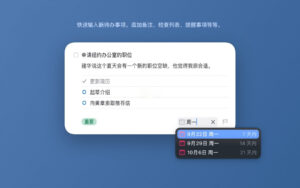
– **Natural Language Input (自然语言输入)**: Input “tomorrow,” “Saturday,” “four days later,” “August 1st,” “Wednesday evening 8 PM,” and the software will automatically recognize dates and times.
#### 五、灵活的重复任务与提醒
– **Repeating Tasks (重复任务)**: Automatically generate To-Dos based on custom cycles, including daily, weekly, monthly, and “repeat after completion” rules; now supports “pre-check” and “easy rescheduling” (choose to create a one-time exception or update future rules), and can batch pause, continue, or stop multiple repeating tasks.
– **Scheduled Reminders (定时提醒)**: Set reminders for tasks that cannot be missed, with options to create reminders through clicks, natural language input, or voice; new reminders are synced to other devices via the cloud in real-time.
#### 六、标签与快速筛选
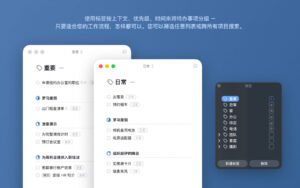
– **Tags (标签)**: Assign context to tasks (such as “run errands,” “phone call,” “@someone,” “high priority”) and combine them across different domains and projects.
– The side panel automatically places projects under their respective domains, making the structure clear and organized.
#### 七、极速收集与输入
– **Magic Plus (神奇加号)**: A floating button available everywhere, allowing you to precisely insert new To-Dos into the list, under a specific heading, or on a specific day, or directly drag them into the inbox; in a project, dragging to the left margin quickly creates a new heading.
– **Mail to Things (邮寄至 Things)**: Forward emails to a dedicated address to automatically convert them into To-Dos.
– Supports collecting content from other applications through the system share menu, with **URL Scheme, Shortcuts, and Siri** support for voice addition and automation workflows.
#### 八、高效搜索、导航与批量操作
– **Quick Find (快速查找)**: Instantly jump to projects, To-Dos, or tags by entering their names.
– **Type Travel (Type Travel)**: Navigate directly in Mac without any keyboard shortcuts.
– **Quick Move (快速移动)**: Quickly transfer To-Dos between projects using keyboard input filters.
– Supports multi-selection, batch editing, drag-and-drop reordering, and numerous keyboard shortcuts; **Slim Mode** allows you to hide the side panel with a single click, reducing distractions and focusing on the current list.
Version 2026.3.1 Updates:
Things is ready for macOS Golden Gate, featuring several impressive new system integrations:
– Fully integrated with the new Siri (in countries where it’s available).
– Fully integrated with the device’s built-in search feature “Focus.”
– More options for delayed reminders, with more suitable durations.
– A new high-quality widget that displays longer lists.
– Other compatibility improvements for the new system.
Software Screenshots:
|



Ratings & reviews
No rating
Let’s rate it.