
Focused Pro Timer for Mac v2.6 Activation Download

  • Introduction
Download
Download now
Join VIP Free download

Description

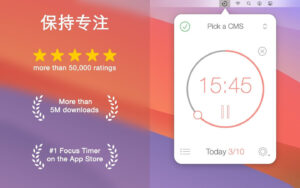
Extended work for a generation that can’t do without electronic screens is a true challenge. By dividing individual tasks into multiple time segments to focus on, with breaks in between, you can do better work. This is also an extremely effective method to keep work enthusiasm and concentration. It can help you create tasks, plan breaks, and track your progress on a daily, weekly, or custom schedule. Your device stays synchronized across iPhone, iPad, and Mac.

  • Task and Interval Management
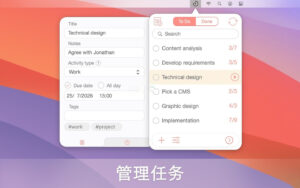
  • Create and manage tasks
  • Start, pause, or skip intervals
  • Auto-start next timer (optional)
  • Paste task lists from other apps
  • Add comments, tags, and deadlines to tasks
  • Plan the number of intervals needed to complete a task and track accuracy
  • Manage completed intervals

Timer Customization

  • Work interval duration
  • Short break duration
  • Long break duration
  • Number of intervals between long breaks
  • Number of daily target intervals
  • Different timer settings for different tasks

Productivity Tracking

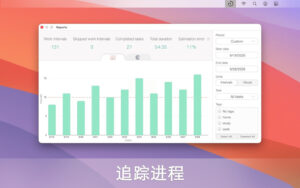
  • Reports for detailed progress tracking
  • Export data as CSV files

Sounds and Notifications

  • Tick sound (optional)
  • Adjustable timer sound frequency
  • Variety of alarm sounds
  • Adjustable alarm and timer volume

Automation

  • Integrate with the Quick Actions app (control tasks and timers through the Quick Actions app)
  • Automatically execute Quick Actions based on events in the Be Focused app

Focus

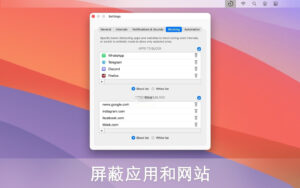
  • Block distracting apps and websites during work (supported browsers: Safari, Chrome, Edge, Opera, Brave)
  • Whitelist specific apps and websites when blocking other apps and websites
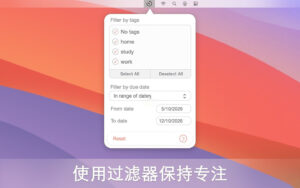
  • Organize tasks and stay focused using tags and filters

Integration

  • Synchronize across all devices (iPhone, iPad, Mac)
  • Integrate with Focus Matrix to manage tasks using the urgent/important principle
  • Integrate with the Quick Actions app for workflow automation

Interface and Accessibility

  • Widgets in the desktop and Notification Center
  • Global shortcuts to start or stop timers from any app
  • Support for dark and light modes

Software Screenshot:


Download info

This resource requires login to download

Log in
Note: This resource is for informational purposes. By using this resource, you agree that you accept full responsibility to the copyright holder. For questions, please contact us.

Ratings & reviews

No rating

Let’s rate it.

  • 5 stars
  • 4 stars
  • 3 stars
  • 2 stars
  • 1 stars

You may also like

More
×
Focused Pro Timer for Mac v2.6 Activation Download
iMac — One-stop Mac Software Download Platform
Social login
captcha
Social login