| Mole is a comprehensive macOS system maintenance tool that integrates system cleaning, application management, performance optimization, disk analysis, and real-time status monitoring into a single application. It features a unique design with five-star modules to consolidate tasks that typically require multiple software applications, running entirely locally and prioritizing privacy and transparency.
Core Function Features:
### 一、系统清理(Clean)
– **Ten Categories of Cache Classification Scan**: Covers system cache, application cache, browser temporary files, Xcode build products, device residues, WeChat media cache, large log files, project build and publish directories, and more, sorted by deletion safety level.
– **Preview Before Deleting**: Lists all target files and their space usage before deletion, allowing each item to be individually selected or skipped, giving users full control over the content to be deleted.
– **Dual Mode Cleanup**: Supports permanent deletion or moving to the trash, reducing the risk of accidental deletion.
– **AI Tool-Specific Cleanup**: Supports cleaning ChatGPT, Ollama, LM Studio, and Grok AI tool caches, while protecting chat records and configuration files from being touched.
– **Deep Cleanup of Development Environment**: Identifies and cleans up directories such as node_modules, target, build, and dist for development projects.
– **Detection and Cleanup of Application Residues After Uninstallation**: Detects and cleans up residual data left on the disk after an application is uninstalled.
### 二、软件管理(Software)
– **Unified Update Across Multiple Sources**: Provides a single point of entry for checking and updating applications from Sparkle, App Store, Homebrew, Electron, GitHub Releases, and more, displaying download progress and size, and handling batch upgrades with independent feedback.
– **Complete Uninstallation**: Removes not only the application itself but also associated hidden files such as Launch Agents, preference settings, Application Support, Group Containers, and receipts, achieving a seamless uninstallation.
– **Unified Management of Startup Items**: Provides a centralized view and management of login items, launch agents, background processes, allowing them to be directly disabled or redirected to system settings.
– **Visualization of Space Occupancy**: Clearly displays the disk space that each application can release before removal.
– **Trash联动卸载**: When an application is dragged into the trash, it automatically prompts for cleanup of residual data, and the Homebrew installation records are cleared simultaneously.
– **Support for External Disk Applications**: Identifies and manages applications installed on external disks.
### 三、系统优化(Optimize)
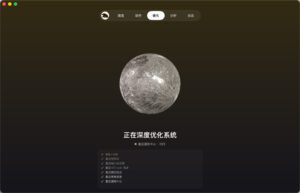
– **One-Click System Maintenance**: Consolidates tasks such as Quick Look repair, cache rebuild, system metadata refresh, Dock reset, input method repair, iCloud Drive optimization, AirDrop and Spotlight indexing maintenance, and more into a single maintenance task.
– **Merge Administrator Permissions**: Consolidates all operations requiring administrator permissions into a single authorization, reducing the frequency of pop-ups.
– **Smart Risk Avoidance**: Automatically skips projects that are uncertain or may affect system stability.
– **Removal of Old Optimization Residues**: Detects and removes hidden system preferences left by third-party optimization tools, restoring macOS to a safe default state.
– **Quick Execution Feedback**: Completes all maintenance tasks in seconds and clearly informs users of the resources released.
### 四、磁盘分析(Analyze)
– **Tree-Structured Visualization**: Uses a treemap heat map to intuitively present the distribution of disk space, allowing users to quickly identify high-occupancy areas.
– **Deep Layered Exploration**: Supports deep exploration of directory hierarchies, quickly locating large files and redundant folders.
– **Integrated Quick Actions**: Right-clicks directly to Finder or moves items to the trash, seamlessly integrating analysis and cleanup.
– **System Directory Protection**: Defaults to excluding system key directories, avoiding accidental damage to system files.
– **Efficient Concurrent Scanning**: Utilizes multi-threaded concurrent computation and cache reuse, resulting in faster analysis of large disks.
– **Support for External Disks**: Analyzes the space usage of mobile hard drives and other external storage devices.
### 五、状态监控(Status)
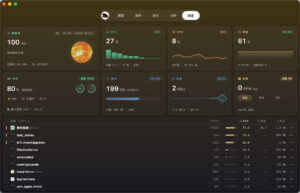
– **Multi-Dimensional Real-Time Monitoring**: Displays real-time CPU, memory, GPU, disk read/write, network up/down, battery health, device temperature, and fan speed, among other core indicators.
– **Apple Chip Fine Monitoring**: Separates the display of performance cores and energy-efficient cores.
– **Deep Process Analysis**: Processes are sorted by actual resource usage, allowing users to view process details and operation descriptions, and supports top-priority focus.
– **Pair Device Battery Status**: Displays the battery status and charging state of paired devices such as iPhones, iPads, and Bluetooth accessories.
– **Network Detail Card**: Expands to view public IP, location, and operator information.
– **60-Second Mini Graphs**: Each metric is equipped with short-term trend charts, dynamically displaying load changes.
## 菜单栏增强功能
### 菜单栏 HUD
– **Persistent Status Display**: Displays CPU, memory, network speed, and other key indicators in the menu bar in real-time, supporting various display styles such as icon mode, compact indicators, and dual-row layout.
– **Dynamic Role Indicators**: Includes dynamic icons such as a running mole or RunCat, which change in real-time based on system load.
– **Right-Click Quick Menu**: Right-click icons directly access any function module, with customizable left and right-click functions.
– **Quick Overview of High-Resource Processes**: Pull-down panel to quickly view the most resource-intensive processes.
### 实用小工具
– **Fan Control**: Offers three fan control modes: automatic, cooling, and silent, supported by Apple chip models. It automatically recovers the system default in case of anomalies.
– **Battery Maintenance**: Smartly maintains charging at around 80%, automatically recovering charging when below 75%, reducing long-term battery damage.
– **Screen Brightness Control**: Supports various time settings for screen brightness, separately controlling screen, lid tasks, or both.
– **Wipe Mode**: One-click switches to a solid-color screen for easy cleaning, supports input locking.
– **Privacy Reminder**: Real-time monitoring of camera and microphone usage, local notifications, and silent applications.
– **Disk Space Warning**: Activates disk space warnings when space is low, allowing users to directly access the cleanup interface.
## 安全与隐私特性
– **Local Execution**: All scans and cleanups are performed locally, ensuring that data does not leave the computer, with no telemetry or analysis reporting.
– **Path Protection Mechanism**: Includes a rejection list covering system key directories and user core structures, validating symbolic link operations before execution.
– **Process Sensitivity Protection**: Automatically skips application cache during runtime and does not clean browser cache when it is open.
– **Whitelist Mechanism**: Supports adding specific files or directories to a protection list, automatically skipping scans for these items.
– **Operation Log Recording**: Each deletion operation is recorded in the log, allowing users to trace historical operations.
Version 1.11.0 Update Content:
Clean: Adds “residue after uninstallation of applications” to clean up data left on the disk after an application is uninstalled, and applications installed on external disks are not mistakenly identified as residues. AI tool garbage has been added with Grok, and chat records are always protected.
Memory: The memory window is automatically released after a few minutes of being closed, and the icon cache is more streamlined, with the background more lightweight.
Storage Space: Allows clearing space to release the占用 of local backups, UTMs, Tart virtual machine caches, and more, and once the iMovie, GarageBand, and other store applications are authorized in the trash.
Activation Reliability: macOS no longer incorrectly marks applications as non-official when applying system marks, and cleaning no longer locks applications, and previous reinstallation cannot restore.
Network Speed: The network speed in the menu bar and status page now reads from the physical network card rather than the tunnel, avoiding being affected by open VPN or TUN proxies.
Menu Bar: Adds a new style, with the running mole and compact indicators side by side, with real-time network speed updates, and a more compact dual-row layout. After logging in, the menu bar immediately pops up the main window.
Software Updates: Homebrew updates display download progress and size, no longer stuck in preparation, and each package has independent progress and failure reasons, with the update reminder dot closing based on the current version, and old files encountered during application updates are automatically restored.
Software: External disk applications no longer display outdated last usage times, only refreshing them from reliable sources. Accounts with inconsistent personal files and usernames can also normally uninstall system-installed applications.
Optimize: Adds a check to find hidden preferences left by old optimization tools, such as globally disabling App Nap and skipping disk image verification, only deleting these to restore macOS to a safe default, and not doing so if not necessary.
Interface: Scanning in and out of planets no longer flickers or shows ghosting, page switching leaves no traces, the selection bar and filter menu have hover feedback and readout labels, and the nine interface languages have been refined according to the user’s native language habits.
Software Screenshots:



|




Ratings & reviews
No rating
Let’s rate it.