

AiArt Image Matting for Mac v2.7 Crack
Here is the page providing Aiarty Image Matting for Mac v2.7 Ai智能图像抠图软件 激活版下载 | 爱上MAC,已测试可用,如遇到链接失效或下载后无法安装等情况,请留言联系我们.
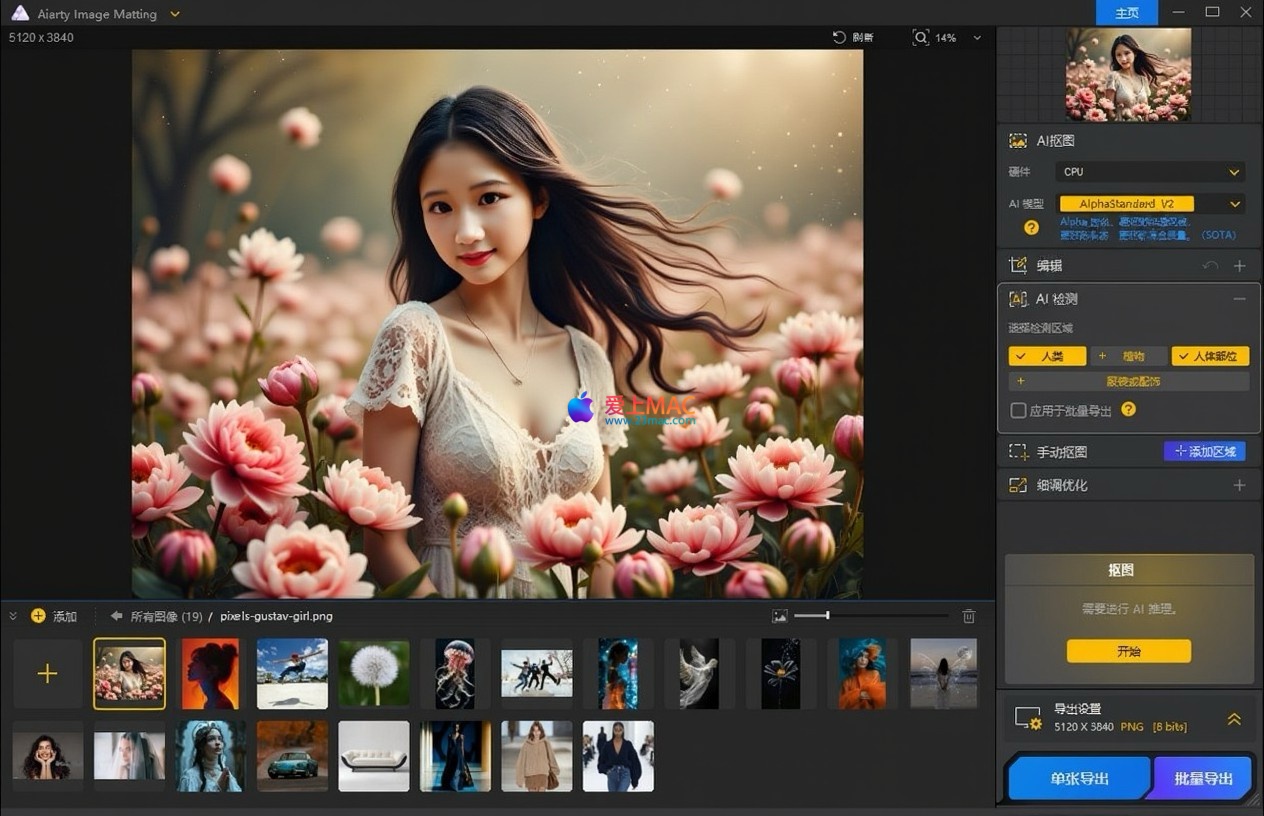
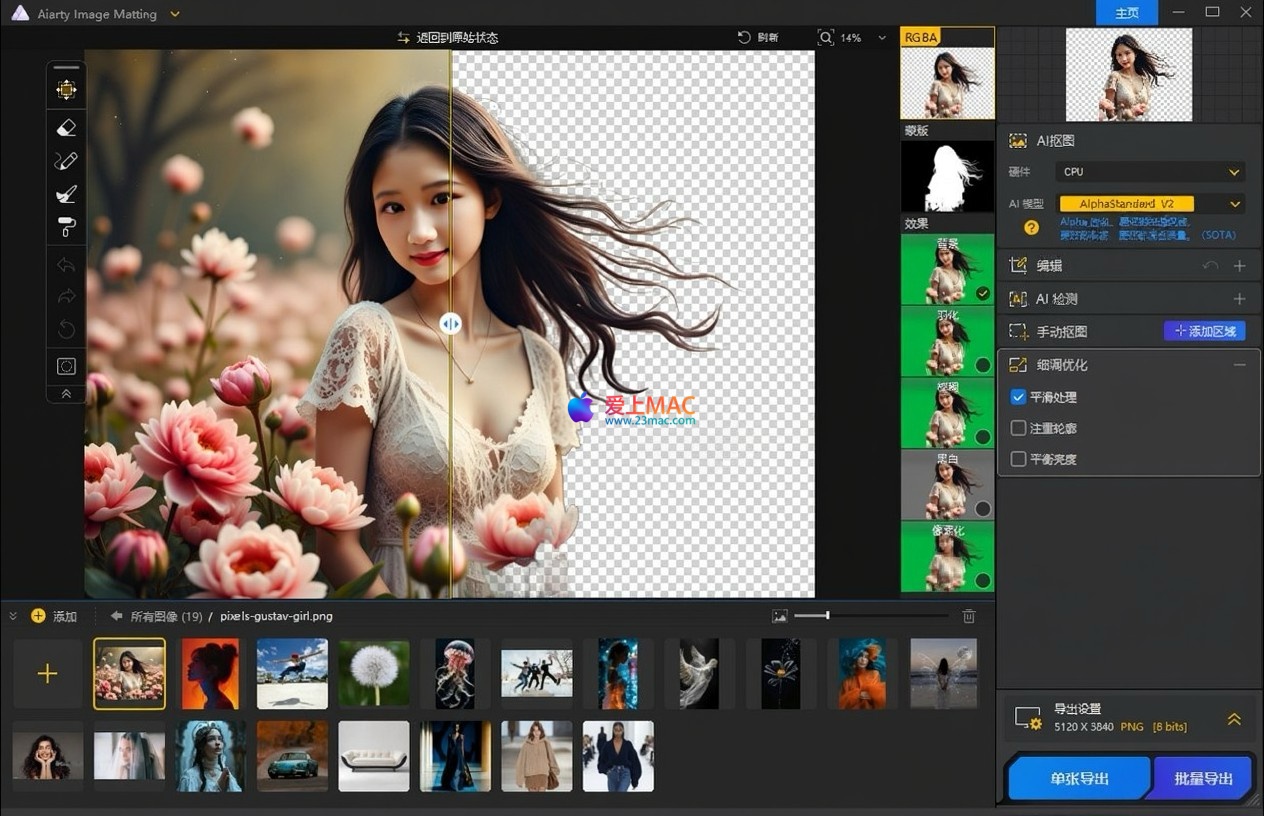
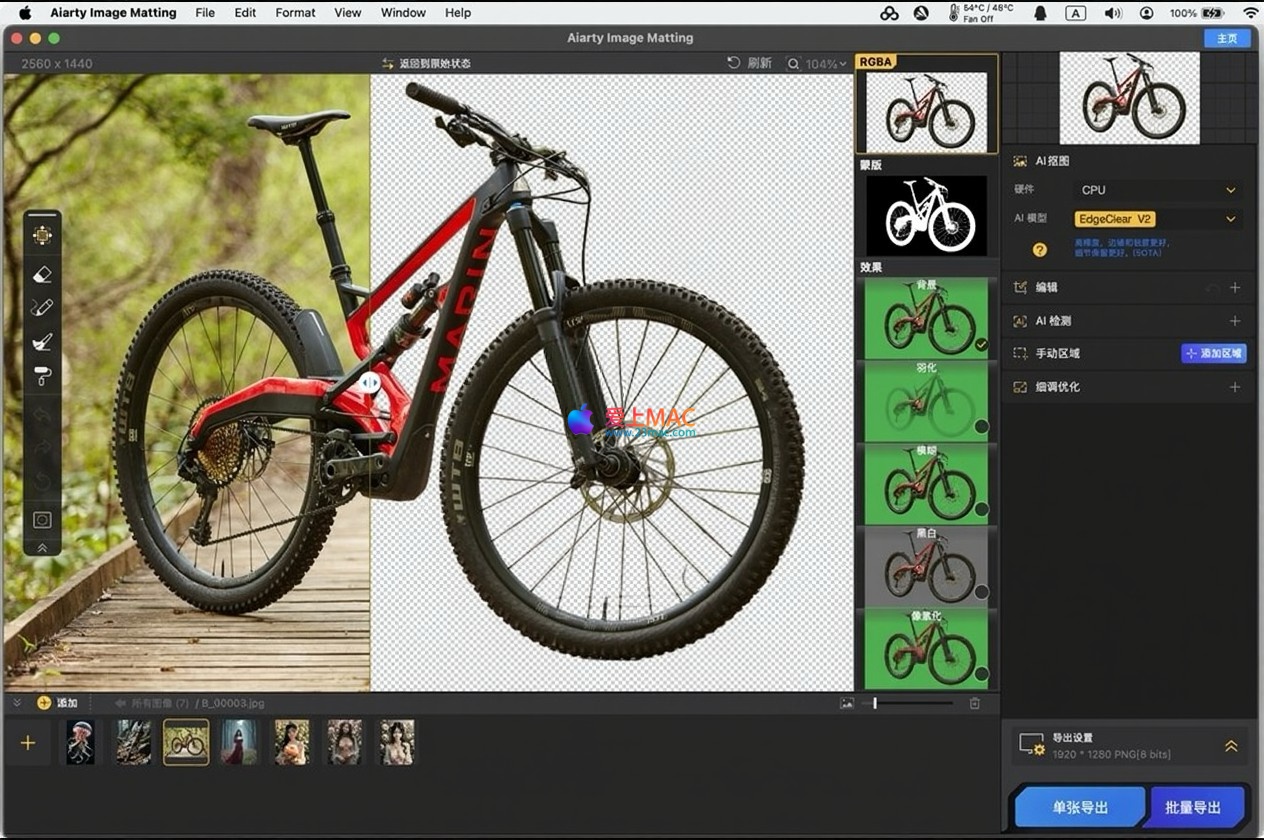
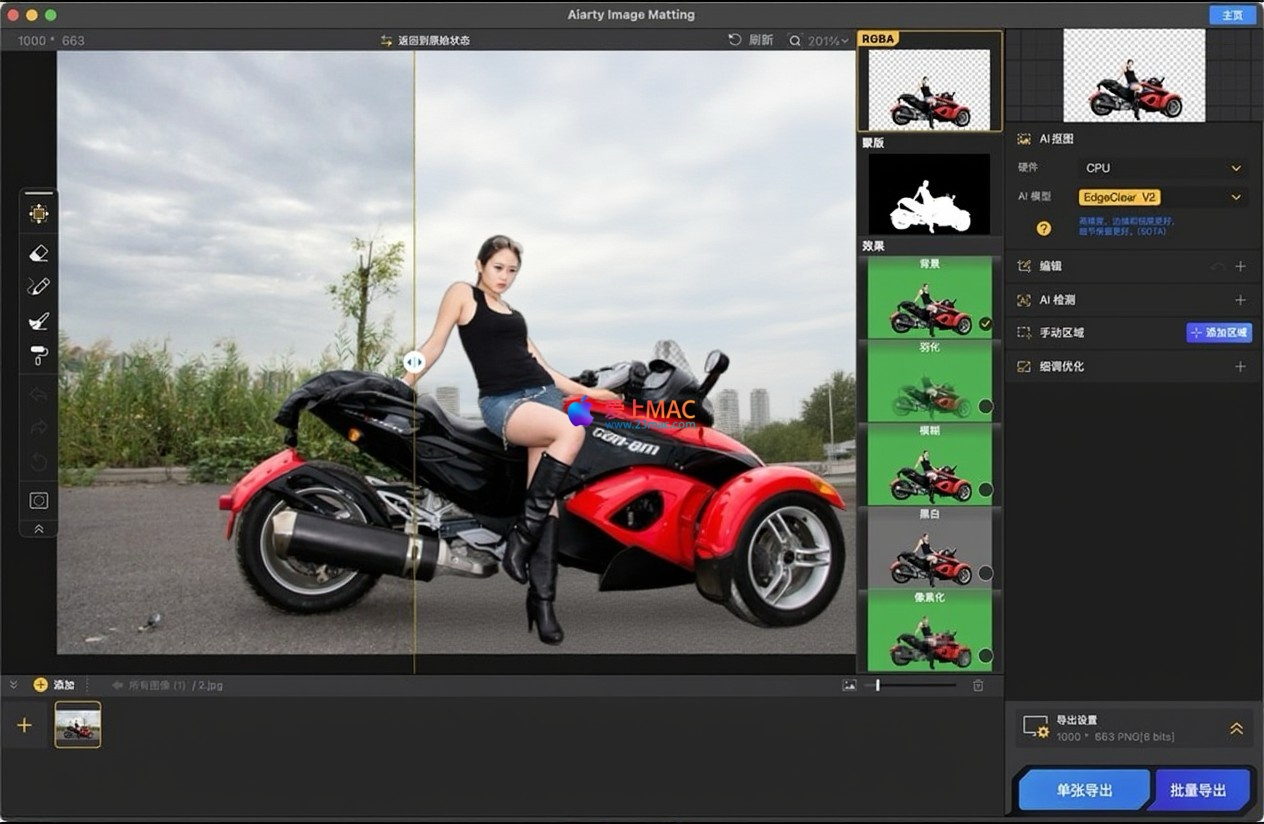
Aiarty Image Matting is a high-performance image matting software designed specifically for AIPC (AI personal computer). It can extract the foreground of an image with unprecedented precision and seamlessly blend it with any background. It can handle challenging scenarios such as hair, animal fur, semi-transparent objects (like wedding dresses, glass), and low-light environments with perfect retention of complex details and sharp edges.
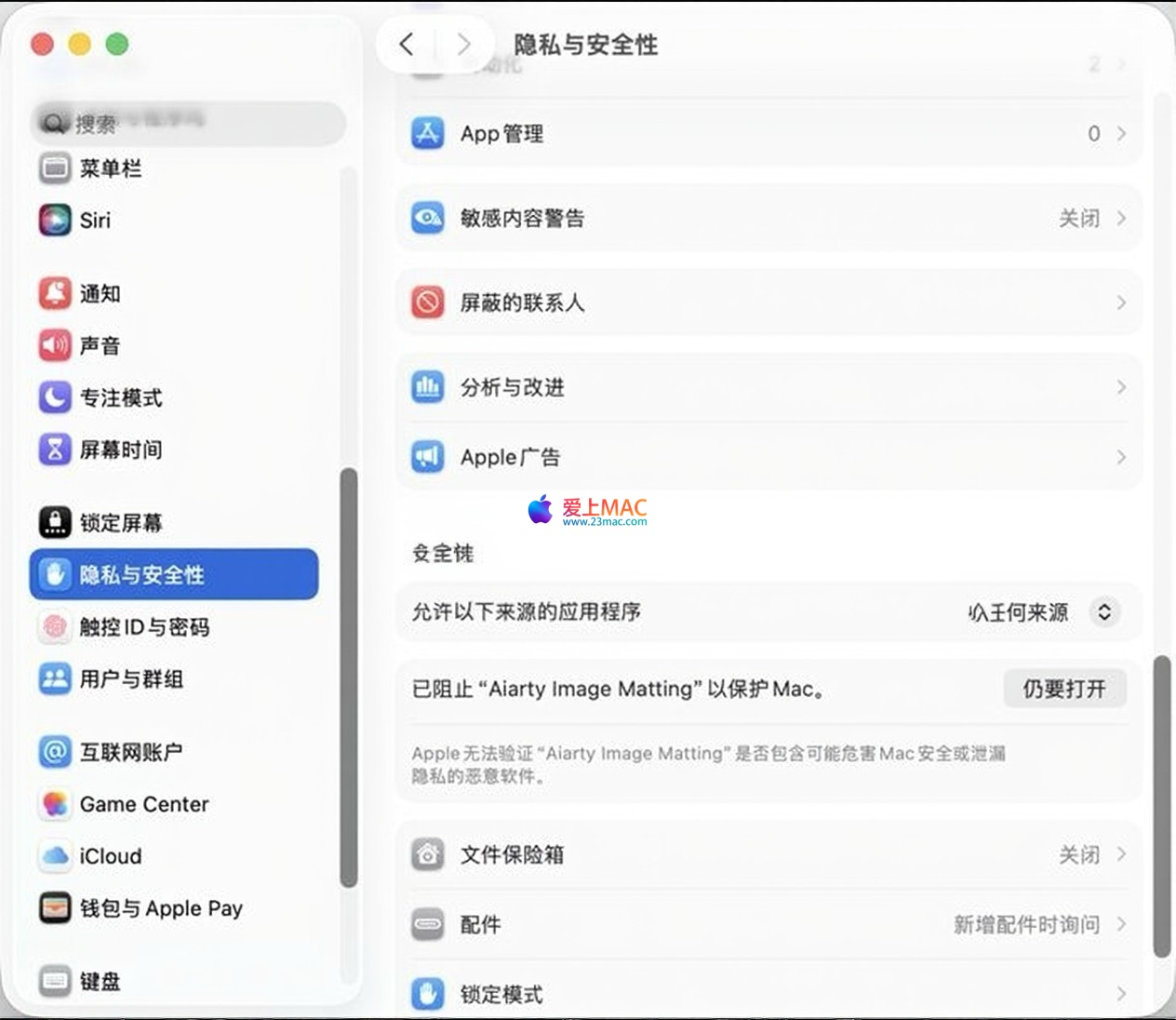
Important Note: If the software prompts “File is damaged” or cannot be opened upon first launch, please follow the steps below:
The software employs advanced Alpha Matting technology, combined with an artificial intelligence framework and a dedicated edge optimization algorithm. It can precisely capture fine details such as hair and fur, and effectively handle complex tasks like semi-transparent objects like wedding dresses and lace. The final results ensure natural, smooth edges without jaggedness, and clear, undamaged hair textures.
It comes with four dedicated AI models to handle different scenarios:
The software integrates three edge optimization algorithms to maintain edge quality. It supports AI image enhancement features, allowing for 2x lossless magnification, improving detail presentation, removing noise and blurriness, and upscaling the image resolution to a level of 10K.
It provides professional-level retouching tools, including: eraser, brush, lighten, darken tools. It supports transparency adjustment for pixel-level fine editing. It also allows for zooming, moving, cropping, and fine-tuning of the mask.
It supports replacing the background with: transparent background, solid color background, custom effects (such as blur), or any other image. This helps users highlight the subject and meet diverse design needs.
In addition to basic rotation, flip, and crop functions, it also offers advanced optimization tools such as smoothing, contour emphasis, and brightness balance. It can effectively extract the subject from low-light or low-contrast images, separate complex structures, and remove complex backgrounds.
Designed for e-commerce and design workflows, it can intelligently identify objects and process up to 3000 product images in a batch, completing background replacement in one go, significantly enhancing work efficiency.
First, download the installation package for Aiarty Image Matting v2.7 from the link provided on this site. After the download is complete, double-click the disk image file (`.dmg`) to mount it to your system.
Drag the “Aiarty Image Matting” icon from the installation package to the “Applications” folder (Applications). This is the standard way to install software on macOS, ensuring that the software is placed correctly.
Open the “Applications” folder and double-click the Aiarty Image Matting icon. If the system prompts “Cannot Open,” refer to the “Important Tips” at the beginning of this article for instructions.
Additionally, the software requires access to the file system when processing a large number of images. Grant “Full Disk Access” permissions during the first prompt to ensure that the batch processing feature works properly.
After launching the software, go to the “Help” menu and select “Input License.” Copy the activation code provided on this site, paste it into the corresponding input box, and click the “Activate” button. Wait a moment, and the software will display that the activation is successful.
After activation, it is recommended to restart the software to ensure that all functional modules are correctly loaded. If activation fails, check your network connection or confirm that the activation code is complete.
Open the software and try importing a picture to test the matting function. If the function operates normally without any error messages, the installation is successful. At this point, you can start enjoying the efficient matting experience provided by Aiarty Image Matting.
The following table summarizes the commonly used shortcuts in Aiarty Image Matting, combined with macOS system shortcuts, to help you quickly improve your editing efficiency.
| Shortcut | Function Description | Applicable Scenarios |
|---|---|---|
| ⌘ + O | Open file/image | Import a single image |
| ⌘ + S | Save current project | Save matting progress |
| ⌘ + Shift + E | Export final image | Output matting result |
| ⌘ + Z | Undo previous operation | Restore accidental actions |
| ⌘ + Shift + Z | Redo the undone operation | Restore accidental undo |
| Spacebar | Switch to hand tool temporarily | View details by panning the canvas |
| ⌘ + + | Zoom in | View edge details |
| ⌘ + – | Zoom out | View overall effect |
| ⌘ + 0 | Fit to screen size | Quick global preview |
Mastering these shortcuts can help you reduce mouse clicks during the matting process, allowing you to focus on creative design.
A: This is a security mechanism of macOS that blocks applications from untrusted developers. Follow the instructions in the “Important Tips” at the beginning of this article to click “Open Anyway” in the “Privacy & Security” settings.
A: The software supports common formats such as JPEG, PNG, TIFF, and BMP. The v2.7 version has optimized RAW format support, including CR3 and RW2 files from professional cameras.
A: According to official data, the software can process up to 3000 images in a batch. However, the actual processing speed depends on your Mac configuration, and it is recommended to use devices with at least 16GB of RAM for large-scale processing.
A: Try switching to different AI models. For fine details like hair, use the “AlphaEdge” model. For semi-transparent objects, use the “AlphaStandard V2” model. Additionally, you can manually adjust the “Edge Optimization” slider for fine-tuning.
A: Yes, it can. In the export step, choose “Custom Background,” then select “Blurred Effect.” You can adjust the blur radius to simulate the depth of field effect from a DSLR camera.
Answer: Please check if there are any extra spaces or line breaks when copying. It is recommended to copy the full activation code directly from this site and ensure that your network connection is normal. If the problem persists, please contact customer service to obtain a new activation code.
Answer: Yes, it does. Aiarty Image Matting v2.7 is natively compatible with Apple Silicon chips, running more smoothly and with higher efficiency on M series chips.
Answer: When exporting, choose the “PNG” file format. PNG supports transparent channels, allowing for perfect preservation of the transparent background after the image has been processed.
Answer: The official provides a limited-function trial version. The version provided on this site is an activation version, unlocking all advanced features, including batch processing and 10K resolution output.
Answer: Try restarting your Mac. If the problem persists, uninstall the software and reinstall it. Ensure that the installation package is complete and not deleted by antivirus software. Additionally, check if your macOS version meets the minimum requirements.
Open a portrait photo of a person, where the hair part has a similar color to the background. Choose the “AlphaEdge” model and check the “Edge Enhancement” option. Click “Start,” and the software will automatically identify the hair. If there are still parts of the background remaining, use the “Brush Tool” to manually paint the foreground area, and then use the “Eraser” to remove the background.
Assume you need to process 200 white background product images. Place all images in a folder. Click “Batch Import,” select this folder. In the “AI Model,” choose “SolidMat” because the product contours are clear. Set the background to “pure white.” Click “Start,” and the software will automatically process and export the images, which should take only a few minutes.
For veils in wedding photos, which can easily lose transparency after removal, import the image and choose the “AlphaStandard V2” model. This model is optimized for semi-transparent objects. When exporting, choose the “PNG” format, and you will notice that the veils retain their natural transparency, blending seamlessly with the new background.
For images taken in low-light conditions, where the edges of the subject are usually blurred, first use the “AI Image Enhancement” feature to increase the resolution by 2x and enable the “Noise Reduction” option. Then proceed with the image removal process. The enhanced image will have richer details, significantly improving the accuracy of the removal.
In the “Background Processing” interface, you can save commonly used background images or colors. Click “Add to Library,” name the background. Next time, you can directly select from the library without re-uploading, greatly improving the efficiency of repetitive work.
Aiarty Image Matting for Mac v2.7 offers a professional-grade image processing solution for Mac users, thanks to its powerful AI image matting technology, a wide range of model choices, and efficient batch processing capabilities.
Whether you are a professional in e-commerce, a graphic designer, or a photographer, you can easily complete complex image removal tasks with this software. The activation version provided on this site has been rigorously tested to ensure stable operation.
If you encounter any issues during installation or use, feel free to leave a message below. We will respond to your inquiries as soon as possible. Download and experience it now to let your creativity be unrestricted by the background.
This resource requires login to download
Log in
NetWorker Pro for Mac v12.1.0 Network Monitoring Tool Chinese Activated Version Download
Downloads:1624 | 2026-10-30

Mac Video Format Converter Ultimate v1.2.2 Chinese Activation Edition Download
Downloads:463 | 2026-10-24

EazyDraw for Mac v10.10.0 Chinese Activation Version Download
Downloads:1358 | 2026-10-22

DaisyDisk for Mac 4.6.5 Find and Delete Useless Files Chinese Activated Version Download
Downloads:2131 | 2026-10-17


Ratings & reviews
4.5
(Maximum 5 ratings, total 14 user reviews)
Let’s rate it.