

Topaz Photo Pro for Mac v1.7.0: Smart Image Enhancement Software Activation Download
Topaz Photo is a flagship AI image processing software from Topaz Labs, a comprehensive collection of its decades of image enhancement technology. It integrates the core capabilities of the industry-renowned DeNoise AI, Sharpen AI, and Gigapixel AI into a complete workflow solution for image restoration, detail enhancement, lossless enlargement, color correction, and flaw removal, eliminating the need for switching between multiple software.
Installation and Crack Method:
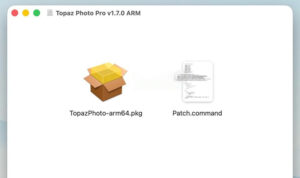
1. After the software download is completed, open the downloaded dmg format package as shown in the image above, choose the version according to your computer chip. If your computer has M1-M5 chips, choose the ARM version; if your computer has older chips, choose the Intel version. Double-click the software “TopazPhoto-arm64.pkg” to install the software.
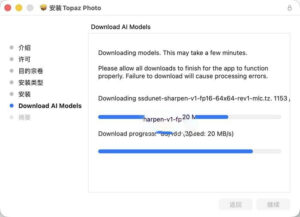
2. As shown in the image below, when installing to the second-to-last step, you need to use a scientific internet connection to complete the installation normally (you can download without a scientific internet connection, but it will be very very slow, possibly taking half an hour to an hour). This is because the AI material is very large, and it is not included in the software package by default, requiring downloading during installation.
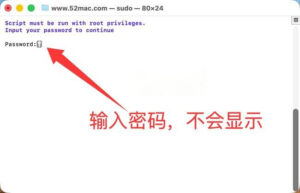
3. After the software installation is complete, do not open the software yet. Drag the software package’s Patch.command (activation tool) to the desktop, double-click the Patch.command on the desktop, and automatically open the terminal as shown in the image below. Enter your computer password (the password will not be displayed, just type it in and press the Enter key).
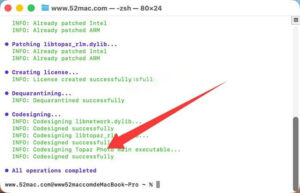
4. As shown in the image below, the last step prompts that the operations are completed, and the text in blue at the bottom indicates that the crack is complete, and you can use the software.
—————————————————————–[Divider]———————————————————————–
### Features:
### 1. Generative AI Lossless Upscale
– Core features the latest **Upscale High-Fidelity v3 model**, supporting up to 600% image lossless enlargement, with a two-stage architecture of “global + block-level content recognition – detail generation” to completely solve the problems of blurring, jaggedness, and AI artifacts in traditional enlargement, ensuring the output content is highly faithful to the original image.
– Optimized for repetitive texture issues in natural scenes (leaves, grass, animal fur), as well as skin texture in portraits, while maintaining a natural and gentle quality, perfectly suited for high-resolution original images and camera RAW files with over 6 million pixels.
– Optimized for Apple Silicon Macs through Neuroserver technology for local offline rendering, allowing for super-resolution processing without a network connection, balancing privacy security and processing efficiency.
### 2. Professional AI Intelligent Noise Reduction (Denoise)
– Features the **Denoise Max extreme noise reduction generative model**, specifically designed for high ISO, dark environments, and long exposure scenes with extreme noise. Unlike traditional noise reduction’s “blur filtering” logic, it can directly reconstruct the details hidden by noise, significantly improving night scenes, astronomical photography, and wildlife photography.
– Supports subject/background noise reduction, allowing for separate settings of noise reduction strength and detail retention, precisely protecting the edges and texture details of the image, perfectly compatible with camera RAW format files, fully preserving the dynamic range of the image.
– Offers three strength presets: Normal, Strong, and Extreme, making it easy for beginners to produce results, while allowing advanced users to fine-tune parameters for efficiency and control.
### 3. Intelligent Focus Repair and Sharpening (Super Focus / Sharpen)
– Features the **Super Focus v3 new generative focus repair model**, capable of precisely repairing blurry issues caused by out-of-focus shots, motion blur, or shooting distance limitations, restoring lost details and sharpness, efficiently saving “useless” shots.
– Resolves the issue of unnatural appearance, smooth texture, and rough edges in sharpening, significantly enhancing the ability to restore fine details such as hair, skin, and natural textures, allowing for safe repeated processing without edge halos or over-sharpening.
– Can intelligently distinguish between the subject and background, optimizing the sharpness of the subject while avoiding excessive magnification of background noise, suitable for all scenarios including portraits, still life, and landscape photography.
### 4. Comprehensive Image Repair and Flaw Removal
– Features the **Wonder 3 intelligent restoration model**, addressing the challenges of low detail, blur, and soft focus images, suitable for a broader range of image quality, significantly enhancing the detail restoration capabilities of old photos, low-quality scans, and compressed images, with added intensity control for automatic repair.
– Includes automatic dust and scratch removal, capable of identifying and removing dust, scratches, spots, and creases from old photos and scans without manual point-by-point repair, significantly improving the efficiency of old photo restoration.
– Equipped with AI removal tools and repair brushes, capable of removing extra people, objects, and out-of-focus elements from the image while intelligently completing background texture restoration, with simple and natural results without any unnatural effects.
### 5. Specialized Human Face Optimization
– Features the **Face Recovery function**, capable of intelligently detecting faces in the image and reconstructing low-resolution, out-of-focus, or blurry facial details, restoring the clarity and natural texture of the face, while avoiding the plastic look of over-sharpening, with outstanding results for portrait photography and ID photos.
– Supports text retention function, allowing for precise protection of edges and clarity of text in images such as ID photos, posters, and images with text, avoiding text blurring or deformation, suitable for commercial design scenarios.
### 6. Comprehensive Color and Light Adjustment
– Features AI light adjustment and color balance tools, capable of intelligently repairing exposure issues, overexposure, underexposure, color bias, and white balance errors, restoring the true light and color quality of the image.
– Offers a complete set of professional-level color adjustment parameters, covering exposure, contrast, highlights, shadows, white balance, black balance, saturation, natural saturation, color temperature, and tone, meeting the needs for fine-tuned color correction.
– Features AI automatic matching of the image scene, recommending the optimal light and color adjustment solutions, even for beginners, allowing for one-click professional-level tone adjustment.
### 7. Efficient Batch Processing and Automation Workflow
– Features batch import and application of AI enhancement presets and parameters, significantly improving the efficiency of processing large quantities of photos for events, weddings, and landscapes.
– Features **Autopilot autonomous function**, automatically analyzing the quality of images and matching and applying the corresponding AI enhancement tools and parameters, without manual adjustments, completing the entire workflow optimization with one click.
– Features customizable preset saving, allowing users to save commonly used parameter combinations as exclusive presets, for easy reuse in their personalized photo editing workflows.
### 8. Full Format Compatibility and Flexible Export
– Features full format compatibility, supporting JPG, PNG, TIFF, and PSD mainstream image formats, and perfectly compatible with RAW format files from various brands of cameras, preserving the original information and dynamic range of the image.
– Features flexible export settings, allowing users to customize output formats, quality, resolution, and color space, meeting the needs for various scenarios such as web publishing, print output, and material archiving.
Version 1.7.0 Update Content:
**New Wonder 3.5 Model**
– Features a new high-precision enlargement model, providing clearer quality and more natural texture details.
– Reduces repetitive pattern artifacts, performing better on structured content such as text and tables.
– Supports local rendering and cloud rendering modes.
**Removed NeuroServer model output size limitations**
– Removed the 192MP resolution limit for models like Wonder 2 and Wonder 3.
– Supports larger image sizes for local processing, no longer constrained by resolution.
**NeuroStream 2 Performance Acceleration (Mac exclusive)**
– Apple Silicon models (M1 and newer) experience a processing speed increase of about 1.77 times.
– Utilizes both the GPU and Neural Engine for faster model initialization and loading.
– Covers models like Wonder 3, Denoise Max, Super Focus 3, Face Recovery 3, and Wonder 2.
**Compliance and Metadata**
– Features new AI-generated metadata tags, compliant with California AI Transparency Act requirements.
– Features optional Topaz Labs watermark (default disabled, can be switched in export settings).
**Other Updates**
– Features additional support for camera models, expanding RAW file compatibility.
– Features numerous stability fixes and performance optimizations.
– Fixes multiple interface display issues and memory leakage problems.
This resource requires login to download
Log in
Easy Screen Recorder for Mac v4.0.0: Download and Activate Screen Recording and Editing Software
Downloads:3621 | 2026-10-24

Amadine for Mac v1.2 Vector Drawing Software Activation Download
Downloads:706 | 2026-10-22

Stylus for Mac v3.7.3: Enhanced Pen Tool Activation Download
Downloads:692 | 2026-10-20

Mac PhoneClean v5.6.0 iOS Device Maintenance Tool Chinese Activation Version Download
Downloads:1135 | 2026-10-20


Ratings & reviews
No rating
Let’s rate it.