

Mac Tower v17.0 Professional Git Graphical Client Download
| Tower is a professional Git graphical client designed for developers and design teams. It encapsulates Git’s powerful version control capabilities into an intuitive and user-friendly visual interface, eliminating the need to remember complex command-line parameters. With drag-and-drop and click operations, users can perform most Git operations, while retaining Git’s full underlying capabilities. It caters to both beginners and advanced users, and is the preferred version control tool for over 100,000 developers worldwide.
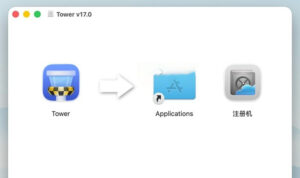
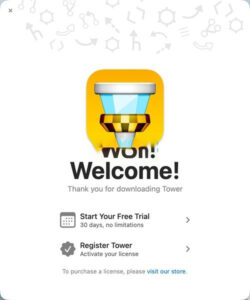
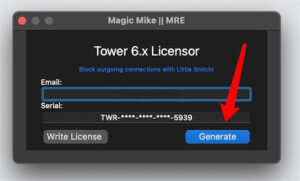
Installation and Crack Method: 1. After downloading the software, open the package as shown in the image and drag the software “Tower” to the Applications folder for installation. 2. After installation, open the “Tower” software and appear with the welcome window as shown in the image. Then close the software. 3. Open the registration machine in the software package and click the Generate button as shown in the image.
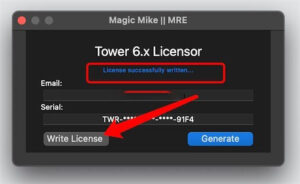
4. Then click the Write License button as shown in the image.
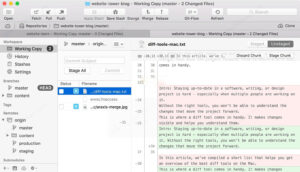
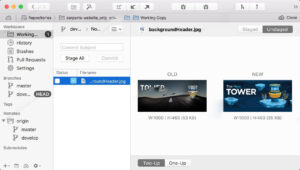
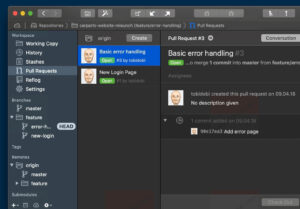
5. The license will be automatically written into the software, completing the activation. You can use it now. Notice: Do not update or upgrade the cracked version! —————————————————————–[Divider]———————————————————————– Core Function Features: ### One. High-Performance Productivity Tools **Quick Operation Panel**: An integrated command panel for quick operation, supporting hotkey activation, enabling instant branch switching, commit search, and file history viewing, significantly reducing menu levels and mouse movements. **Automated Background Tasks**: Supports automatic fetching of remote updates and automatic staging, eliminating the need for frequent fetch operations, keeping remote repositories up-to-date; large repository cloning can be executed in the background without blocking foreground work. **Multi-Window Parallel Work**: Supports opening multiple repository windows simultaneously, allowing parallel viewing and development across different projects. **AI Commit Generation**: Built-in AI Commit support, automatically generating commit information and descriptions based on code changes, supporting custom prompt templates to standardize commit logs. **Commit Template Management**: Supports creating, editing, and importing commit templates, standardizing team commit information formats to enhance code review efficiency. **Repository Quick Start**: Utilizes quick opening functionality, combined with search and drag-and-drop, to locate and open any local repository in milliseconds. ### Two. Workspace and Staging Management **Fine-Tuned Staging Area**: Supports file-level, code block-level, and even single-line-level precise staging, allowing users to freely choose the specific changes included in each commit, achieving atomic commits. **Integrated Difference Viewer**: Built-in visual difference comparison view, clearly distinguishing between staged and unstaged changes, supporting syntax highlighting for over 200 programming languages. **Change Discard and Rollback**: Allows discarding local changes at the file level, even down to the single-line level, enabling flexible revocation of unnecessary local modifications. **Merge Conflict Guide**: An exclusive conflict resolution guide presented in a visual side-by-side manner, guiding users through the resolution process, reducing the difficulty of handling merge conflicts. **Patch Operations**: Supports creating and applying patch files, facilitating code change transmission across environments. **Gitmoji Support**: Native support for Gitmoji commit conventions, allowing quick insertion of semantic emoji icons. ### Three. Branch, Tag, and Remote Management **Visual Branch Spectrum**: Interactive submission spectrum provides an intuitive view of branch relationships, merge connections, and commit history, clearly displaying complex branch structures and derivation paths. **Drag-and-Drop Branch Operations**: Simple drag-and-drop operations enable branch merging, derivation, creation, and pull, lowering the learning threshold for complex Git operations. **Interactive Rebasing (Interactive Rebase)**: Drag-and-drop reordering, editing, and compressing of commit history, simplifying the output of clean commit lines. **Branch Comparison and Review**: Supports branch-to-branch difference comparison, allowing viewing of unique commits; built-in branch review function quickly identifies outdated branches and fully merged branches, aiding in repository cleanup. **Branch Fixing and Automatic Management**: Supports pinning frequently used branches to the top; automatically identifies and archives outdated or fully merged branches, keeping the sidebar tidy. **Safe Forced Push**: Built-in lease-based forced push (Force Push with Lease) as a safer alternative to `git push –force`, avoiding accidental overwriting of others’ commits. **Synchronization One-Click Completion**: Synchronization button executes pull and push sequentially, completing the bidirectional synchronization of local and remote repositories in one click. ### Four. Commit History and Trace **Full-Dimensional Historical Records**: Supports viewing complete histories of branches, tags, and staging areas, providing multiple sorting and view layouts. **File History Trace**: Tracks the complete evolution of a single file, viewing each modification and author. **Blame Line-by-Line Trace**: Displays the last modifier and modification time for each line of code, quickly locating the responsible party and change background. **Commit Search and Filtering**: Supports multi-dimensional filtering and searching based on commit information, author, and date, enabling quick target commit location. **Cherry-Pick Selective Commit**: Easily transfers specified commits to other branches, flexibly reusing code changes. **Browse Any Version**: Allows browsing the complete file directory structure at any historical commit moment, viewing the code state at that time. ### Five. Collaboration and Pull Request Management **One-Stop Pull Request Management**: Without switching browsers, complete Pull Request creation, viewing, commenting, merging, and closing can be done within the software, streamlining the entire collaboration process. **Seamless Integration with Mainstream Platforms**: Perfectly compatible with GitHub, GitLab, Bitbucket, Azure DevOps, Beanstalk, and other mainstream code hosting services, supporting unified management of multiple accounts. **One-Click Cloning and Creation**: After binding the service account, one-click clones remote repositories or creates new remote repositories directly within the software, without manual handling of tokens and URLs. **Unsynced Commit Alerts**: Clearly displays the number of local commits not pushed and remote commits not pulled, ensuring real-time synchronization status awareness. ### Six. Advanced Git Features **Git-Flow Workflow**: Native integration of Git-Flow branch models, enabling one-click workflow initialization, standardizing feature development, release, and hotfix processes. **Git LFS Large File Storage**: Supports Git Large File Storage out of the box, without the need for additional installation or configuration, making it easy to manage large binary resources. **Submodule Management**: Complete support for Git submodules, allowing direct retrieval, update, and opening of sub-module projects within the software. **Worktrees (Worktrees)**: Supports creating and managing multiple worktrees, enabling parallel debugging of the same repository’s multiple branches. **Staging and Snapshots**: Temporarily saves the current work progress to obtain a clean workspace; supports partial application of staged content; snapshot functionality automatically recovers staged content, facilitating quick thought verification. **Reflog Operation Logs**: Accesses Git operation logs, allowing recovery of deleted commits and branches, nearly revoking any Git operation. **git-svn Compatibility**: Supports direct对接Subversion remote repositories, compatible with traditional SVN work environments. ### Seven. Usability and Fault-Tolerance Design **Global Undo (⌘+Z)**: Industry-leading undo capabilities, allowing virtually any operation to be undone with a single hotkey, including local changes, commit restoration, branch deletion, and merge rollback, even recovering content Git itself cannot directly recover. **Drag-and-Drop Operation Paradigm**: Enables numerous complex operations, such as merging, Cherry-Pick, compressing commits, and creating branches, through intuitive drag-and-drop, significantly reducing mental burden. **Multi-User Configuration Files**: Supports managing multiple submission identities, allowing quick switching between personal and work identities, adapting to various development scenarios. **SSH and GPG Signatures**: Built-in SSH and GPG key management, supporting submission and tag signing and verification, ensuring code security and trust; supports 1Password as an SSH proxy. **External Difference Tools Integration**: Allows invoking multiple mainstream external difference comparison tools, such as Kaleidoscope, BBEdit, FileMerge, and Araxis Merge. **Command-Line Synergy**: Accompanying command-line tools enable seamless switching between terminal and graphical interfaces, catering to mixed usage habits. Software Screenshots: |
This resource requires login to download
Log in
Sonority for Mac v1.5: Puzzle Adventure Game – Sonoritymac Download and Activation Version
Downloads:1909 | 2026-10-23

Hydra for Mac v4.2: Download and Activate HDR Image Creation Version
Downloads:2178 | 2026-10-22

iStat Menus for Mac v6.63 – Menu Bar System Monitoring Software Chinese Activated Version Download
Downloads:2398 | 2026-10-17

SnippetsLab for Mac v1.9 Code Snippet Manager Chinese Activated Version Download
Downloads:2550 | 2026-10-17


Ratings & reviews
No rating
Let’s rate it.