


Regex Tools for Mac v1.3.10 Activation Download
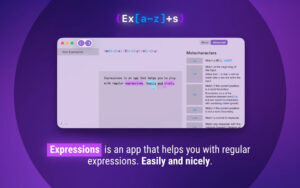
Expressions is a professional productivity tool dedicated to the creation, testing, and debugging of regular expressions, tailored for developers, data analysts, and content operators. It replaces the cumbersome online testing tools and the inefficient debugging process within code, making the entire process of regular expression creation, validation, and reuse more efficient and intuitive. It serves as a reliable auxiliary tool for text processing and string operations.
Core Function Features:
1. **Real-time Matching Preview and Precise Syntax Highlighting**
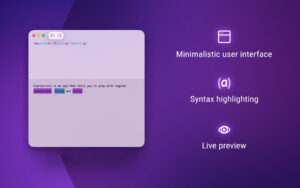
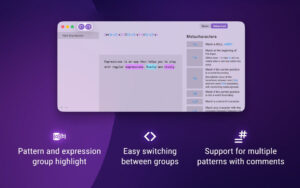
Upon inputting a regular expression pattern and test text, the system will display the matching results in real-time without needing to manually trigger the validation. It comes equipped with an advanced syntax highlighting engine that supports hierarchical syntax highlighting for regular expressions, grouping, and sub-expression structures, clearly displaying nested structures and significantly enhancing the readability and debugging efficiency of complex regular expressions.
2. **Built-in Syntax Quick Reference, Efficient and Quick Operations**
It comes with a comprehensive reference table for regular expression syntax, allowing users to quickly consult the syntax rules and usage examples without switching windows. It supports keyboard shortcuts for quickly switching the highlighting levels of groupings, and it can generate a transposed regular expression that is ready for use in development projects, simplifying the workflow.
3. **Mode Library Management, Support for Reuse and Annotation**
It supports saving commonly used regular expressions, accompanying test samples, and explanatory comments, allowing users to build their own mode libraries. It also supports breaking down complex regular expressions into logical modules and adding explanatory comments, enhancing the maintainability of regular expression rules and making them easier to reuse and share within teams.
4. **Minimalist Immersive Interface, Focus and Efficient Creation**
It employs a minimalist, distraction-free interface design, eliminating redundant buttons and complex menus, focusing on an immersive work experience. It supports full-screen work mode, reducing visual distractions and allowing users to concentrate on regular expression creation and debugging, thereby improving their focus on work.
5. **Adaptable to Various Text Processing Scenarios**
It can efficiently handle tasks such as string extraction, rule validation, and batch replacement logic debugging, suitable for various business scenarios including code development, data cleaning, content batch processing, and log analysis, meeting the text processing needs of different positions.
Version 1.3.10 Update Content:
– Fixed the issue with the toolbar button for displaying and hiding the side panel, which caused the application to freeze in some scenarios.
– Updated to be compatible with the macOS Tahoe system.
– Fixed issues related to the toolbar buttons.
Software Screenshot:
This resource requires login to download
Log in
NetWorker Pro for Mac v11.0.9 Download with Network Speed Information Chinese Activation Version
Downloads:1 | 2026-10-27

iSkysoft Video Converter Ultimate for Mac v11.5.1 Download and Activation Version
Downloads:1216 | 2026-10-24

DxO PhotoLab 9 for Mac v9.0.1 Chinese Activation Version Download
Downloads:3185 | 2026-10-21

Compact Translation Software with Activation for Mac v1.9.3
Downloads:1006 | 2026-10-20


Ratings & reviews
No rating
Let’s rate it.