



WonderPen for Mac v2.3.0 – Professional Writing Software (Chinese Activated Version) Download
This page provides WonderPen for Mac v2.3.0 – Professional Writing Software (Chinese Activated Version) Download | LoveMac, tested and working. If you encounter a dead link or cannot install after downloading, please leave a comment to contact us.
WonderPen is a professional writing software designed specifically for macOS. With a clean interface and powerful features, it aims to provide an efficient and focused creative environment for writers, students, editors, academic researchers, and writing enthusiasts, helping users easily complete the entire process from conception to final draft.
WonderPen integrates a number of practical features designed to enhance writing efficiency and experience:
The latest version includes multiple optimizations in details and experience. Specific updates are as follows:
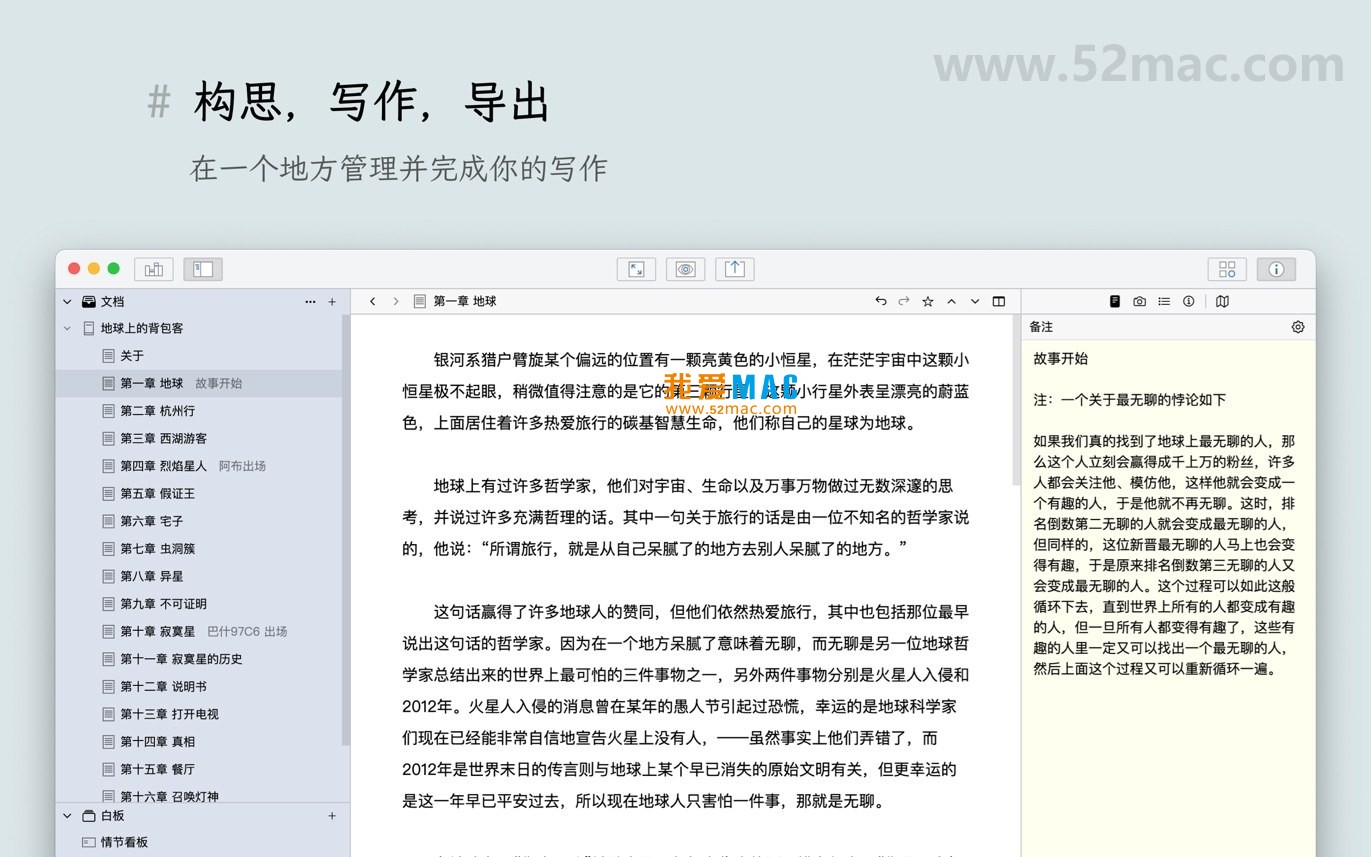
Below are screenshots of WonderPen for Mac, showcasing its core workspace and特色 features:
Many users new to Mac software worry about complicated installation. Actually, installing WonderPen is very straightforward; just follow these steps.
Download the WonderPen v2.3.0 installer from the link provided on this site. After downloading, you will get a .dmg file, the most common software distribution format on macOS.
WonderPen_v2.3.0.dmg file; the system will mount a virtual disk.If you encounter a “file is damaged” prompt during installation, check whether the downloaded file is complete or try downloading again. If a “cannot verify developer” warning appears, refer to step 2 above.
We have compiled the most frequently asked questions to help you get started quickly.
WonderPen v2.3.0 is compatible with macOS 10.14 (Mojave) and later, including the latest macOS Ventura and Sonoma.
Click the “Focus Mode” icon on the toolbar, or use the shortcut Command + Shift + F, to enter a full-screen, distraction-free writing environment.
WonderPen’s export engine is optimized; when exporting to .docx format, it well preserves Markdown formatting and Chinese typesetting, with very rare garbled text.
WonderPen supports automatic backups. You can view historical versions in “Preferences” -> “Backup”, or recover from the Trash.
Please first confirm there are no extra spaces in the entered activation code. If it still doesn’t work, contact us via the contact information at the beginning of the article.
The document tree is used to manage the structure of long works, such as chapters and paragraphs. The whiteboard is more free-form, suitable for brainstorming, plot planning, and character relationship diagrams.
WonderPen supports storing the document library in cloud folders such as iCloud or Dropbox for multi-device synchronization.
Please ensure your macOS system is updated to the latest version. If the problem persists, try disabling resource-intensive features like “real-time statistics” in “Preferences”.
Currently WonderPen supports importing plain text, Markdown, and some rich text formats. For Scrivener projects, it is recommended to export as Markdown first and then import.
The free version has a limit on the number of documents and some advanced features (such as whiteboard and card list) are unavailable. The activated version has no restrictions.
Mastering shortcuts can significantly improve writing efficiency. Below is a summary of common shortcuts in WonderPen:
| Category | Shortcut | Description |
|---|---|---|
| File Operations | Command + N |
New Document |
| File Operations | Command + S |
Save Current Document |
| File Operations | Command + Shift + S |
Save As |
| Edit Operations | Command + Z |
Undo |
| Edit Operations | Command + Shift + Z |
Redo |
| Edit Operations | Command + F |
Search in Current Document |
| Edit Operations | Command + Shift + F |
Global Search |
| View Operations | Command + Shift + F |
Toggle Focus Mode |
| View Operations | Command + R |
Toggle Night Mode |
| Navigation Operations | Option + Command + ← |
Collapse Current Node |
| Navigation Operations | Option + Command + → |
Expand Current Node |
| Format Operations | Command + B |
Bold |
| Format Operations | Command + I |
Italic |
| Format Operations |

妙笔(WonderPen) for Mac v1.7.6 专业的写作软件 中文激活版下载 | 爱上MAC
下载次数:2754 | 2026-01-13

Scrivener for Mac v3.2.2 写作管理和文字处理工具 中文激活版下载 | 爱上MAC
下载次数:2117 | 2026-01-13

iA Writer for Mac v6.0.2 专业的写作应用 中文激活版下载 | 爱上MAC
下载次数:482 | 2026-01-13
iA Writer for Mac v7.1.2 专业的写作应用 中文激活版下载 | 爱上MAC
下载次数:876 | 2026-01-13


评分及评论
暂无评分
来评个分数吧