一、Core Performance Advantages
Final Cut Pro has been deeply optimized for Apple silicon, and with its powerful Metal graphics engine, it has achieved a飞跃 in performance. It can efficiently handle more complex projects, supporting larger frame sizes, higher frame rates, and richer effects, resulting in a smooth and swift editing experience. The software fully taps into the powerful processing capabilities of Mac Pro, Mac Studio, or MacBook Pro, elevating the efficiency of creative work to a new level.
On Macs equipped with Apple silicon, Final Cut Pro demonstrates exceptional performance and efficiency. It leverages the high-speed unified memory architecture shared by the CPU, GPU, and neural network engine to play higher-resolution video streams smoothly and achieve rapid video rendering.
二、Key Features and Functions
1. Innovative Video Editing
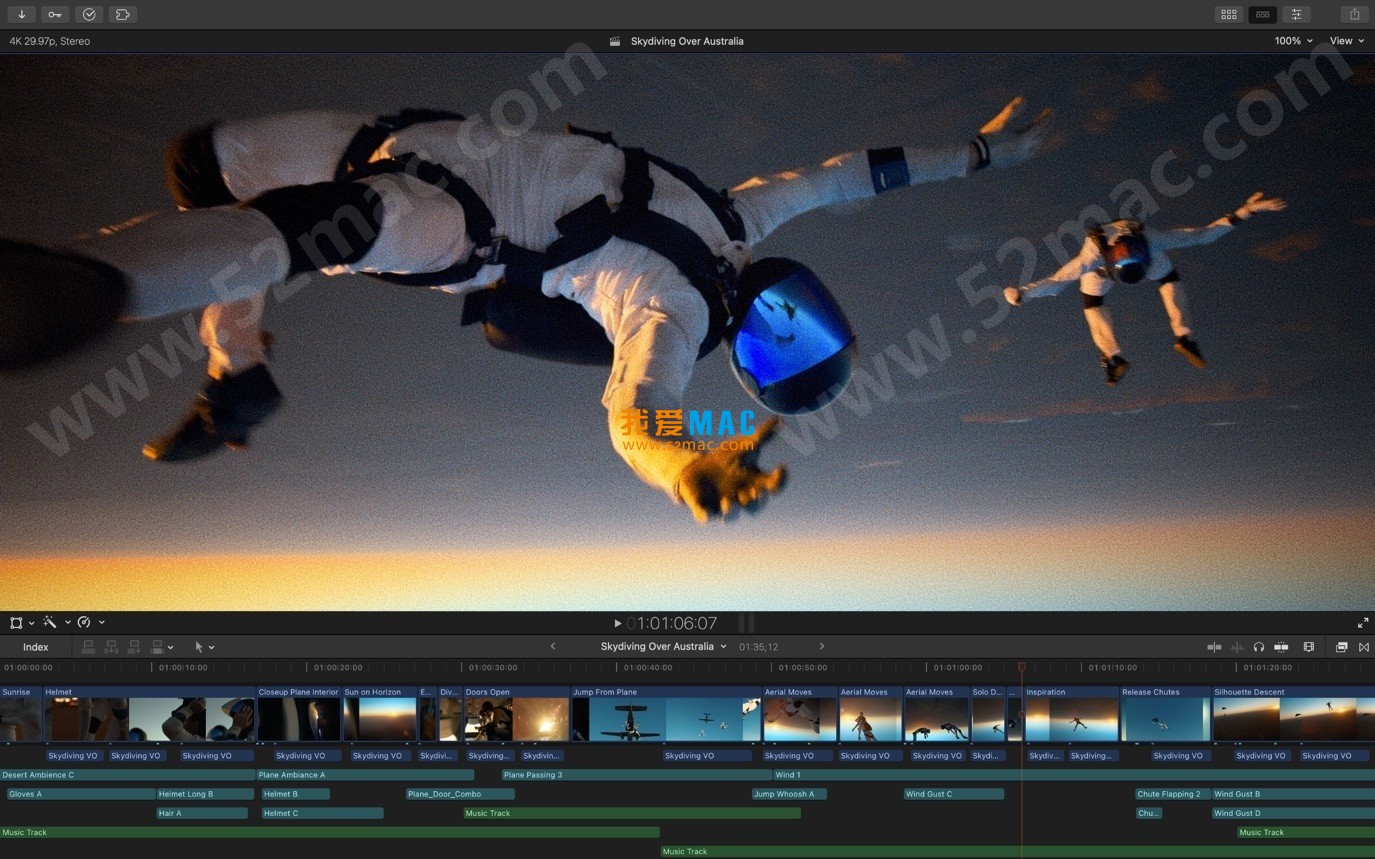
- Magnetic Timeline: Utilizing advanced metadata for quick and flexible editing.
- Enhanced Timeline Navigation: Easily rearrange the timeline layout by dragging audio clips.
- Clip Attachments: Attach B-roll, sound effects, and music directly to the timeline.
- Composite Clips: Group multiple clips together to simplify the timeline and reduce visual clutter.
- Multi-Camera Editing: Supports automatic synchronization of up to 64 camera angles.
- Smart Composition: Automatically convert projects to square or vertical formats to meet delivery requirements for different platforms.
- Spherical Video Editing: Import and edit various formats and frame sizes of isometric cylindrical projection videos.
- Hidden Subtitles: Support for creating, editing, and delivering hidden subtitles directly within the software.
- Extensibility: Further enhance software functionality through third-party workflow expansion plugins.
2. Powerful Media Organization
- Library Management: Efficiently organize projects through the library for media management and team collaboration.
- Proxy Media: Create proxy copies of media to enhance project portability and editing performance.
- Content Automatic Analysis: Automatically collect camera metadata and analyze the content of shots in the background.
- Keywords and Collections: Quickly create and apply custom keywords or personal collections while browsing clips.
- Smart Selection: Dynamically organize media content, allowing quick positioning of required shots with a simple tap.
3. Exceptional Editing Performance
- Apple Silicon Optimization: Significantly improve performance and efficiency on Macs equipped with Apple silicon.
- Real-time 8K Editing: Leverage the acceleration of Mac Pro and Afterburner cards to achieve smooth real-time 8K video editing.
- Modern Metal Engine: Modern Metal graphics engine fully optimizes playback, rendering, and compositing performance across all Macs.
- Multi-GPU Support: Utilize all GPU resources in the Mac to ensure outstanding real-time playback performance and quick background rendering.
- Wide Format Support: Handle a wide range of formats including ProRes, RED, XAVC, AVCHD, Avid DNxHR®/HD®, H.264, HEVC, and more.
4. Eye-Catching Customizable Effects
- Dynamic Subtitles: Provide beautiful 2D and 3D subtitle animation templates to simplify the process of creating custom subtitles.
- Intuitive Controls: Adjust subtitles, transitions, and effects with intuitive controls.
- Plugin Ecosystem: Access a rich ecosystem of third-party FxPlug plugins with customizable interfaces for effects.
5. Integrated Audio Editing
- Role Assignment: Assign roles (dialogue, music, effects, etc.) to audio clips upon import, facilitating project tracking and management.
- Multi-Channel Audio Editing: Edit and expand multi-channel audio files directly within the timeline.
- Synchronized Audio: Synchronize video and independent audio files with a single operation using audio waveforms.
6. Intuitive Color Grading
- Wide Color Gamut Support: Import, edit, and deliver videos in standard color spaces or wide color gamut Rec. 2020 color spaces.
- HDR Video Viewing: Precisely view HDR video effects using Pro Display XDR.
- Professional Color Grading Tools: Provide powerful color wheels and curve tools for precise adjustment of keying and masking.
7. Efficient One-Step Output
- Quick Export: Quickly export videos for playback on Apple devices or upload to platforms like Vimeo or YouTube.
- Multiple Version Delivery: Export audio stems and multiple different versions of the final product using role metadata.
- XML Support: Import and export XML files for third-party color grading and mixing workflows to ensure smooth collaboration.
三、Version 11.0 Important Updates
1. Magnetic Masking
With the new masking tools powered by AI technology, you can easily separate characters, objects, and shapes from backgrounds without green screens or tedious manual tracking/transcription, significantly expanding creative freedom.
2. Transcripts to Subtitles
Utilizing a powerful AI language model designed for speed and accuracy, the software automatically generates subtitles within the timeline. (This feature requires macOS Sequoia or a later version.)
3. Spatial Video Editing
Supports importing and editing video clips captured by devices such as Apple Vision Pro or iPhone 15 Pro (and later models). Users can add subtitles, perform color correction, and apply effects to create engaging spatial projects that can be viewed on Apple Vision Pro.
4. Workflow Improvements
- Use the “Zoom to Fit” feature to adjust the height of clips to fit the timeline.
- Hide clips in the browser to keep the workspace tidy.
- Supports handling more video formats via macOS built-in “Media Extensions” feature. (Requires macOS Sequoia or a later version.)
- Adds “Annotation Box” and “Overlay” effects, modular transitions, and provides more keyboard shortcuts for common tasks in the browser and timeline to enhance editing speed.
Four, System Requirements
- Operating System: macOS 14.6 or later.
- Memory: 8 GB RAM (16 GB recommended).
- Graphics Card: Graphics card supporting Metal (only for Intel-based Mac computers).
- Storage Space: 6.9 GB available storage space.
Five, Software Screenshots






Ratings & reviews
4.7
(Maximum 5 ratings, total 70 user reviews)
Let’s rate it.