

Topaz Video Enhance AI for Mac v1.5.1 Activation Download
opaz Video is a professional-grade AI video enhancement and restoration tool (originally Topaz Video AI) developed by Topaz Labs, tailored for the Mac platform. It leverages deep learning AI models to enhance video quality without losing any detail, repair old footage, and optimize frame rates, making it a benchmark tool for Mac users to improve video quality and restore image materials.
Installation and Crack Method:
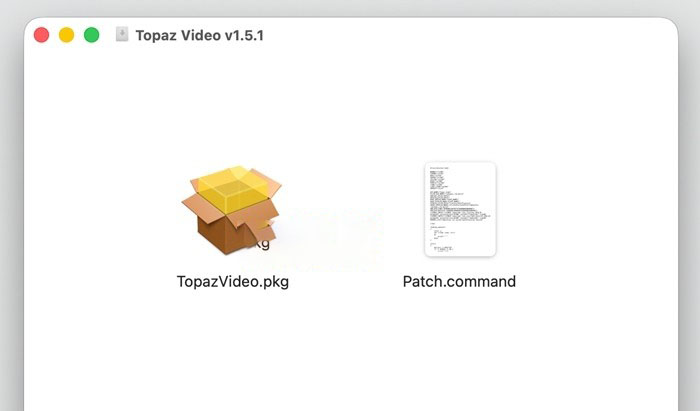
1. After the software download is completed, open the downloaded dmg format package as shown in the image above, double-click the software “TopazVideo.pkg” to install the software. By default, proceed with the installation steps.
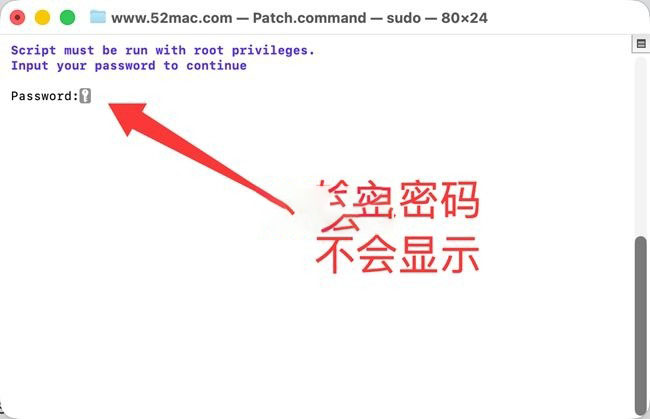
2. After the software installation is completed, do not open the software yet. Drag the software package’s Patch.command (activation tool) to the desktop, then double-click the Patch.command on the desktop. This will open the terminal, as shown in the image below. Enter your computer password (the password input will not be displayed, just type it in and press the Enter key).
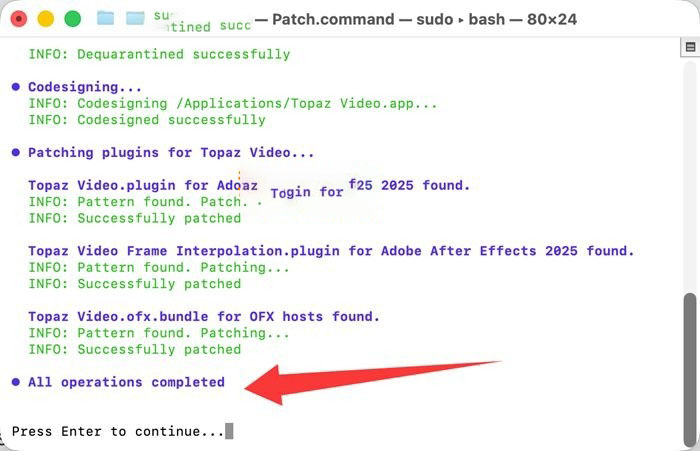
3. As shown in the image below, after the terminal prompts “All operations completed” in blue, the software has been successfully cracked and can be used.
—————————————————————–[Separator]———————————————————————–
Core Function Features:
### 1. AI Super Resolution and Image Enhancement (Core Highlight Feature)
The software is equipped with 20+ specialized training AI enhancement models, capable of achieving a maximum 16x lossless enlargement, supporting up to 8K resolution output. It precisely restores lost details in videos, completely solving issues such as blurry images, insufficient resolution, compression distortion, and plastic feel.
– General Enhancement: Proteus, Artemis models, balanced models suitable for low/medium/high quality materials, automatically fixing compression artifacts, halos, and jagged edges with a single click. Beginners can use the automatic mode for quick output, while advanced users can manually adjust parameters.
– Specialized Optimization: Iris model focuses on enhancing facial details and skin texture for beauty and product videos; Rhea series models specialize in enhancing fine textures for makeup and product videos; Theia model focuses on sharpening images while controlling noise.
– Real-time Preview Comparison: Supports side-by-side, sliding, and overlay preview modes, allowing real-time comparison between the original image and the enhanced effect, enabling precise parameter adjustments and avoiding unnecessary rendering.
### 2. Comprehensive Video Restoration Capabilities
– **Smart Precise Noise Reduction**: Equipped with Nyx series noise reduction models, capable of precisely distinguishing between noise and real details in the image, effectively removing noise caused by low light shooting and high ISO recording, as well as repairing grain noise and base noise in old videos, preserving the natural texture of the image without over-smoothing or losing details.
– **Image Stabilization**: AI analyzes frame-to-frame motion trajectories to correct shaky shots caused by handheld shooting and camera movements, supporting automatic cropping and full-frame modes, and providing curtain shutter correction to eliminate the “jello effect” in moving images, reducing motion blur caused by slow shutter speeds, and achieving a stable effect similar to professional tripod shooting.
– **Specialized Restoration for Old Videos**: Provides a dedicated pipeline for removing interlaced lines in old VHS, DVD, and TV materials, eliminating flickering, color fading, and scratch damage, allowing decades-old family videos and historical materials to regain clear images.
– **Motion Deblurring**: AI accurately restores blurry images caused by high-speed motion, panning, and zooming, whether in sports events, outdoor vlogs, or fast-moving video footage, ensuring sharpness and details, and eliminating dynamic blurring.
### 3. Intelligent Frame Rate Conversion and Smooth Slow Motion
Equipped with professional frame interpolation AI models such as Apollo, Chronos, and Aion, the software can achieve up to 16x slow motion production, converting low frame rate videos (24/30fps) to high frame rate videos (60/120fps) without losing quality, effectively solving issues like frame skipping and motion blur, and maintaining natural fluidity in complex motion scenes.
– **Scene Detection Function**: Automatically identifies scene transitions to avoid blending between different shots and smearing errors, and supports seamless integration of multiple clips.
– **Compatibility with Various Scenarios**: Supports scenarios such as game recording, film upscaling, and motion video production without requiring high-end shooting equipment, achieving smooth slow motion effects comparable to professional filmmaking.
### 4. Professional Encoding and Efficient Creation Workflow
– **Native Compatibility with Multiple Formats**: Supports native Mac video formats including MOV, MP4, ProRes, HEVC, and MKV, preserving the original video and audio streams without loss, and supports alpha transparency for seamless integration with professional post-production workflows.
– **Batch Processing and Queue Export**: Supports importing multiple video clips at once, setting AI enhancement parameters uniformly, and executing batch processing tasks in the background. The software does not occupy the foreground, supports resuming tasks from where they left off, and significantly improves the efficiency of handling multiple video clips.
– **Seamless Integration with Professional Editing Software**: Post-processing clips can be directly imported into Final Cut Pro, Premiere Pro, or DaVinci Resolve, eliminating the need for re-encoding, and supporting a wide range of creative scenarios from personal projects to professional film production.
– **Rich Auxiliary Creation Features**: Supports SDR to HDR conversion, expanding the color depth and contrast of the image; adds realistic film grain effects to give videos a cinema-like quality; includes built-in video cropping and trimming functions, allowing basic editing operations without opening additional editing software.
Version 1.5.1 Update Content:
## Major New Features
1. **New Nyx XL Noise Reduction AI Model (Cross-Platform Support)**: Retains more fine details while removing low light noise and grain, particularly suitable for high-resolution material processing.
2. **Starlight Sharp Model Variant**: An upgraded version of the video restoration model based on diffusion technology, offering higher clarity and detail restoration, with superior handling of small facial features and facial details.
– Mac users currently only support cloud rendering, while Windows NVIDIA users can perform local rendering.
3. **Real-time Frame Preview (Beta)**: Allows instant preview of the enhanced effect of the current frame, eliminating the need for full rendering, significantly improving workflow efficiency. Note: This feature is not supported by the Starlight series models.
4. **General Enhancement Presets and Single Slider Tuning**: Adds preset options suitable for most scenarios, along with a single slider for dynamic adjustment of multiple model parameters to achieve optimal results, saving time on parameter tuning.
5. **Optimized Right-Hand Panel Layout**: Continues to improve the layout and interaction of the right-hand control panel, making operations more intuitive and convenient.
## Bug Fixes
– Optimized resolution issues with the Starlight Precise model.
– Fixed internal damage feedback links.
– Resolved export errors and stability issues reported by some users.
– Improved cloud rendering task queue and processing mechanisms.
## Important Notes
– Intel-based Macs are currently unsupported.
– Users with high-performance hardware are recommended to use cloud rendering for the Starlight Sharp model to achieve the best experience.
– The real-time frame preview feature is currently in the Beta stage, and may have some compatibility issues.
– All new models and features require a Topaz Studio subscription to use.
This resource requires login to download
Log in
Personal Finance Management Tool for Mac v4.0.8 Chinese Activation Download
Downloads:0 | 2026-10-27
EdgeView 5 for Mac v5.8.9 Chinese Activation Version Download
Downloads:0 | 2026-10-27

Bloons TD 6 for Mac v48. 0 Chinese Activation Download
Downloads:423 | 2026-10-23

MenuBar Stats for Mac v3.8.5 – Menu Bar System Monitoring Software Activated Version Download
Downloads:1724 | 2026-10-17


Ratings & reviews
No rating
Let’s rate it.