

Blackmagic Fusion Studio for Mac v21.0: Professional Visual Effects Compositing Software
Blackmagic Fusion Studio is a globally advanced node-based 2D/3D visual effects compositing software designed for VFX artists, broadcast designers, dynamic graphic designers, and 3D animators. Over the past 30 years, Fusion has been widely used in the production of thousands of Hollywood blockbusters and popular TV shows, including “The Hunger Games,” “Doctor Strange,” and “Guardians of the Galaxy,” and is one of the standard tools in the post-production industry.
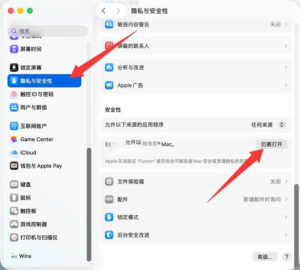
**Important Note:** The software is already cracked and can be used after double-clicking the installation file. When opening the software for the first time, a “damaged” prompt will appear. To resolve this, go to System Settings -> Privacy & Security -> Under the “Security” section, check the box “Open Anyway,” as shown in the following image.
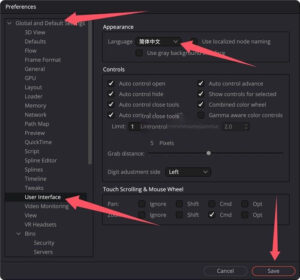
**Language Settings:** By default, the software is set to English upon first opening.
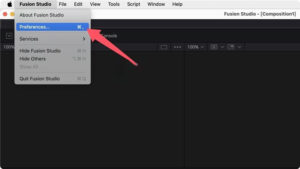
To change to Chinese, click on the top-left menu bar, select Fusion Studio -> Preferences…, and then select Global and Default Settings -> User Interface -> Language -> Simplified Chinese. Restart the software to see the changes.
## I. Core Workflow: Node-Based Compositing Architecture
Fusion employs a **powerful node-based interface** rather than a traditional layer-based workflow. By connecting different types of image processing nodes, complex effects can be built. This approach offers the following advantages:
– Non-linear, flexible editing capabilities, allowing for real-time adjustments to any node parameters without affecting other parts
– Clear and efficient management of complex multi-element shots
– Support for unlimited levels of compositing, far exceeding the processing capabilities of layer-based software
– Nodes can be saved as macros for reuse, significantly boosting productivity
– Support for node view bookmarks, custom toolbars, and vertical layout, facilitating navigation in large projects
## II. Fusion 21.0, the Latest Version of 2026, Features
### 1. Dynamic Graphics Tools Upgrade
– **Native Integration of Krokodove Plugin**: Over 70 professional dynamic graphics effect tools, including filters, deformers, and text animations, have been added.
– **Support for Lottie and OGraf Formats**: Directly import JSON-formatted Lottie animations and HTML-formatted OGraf graphics, enabling seamless workflows across platforms.
– **Text Tools Update**: Text+ and MultiText tools now support colored fonts and emojis, come with built-in spell check and auto-correct systems, and include CSV import functionality.
– **New Macro Editor**: Features a checkerboard view and macro publishing capabilities, making it easier to create reusable tool sets.
### 2. Enhanced Depth Compositing and 3D Workflow
– **Expanded Depth Compositing Toolset**: A new dColorCorrector node has been added, allowing for color correction directly in depth mode without the need to convert to a flat image.
– **USD Workflow Upgrade**: Updated to USD SDK 25.11 and Hydra 2.0 API, with new uProjector and uCatcher nodes supporting 3D mask objects and textures.
– **3D Renderer Support for Cryptomatte**: Directly render Cryptomatte ID masks from 3D scenes, significantly improving post-production synthesis efficiency.
– **Professional Lens Calibration Tool**: A new professional lens calibration tool has been added, enabling precise correction of lens distortions.
### 3. Performance and Collaboration Improvements
– **Animated Curve Modifier**: Automatically adjusts animation times when changing clip durations in the timeline.
– **Audio Waveform Display**: Supports audio playback and waveform display, facilitating precise synchronization of animations.
– **Shared Markers**: Allows sharing markers across multiple pages, enabling collaborative work.
– **27 New GPU-Accelerated Resolve FX**: Including noise reduction and sharpening tools on the color grading page, all supporting GPU acceleration.
## III. Comprehensive Professional Features
### 1. Core 2D Compositing Capabilities
– **Professional Keying Tools**: Includes industry-leading keying algorithms such as Delta Keyer and Primatte, supporting blue/green screen keying and complex edge handling.
– **Tracking and Stabilization**: AI-driven IntelliTracker point tracking, planar tracking, 3D camera tracking, and image stabilization based on optical flow.
– **Painting and Masking**: Vector painting tools, multi-segment masking tools, Bezier curve masking, support for frame-by-frame painting and dynamic masking.
– **Color Correction**: A comprehensive suite of color correction tools, supporting ACES 2.0 and OCIO 2.4.2 color management systems.
– **Optical Flow Tools**: SpeedWarp AI, generating smooth slow-motion effects without jitters.
### 2. Powerful 3D Compositing Capabilities
– **Complete 3D Workspace**: Synthesize 2D and 3D elements within a 3D space, supporting cameras, lights, and materials.
– **3D Particle System**: Physically driven particle effects, supporting particle collisions, gravity, and wind properties.
– **3D Model Import**: Supports importing FBX, OBJ, USD, and other formats for 3D models and scenes.
– **3D Text and Logos**: Create 2D and 3D text, supporting extrusion, chamfering, material effects, and lighting.
– **Stereo 3D Support**: Complete stereo 3D workflow, supporting left-eye and right-eye views for output.
### 3. VR/Immersive Content Creation
– **Support for 180° and 360° VR**: Comprehensive VR content creation tools, including panoramic stitching, stabilization, and synthesis.
– **Apple Vision Pro Support**: Output compatible with Apple Vision Pro for spatial video content.
– **VR Preview**: Supports real-time preview of synthesis effects through VR headsets.
### 4. Format and Resolution Support
– **Resolution-Independent**: Supports from SD to 32K×32K resolutions, with no output limitations.
– **Multi-Layer Workflow**: Native support for PSD, layered EXR, and other multi-layer image formats, allowing direct access and manipulation of individual layers.
– **Professional Format Support**: Supports ProRes, DNxHD, H.265, OpenEXR, DPX, and all mainstream video formats.
– **High Dynamic Range**: Supports 16-bit and 32-bit floating-point color depths, handling HDR content.
This resource requires login to download
Log in
DxO PureRAW 6 for Mac v6.0.0 RAW Image Processing Software Chinese Activation Version Download
Downloads:3780 | 2026-10-27

Microsoft Office 2019 for Mac v16.46: Essential Office Software Download
Downloads:253 | 2026-10-27

Elmedia Player Pro for Mac v7.7 Chinese Activation Download
Downloads:2812 | 2026-10-24

ON1 Photo RAW MAX 2025.2 for Mac v19.2.0 Chinese Activation Version Download
Downloads:269 | 2026-10-21


Ratings & reviews
No rating
Let’s rate it.