| Topaz Video is a professional-grade AI video enhancement and restoration tool (originally Topaz Video AI) from the global top imaging brand, Topaz Labs, specifically optimized for the Mac platform. The software is powered by deep learning AI models, enabling users without complex video editing knowledge to achieve a lossless video quality improvement, restore old footage, and optimize frame rates, all in a seamless workflow. It is a benchmark-level tool for Mac users to enhance video quality and restore image materials.
Installation and crack method:
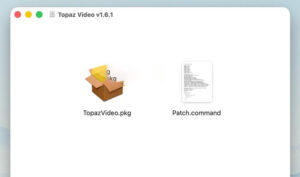
1. After the software download is completed, open the downloaded dmg format software package as shown in the image above, double-click the software “TopazVideo.pkg” to install the software, and proceed with the default next-next installation.
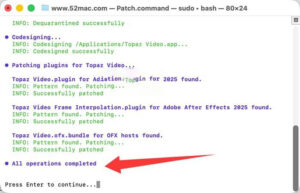
2. After the software installation is completed, do not open the software yet. Drag the software package’s Patch.command (activation tool) to the desktop, double-click the Patch.command on the desktop, and automatically open the terminal as shown in the image below. Input your computer password (the password input will not be displayed, just input the password and press the Enter key).
3. As shown in the image below, when the final blue text, All operations completed, appears, the cracking is complete, and the software can be used.

—————————————————————–[Divider]———————————————————————–
Core Function Features:
### 1. AI Super Resolution and Image Enhancement (Core Highlight Function)
The software is equipped with 20+ specialized training AI enhancement models, capable of achieving a maximum 16x lossless enlargement, supporting up to 8K resolution output, precisely restoring lost video details, completely solving issues such as blurry images, insufficient resolution, compression distortion, and plastic feel.
– General Enhancement: Models like Proteus and Artemis are balanced models, suitable for low/medium/high quality raw materials, one-click repairing compression artifacts, halos, and jagged edges. Beginners can use the automatic mode for one-click output, while professional users can manually adjust parameters.
– Special Optimization: The Iris model specializes in optimizing facial details and skin texture for beauty and product videos; The Rhea series models focus on enhancing fine textures for makeup and product videos; The Theia model focuses on sharpening images while controlling noise.
– Real-time preview comparison: Supports side-by-side, sliding, and overlay preview modes, allowing real-time comparison between the original image and the enhanced effect, precise parameter adjustment, and avoiding unnecessary rendering.
### 2. Full-scenario video restoration capabilities
– **Smart Precise Noise Reduction**: Equipped with the Nyx series noise reduction models, capable of precisely distinguishing between noise points and real details in the image, effectively removing noise points caused by low-light shooting and high ISO recording, while also repairing noise points and base noise in old video tapes and magnetic tape materials, preserving the natural texture of the image without causing over-smoothing or loss of details.
– **Image Shaking and Stabilization**: AI intelligent analysis of frame-to-frame motion trajectories to correct hand-held shooting and camera movement, supporting automatic cropping and full-frame modes, and providing curtain shutter correction function to solve the issue of the jello effect in moving images, reducing motion blur caused by slow shutter speeds, achieving a professional tripod shooting stable effect.
– **Specialized Restoration for Old Videos**: Provides a dedicated pipeline for removing interlacing lines in old video tapes, DVDs, and television interlaced scanning materials, eliminating image crossover lines; capable of repairing flickering, color fading, and scratch damage in old videos, allowing decades of family photos and historical materials to regain clear image quality.
– **Motion Deblurring**: AI accurately restores blurry images caused by high-speed motion, panning, and zooming, whether in sports events, outdoor vlogs, or fast-moving footage in films, ensuring the sharpness and details of the image, eliminating dynamic blurring.
### 3. Intelligent Frame Rate Conversion and Smooth Slow Motion
Equipped with professional frame interpolation AI models like Apollo, Chronos, and Aion, capable of achieving up to 16x slow motion production, converting low frame rate videos from 24/30fps to 60/120fps without loss, completely solving issues such as frame skipping and shadowing, and maintaining natural and smooth image effects in complex motion scenes.
– **New Scene Detection Function**: Automatically identifies lens switching, avoiding blending and smear errors between different lenses, and perfectly adapting to multi-clip video editing.
– **Adaptable to various scenarios**: Supports game screen recording, film upscaling, and motion video production, without requiring high-end shooting equipment, achieving smooth slow motion effects comparable to professional film production.
### 4. Professional Encoding and Efficient Creative Workflow
– **Native Compatibility for All Formats**: Native support for Mac’s mainstream video formats, including MOV, MP4, ProRes, HEVC, and MKV, preserving the original video audio stream without loss, supporting alpha transparency export, and perfectly adapting to professional post-production workflows.
– **Batch Processing and Queue Export**: Supports importing multiple video segments at once, setting AI enhancement parameters uniformly, and executing batch processing tasks in the background without occupying the front-end operation; supports resuming unfinished export tasks after software crashes, significantly improving multi-media processing efficiency.
– **Seamless Integration with Professional Editing Software**: Post-processing materials can be directly imported into Final Cut Pro, Premiere Pro, and DaVinci Resolve, without the need for re-encoding, suitable for personal creation and professional film production scenarios.
– **Rich Auxiliary Creation Features**: Supports SDR to HDR conversion, expanding the depth and contrast of the image; adds realistic film grain effects to videos, achieving a cinema-level quality; includes video cropping and segment trimming functions, allowing basic editing operations without opening additional editing software.
Version 1.6.1 Update Content:
## Function Improvements and New Features
– Added an option to update current project settings when preferences are changed (such as timecode display, etc.)
– Updated warning notifications, marking clipping marks as filters for cloud rendering
– Updated the Hyperion 2 (SDR to HDR) model’s codec container, now supporting audio output
– Added a prompt for the Nuke plugin in the OFX plugin installation button
– Improved frame preview experience, added caching mechanisms, and enhanced overall speed
– Added a setting option for de-interlacing in frame previews
– Added a unique ID for each OFX plugin
– Added pinch-to-zoom functionality for touchpad previews and timelines
– Added dynamic compression settings for NVIDIA GPUs when using AV1 encoding
– Automatically adds correct metadata to output files when using HDR models
– Added cloud export history records for export tasks less than 7 days old
## Bug Fixes
– Fixed a severe issue where deleting a project might accidentally delete additional folders
– Fixed the application hanging when using network drives with source files
– Fixed incorrect output FPS when using slow motion and de-interlacing simultaneously
– Fixed audio failure when exporting iPhone videos due to unsupported audio streams
– Fixed the issue of automatically popping up the installation program when no installed models are selected
– Fixed the issue where the second enhancement step might run an incorrect model
– Fixed the issue of thumbnail distortion for non-proportional input videos
– Fixed issues with frame counting and duration changes in image sequences
– Fixed cloud export task hang-ups
– Fixed the issue of users recovering seats when their professional license expired
– Fixed issues with validation tokens containing foreign characters
Software Screenshots:
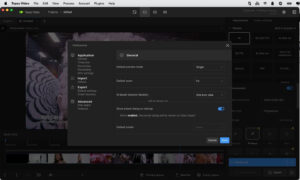
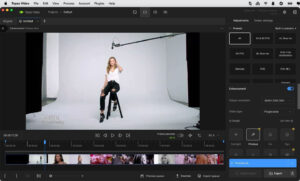

 |




Ratings & reviews
No rating
Let’s rate it.