



Topaz Video Enhance AI for Mac v1.7.0 Activation Download
Topaz Video is a professional-grade AI video enhancement and restoration tool (formerly Topaz Video AI) developed by Topaz Labs, a leading manufacturer of imaging solutions. It is optimized and tailored for the Mac platform, leveraging deep learning AI models to enhance video quality without losing any information, repair old footage, and optimize frame rates. It is a benchmark tool for Mac users looking to improve the visual quality of their videos and repair their image assets.
Installation and Crack Method:
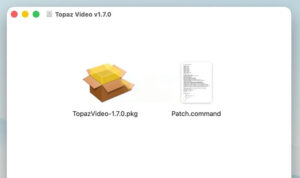
1. After the software download is completed, open the downloaded dmg format package as shown in the image above, double-click the software “TopazVideo-1.7.0.pkg” to install the software. Follow the default instructions to proceed with the installation.
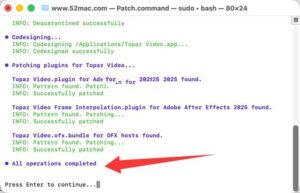
2. After the software installation is complete, do not open the software yet. Drag the software package’s Patch.command (activation tool) to the desktop, then double-click the Patch.command on the desktop. This will open the terminal, as shown in the image below. Enter your computer password (the password input will not be displayed, just type it in and press the Enter key).
3. As shown in the image below, wait for about one minute. When you see the final blue text, “All operations completed,” the software has been cracked and is ready to use.
—————————————————————–[Divider]———————————————————————–
Core Function Features:
### 1. AI Super Resolution and Image Enhancement (Core Highlight Feature)
The software is equipped with 20+ specialized AI enhancement models, capable of achieving a maximum 16x lossless enlargement, supporting up to 8K resolution output. It precisely restores lost details in videos, effectively resolving issues such as blurry images, insufficient resolution, compression artifacts, and plastic look.
– General Enhancement: Proteus, Artemis, and other balanced models are suitable for low/medium/high quality footage, automatically fixing compression artifacts, halos, and jagged edges with a single click. Beginners can use the automatic mode, while advanced users can manually adjust parameters.
– Specialized Optimization: Iris model is dedicated to enhancing facial details and skin texture for beauty and product videos. The Rhea series models focus on enhancing fine textures in makeup and product videos. The Theia model concentrates on sharpening the image while controlling noise.
– Real-time Preview Comparison: Supports side-by-side, sliding, and overlay preview modes, allowing real-time comparison between the original image and the enhanced effect. This enables precise parameter adjustments, avoiding unnecessary rendering.
### 2. Comprehensive Video Restoration Capabilities
– **Smart Precise Noise Reduction**: The Nyx series noise reduction models can precisely distinguish between noise in the image and actual details, effectively removing noise caused by low-light photography and high ISO recording, as well as repairing grain noise and base noise in old video recordings, preserving the natural image quality without causing over-smoothing or loss of details.
– **Image Shaking and Stabilization**: AI analyzes the motion trajectories between frames to correct shaky shots caused by handheld shooting and camera movements. It supports automatic cropping and full-frame modes, as well as the correction of rolling shutter effects, addressing the “jello effect” in moving images and reducing motion blur caused by slow shutter speeds, resulting in a stable image quality akin to professional tripod shooting.
– **Specialized Restoration for Old Videos**: For old video recordings, including VHS tapes, DVDs, and interlaced scanning TV footage, the software provides a dedicated pipeline for removing interlacing artifacts. It can also repair flickering, color fading, and damage in old video footage, restoring the clarity of decades-old family memories and historical records.
– **Motion Deblurring**: AI can accurately restore blurry images caused by fast-moving shots, panning, or zooming, whether in sports events, outdoor vlogs, or fast-moving footage in films, ensuring sharpness and details without losing motion.
### 3. Smart Frame Rate Conversion and Smooth Slow Motion
The software is equipped with professional frame interpolation AI models such as Apollo, Chronos, and Aion, capable of achieving up to 16x slow motion effects. It can convert low frame rate videos (24/30 fps) to high frame rate videos (60/120 fps) without losing any quality, effectively resolving issues such as frame skipping and motion blur, ensuring natural and smooth motion effects in complex scenes.
– **Scene Detection Function**: Automatically identifies and handles transitions between different camera lenses, avoiding issues such as blending between different shots and smear errors. It also supports seamless integration of multiple clips.
– **Compatibility with Various Scenarios**: The software can be used for game recordings, film upscaling, and motion video editing, without requiring high-end equipment. It can achieve smooth slow motion effects comparable to professional film production.
### 4. Professional Encoding and Efficient Workflow
– **Native Compatibility with Multiple Formats**: The software supports native Mac video formats, including MOV, MP4, ProRes, HEVC, and MKV, preserving the original video and audio streams without loss. It supports exporting with alpha transparency channels, ensuring compatibility with professional post-production workflows.
– **Batch Processing and Queue Export**: The software supports importing multiple video clips at once, setting AI enhancement parameters uniformly, and executing batch processing tasks in the background. It supports resuming tasks from where they left off, even if the software crashes. This significantly improves the efficiency of handling multiple video clips.
– **Seamless Integration with Professional Editing Software**: The software can directly import processed clips into Final Cut Pro, Premiere Pro, and DaVinci Resolve, eliminating the need for re-encoding. It is suitable for personal creation and professional film production scenarios.
– **Rich Auxiliary Creation Features**: The software supports SDR to HDR conversion, expanding the color depth and contrast of the image. It can add realistic film grain effects, giving videos a cinema-like quality. It also includes built-in video cropping and trimming functions, allowing users to perform basic editing tasks without opening additional editing software.
Version 1.7.0 Update Content:
#### 一、新增功能
1. 正式推出Final Cut Pro原生插件,用户可以在FCP中直接调用AI增强和运动去模糊模型,参数调节逻辑与桌面端手动模式一致。插件需在安装包中勾选安装,暂不支持软件内单独加装。
2. 全面切换到Neuroserver架构,Mac版不再提供DMG格式安装包。
#### 二、AI模型升级
1. **Starlight Precise 2.6**(基于2.5版本重制)
– 新增3档锐度滑块可调,3档为默认效果(与原2.5锐度效果相同),1档风格自然柔和,2档效果均衡。
– 优化AMD和Nvidia显卡适配,提升画面时序一致性,渲染速度最高提升15%。
– 主打真实人脸与皮肤质感的还原,优化材质、文字和细节纹理的表现,降低细碎纹理闪烁,最高支持4K分辨率输入输出,支持本地运行。
2. **Starlight Mini**升级
– 渲染性能大幅优化,12GB显存以上的N卡提速最高可达2倍;修复画面底部偶尔出现的水平边缘线瑕疵。
– 取消Pro账号专属限制,所有授权用户均可本地使用。
– 定位为低/中等质量的老视频修复,擅长处理标清素材,自带柔和的胶片质感,弱化AI带来的塑料感,最高支持4K输出。
#### 三、体验优化
1. 防抖功能支持实时预览,用户可以在全画幅和自动裁切模式之间进行对比,支持滚动快门和抖动修正选项。首次启用该功能需要完成素材分析缓存,该功能不兼容Starlight系列模型。
2. 模型管理器升级,支持按需下载和删除Neuroserver系列模型,方便管理磁盘空间,显示下载进度和体积信息。
3. 导出队列新增自动补全模型能力:当用户选择未下载的Neuroserver模型时,导出队列会自动完成下载后再开始渲染,无需提前手动操作。
4. 优化HDR预设和批量处理逻辑,优化图像序列导出的文件夹生成规则。
#### 四、问题修复
– 修复Starlight系列单帧渲染异常、Starlight Sharp分辨率不匹配、Mac端Starlight Mini本地导出被禁用等模型问题。
– 修复达芬奇和After Effects插件卡顿和假死的问题。
– 修复图像序列导出崩溃、文件路径过长报错、包含逗号的文件夹播放异常等问题。
– 修复导出暂停/失败后仍后台运行、批量导出忽略原文件夹路径、云导出多段剪辑错乱等导出问题。
– 修复WebM AV1格式音频转换导出失败、参数提示错误、Neuroserver系统检测卡死等细节问题。
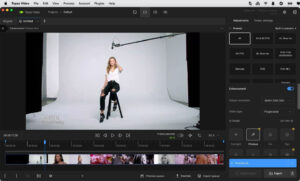
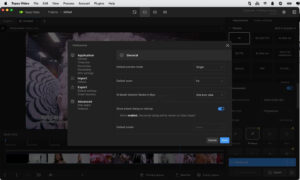
Software Screenshots:
This resource requires login to download
Log in
Djay Pro for Mac v5.6.6 Professional DJ Software Chinese Activation Download
Downloads:0 | 2026-10-27

Captain Blood for Mac v2025.05.01.002: Action Game – Captain Bloodmac Download & Activation Crack Version
Downloads:375 | 2026-10-23

Cursor Pro for Mac v2.3 Highlighter with Chinese Activation Download
Downloads:2705 | 2026-10-20

XMind 2021 for Mac v11.0.1 Chinese Activation Edition Download
Downloads:2238 | 2026-10-19


Ratings & reviews
No rating
Let’s rate it.