

Downie 4 for Mac v4.12.5 Professional Video Downloader Chinese Activation Version Download
Downie is a professional video download tool designed specifically for macOS. It is renowned for its minimalistic operation, high download success rate, and broad support for websites. It helps users easily save video, audio, and subtitle content from the internet, supporting offline viewing, asset collection, and backup of learning materials.
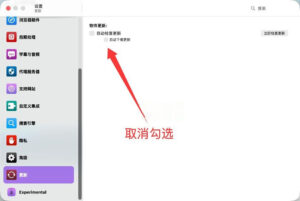
Note: Do not update or upgrade the cracked version, nor disable its automatic updates. Go to Downie 4 > Settings > Update, then uncheck the box for automatic updates.
Due to the updates of various video websites, the video download software needs to be updated frequently to download videos (meaning that if the software cannot use the updated video website, it will be unable to use the software, so the software updates are frequent, updating as often as every 10 days, please pay attention).
Core Function Features:
### 1. Extensive Website Support
– Currently supports over **1200 video websites**, covering mainstream streaming platforms both domestically and internationally, as well as numerous niche sites.
– The official team maintains **a frequency of 1-2 updates per week**, promptly adapting to website anti-crawling mechanisms to ensure download success rates.
– Users can submit requests for unsupported websites, which will be added to the next update.
### 2. Super High-Resolution Download Experience
– Supports **up to 8K resolution** videos, preserving high-quality features such as HDR and 60fps.
– Optimized for Apple Silicon chips (M1/M2/M3/M4), accelerating decoding with hardware media engines, resulting in a download speed increase of 2.3 times compared to Intel-based systems.
– Supports complete downloads of YouTube 4K/8K videos, including VP9 and AV1 encoding formats (the latest version added experimental AV1 encapsulation in MP4, allowing M3 and above chips to play natively).
### 3. Minimalist Operation, Multiple Download Methods
– **Three-step download process**: Copy video link → Paste into Downie → Click to start, suitable for beginners.
– Supports **drag-and-drop download**: Drag URLs from browser windows directly into the software window for automatic recognition.
– Provides **Safari/Chrome/Opera browser plugins** for one-click download, without switching applications.
– Supports **menu bar quick access**: Manage download tasks without opening the main window.
### 4. Advanced Batch and Queue Management
– Supports adding multiple links at once, automatically downloading in sequence.
– Can parse and download entire YouTube playlists, Bilibili collections, Douyin user profiles, and other batch content.
– Supports importing TXT files for batch downloads, significantly improving efficiency.
– Supports resume downloads after network interruptions.
### 5. Rich Post-Processing Features
– Built-in format conversion: Automatically converts downloaded videos to MP4, MOV, etc., suitable for devices like iPhone/iPad.
– Supports **pure audio extraction**: Saves video audio as MP3, AAC, etc.
– Smart subtitle handling: Automatically downloads and embeds subtitles in multiple languages.
– Integrates with Permute format conversion software for advanced post-processing after download.
– Supports custom file naming, including resolution, date, and title information.
### 6. Other Useful Features
– **iCloud history synchronization**: Synchronize download history across multiple Mac devices.
– Built-in YouTube search function, allowing video searches without opening a browser.
– Supports proxy server settings, facilitating downloading of content restricted by regions.
– Supports user-guided extraction (UGE) for complex pages, allowing manual parsing of video sources.
– Supports custom Shell scripts for advanced post-processing.
Supported Video Sites:
### Mainstream Domestic Platforms
Bilibili, Douyin, Xiaohongshu, Xigua Video, Kuaishou, Youku, iQiyi, Tencent Video, AcFun, Xinshipan, Weibo, Zhihu, etc.
### Mainstream International Platforms
YouTube, Twitch, Vimeo, Instagram, Facebook, TikTok, Twitter/X, Netflix (partial content), Amazon Prime Video (partial content), etc.
### Popular Hot Sites
aetv.com, ardsounds.de, servustv.com, sooplive.com, tf1.fr, tv5plus.ca, urplay.se, vrt.be, etc., totaling 1200+ sites globally.
Version 4.12.5 Update Content:
New Features: Added experimental option to support AV1 encoding in MP4 format. Native playback requires devices with M3 or higher chip versions.
Optimized website compatibility: aetv.com, Bilibili, Douyin, servustv.com, sooplive.com, tf1.fr, tv5plus.ca, twitch.tv, urplay.se, vrt.be, Xiaohongshu, YouTube.
Function Adjustments: If the manual extraction window does not cover the main interface, adding links to the task queue will no longer automatically open the main window.
Bug Fixes:
1. Fixed the issue where the software could be repeatedly started;
2. Fixed the issue where Downie would load old cached preview images;
3. Fixed the issue where incompatible subtitles in downloaded videos caused transcoding failures.
This resource requires login to download
Log in
Screen Recording Editor for Mac v1.4.3 Chinese Activation Download
Downloads:2280 | 2026-10-24

DaVinci Resolve Studio for Mac v18. 6 Chinese Activation Edition Download
Downloads:3465 | 2026-10-24

Adobe Illustrator CC 2015.3 for Mac v20.0.0 Chinese Activation Download
Downloads:1389 | 2026-10-22

Adobe Lightroom Classic 2020 for Mac v9.2.1 Activation-Free Lr Chinese Activation Version Download
Downloads:2091 | 2026-10-21


Ratings & reviews
No rating
Let’s rate it.