

SoundSource for Mac v6.1.2 Audio Control Software License
SoundSource is a Mac audio control tool developed by Rogue Amoeba, residing in the menu bar to provide users with comprehensive and fine control over Mac audio input, output, and audio devices, allowing users to truly control every audio detail on their Mac.
Application-level independent volume control
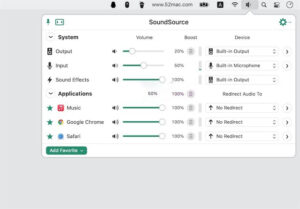
Breaks the system’s limitation of only being able to adjust global volume, SoundSource supports setting individual application volumes. You can have the music player’s volume higher than other applications, or completely mute a bothersome application’s notification sound, easily managing the volume balance between multiple applications.
Application-level audio routing redirection
Supports routing different applications’ audio output to different devices. For example, routing music player sounds to high-quality speakers, and sending video conferencing applications (such as Zoom, Skype) audio to headphones, achieving true multi-task audio processing to meet different scenarios’ audio needs.
Professional-level audio effect processing
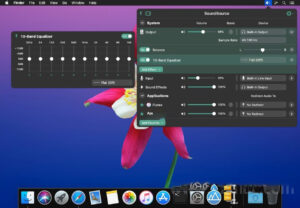
10-band equalizer (EQ): Built-in professional 10-band equalizer with multiple presets (such as vocal enhancement, bass enhancement, small speaker optimization, rock, jazz, classical), allowing for equalization effects applied to the system globally or individually to a specific application.
Magic Boost 2: A one-click enhancement for audio performance, even the smallest speakers can achieve rich and full sound.
Volume Overdrive: Supports amplifying application audio up to 400% without noticeable distortion.
Headphone EQ: Optimized presets for thousands of different headphone models, allowing for customized best sound quality for specific headphones.
Audio Unit plugin support: Supports loading third-party Audio Unit v3 plugins, allowing for advanced audio effects applied to individual applications or the entire system, providing infinite expansion possibilities for audiophiles and professionals.
Smart device management
Quickly switch input/output devices with just two clicks.
Save personalized settings for different devices, automatically applying the corresponding configurations when switching devices.
Real-time monitor input device (microphone) activity, allowing for instant microphone or speaker muting with a single click.
Supports grouped output (Grouped Output), allowing simultaneous audio playback to multiple devices.
Supports AirPlay streaming, allowing wireless transmission of any application’s audio to networked AirPlay devices.
Super Volume Keys (Super Volume Keys)
Allows Mac keyboard’s volume up/down keys to control HDMI devices, DisplayPort audio output, and other external devices that typically do not support these keys, without needing to adjust the volume through the device’s physical keys.
Quick Configs
Users can create multiple audio configuration presets (such as “Work Mode”, “Game Mode”, “Music Production Mode”, etc.), switching between different volume, device, and effect combinations with a single click, suitable for quick switching between different workflows and usage scenarios.
Automation and intelligence
Automatically detects and lists audio applications currently playing, without requiring manual addition.
Automatically cleans up stopped audio applications (also fixed by the “Favorites” feature to keep commonly used applications fixed).
Supports setting specific applications to automatically switch audio devices or effects upon startup.
Supports integration with macOS Shortcuts for automated audio adjustments.
Keyboard shortcuts and operation efficiency
Supports custom global keyboard shortcuts, instantly showing/hiding the SoundSource window with a single click.
Assigns independent global keyboard shortcuts to each audio device and Quick Config.
Menu bar icon displays current volume level and mute status in real time.
Supports displaying audio level meters directly in the menu bar and muting with a single click.
Supports floating window mode, allowing the control panel to be fixed on the screen for easy adjustment.
Version 6.1.2 Update Content:
Initial support for macOS 27 (Golden Gate) test version
No longer prompts a warning when launching SoundSource on macOS 27 (Golden Gate). No known issues related to Golden Gate have been discovered.
Please note that Apple’s test version systems are still in a state of change. For the best experience, we always recommend users to use the official (non-test version) operating system.
Multiple AirPlay enhancement features
We have improved several features of SoundSource’s AirPlay streaming function:
– Now reliably connects to the AirPlay device when sending audio.
– Output groups and AirPlay devices now correctly re-establish connections after core audio service (coreaudiod) restarts.
– Optimized synchronization mechanisms for AirPlay devices, fixing audible audio drift issues when streaming to multiple output devices for extended periods.
– Fixed the “UID already exists” error when connecting to AirPlay devices.
– Automatically restores the last used volume when connecting to AirPlay devices.
Significantly optimized the handling of silent (mute) audio, significantly reducing average CPU usage.
SoundSource is now able to work normally with the Mixed In Key’s “SE” audio unit (Audio Unit) plugin.
No longer shows multiple audio sources in SoundSource when the same process runs, avoiding the issue of audio being duplicated.
Audio playback is no longer incorrectly repeated when previewing media in Finder, fixing the issue that caused audio to be unable to be muted.
Improved mechanisms to avoid Loopback virtual device being muted for up to 10 seconds after being no longer captured by other applications.
Fixed a rare issue that could cause SoundSource to crash when running in the background.
Interface elements that may appear blurry on non-Retina displays should now be clearly visible.
When opening the effect pop-up window with the “Open/Close Effects Window” shortcut, it now retains its previous position.
The new instance of audio unit (Audio Unit) effects now reverts to its initial default size, fixing a feature regression introduced in SoundSource 6.1.1.
SoundSource no longer incorrectly floats above the menu bar when system settings enable “Auto Hide and Show Menu Bar.”
The “Local Network Access” permission no longer incorrectly switches between “Enabled” and “Denied.”
The SoundSource application icon has been updated to support the system-level “Dark Icon” style for macOS 26 and higher.
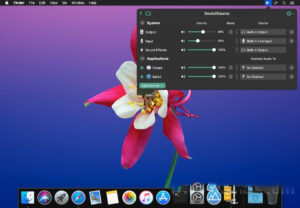
Software Screenshot:
This resource requires login to download
Log in
Arranger: A Role-Playing Puzzle Adventure for Mac v1.1.0
Downloads:3068 | 2026-10-23

Adobe Acrobat Pro DC for Mac v2019.021.20049 Chinese Activation Edition Download
Downloads:243 | 2026-10-20

Mac File List Export v2.9.4 Metadata Exporter Activation Download
Downloads:1081 | 2026-10-20

Final Draft 13 for Mac v13.2.3 Screenwriting Software Activated Version Download
Downloads:151 | 2026-10-17


Ratings & reviews
No rating
Let’s rate it.