| Octavo is a professional prepress imposition tool for Mac, supporting multiple booklets, foldlets, business cards, and pamphlets, allowing precise control over crop marks and print parameters, and exporting compliant PDFs for professional printing needs.
#### What can Octavo do?
Simply drag in PDFs or images to get a complete prepress workflow:
– **Create booklet**s: Automatically calculate the order for double-sided printing, add fold lines and staple positioning marks, output a printable imposition file.
– **Organize PDF originals**: Supports rotation, flip, straighten, perspective correction, and crop, all through a canvas visual editor.
– **Fine-tune margins**: Precisely position content to avoid cropping during binding, supports multiple zoom modes for page-by-page fine-tuning.
#### Imposition Styles
– **Perfect binding booklet**: Classic folded-and-stapled booklet style.
– **Multi-fold pamphlet**: Suitable for thick books, splitting pages into multiple foldlets, binding together.
– **Spiral/Tab binding**: Provides hole positioning, binding edges, and specific margin settings for spiral-bound documents.
– **Tri-fold brochure**: Supports C-fold and Z-fold layouts, suitable for brochures and manuals.
– **Single-sided output**: Single-sided or double-sided printing, supports full content positioning.
– **Business cards and labels**: Grid layout, customizable rows, columns, and spacing.
– **8-page mini magazine**: Single sheet folding into an 8-page booklet, ideal for fanzines or creative projects.
– **Accordion magazine**: Single sheet folding into accordion-style pages.
#### PDF Layout and Margins
– **Drag control points to set top, bottom, inner, and outer margins**.
– Supports page/global adaptive zoom, or manual setting of zoom ratios.
– Aligns content to page edges or corners for cross-page layouts.
– Supports independent page settings, allowing linking or unlinking pages for individual adjustments.
– Supports bleed settings for content beyond the margin.
– Supports preview modes for reading across pages or for full-size imposition sheets.
#### Markers and Page Numbers
– **Fold lines, staple positioning lines, crop marks, crop lines**.
– **Spiral binding hole positioning lines**.
– Customizable marker thickness, color, and style.
– **Page numbers**: Supports Arabic, Roman, or letter sequences, with custom fonts, colors, and background shapes.
– **Skip cover and blank pages**, or exclude specific pages.
– **Customize page numbers** to include or exclude prefixes and suffixes.
#### Media and Paper Management
– Create named media types, set paper sizes, weights, and paper types.
– Assign printers and paper trays to each media type.
– Specify media for single pages, such as thick cardstock for covers and thin paper for interiors.
– Automatically insert blank pages to ensure media alignment.
#### Printing and Exporting
– **Export PDFs**: Can output reading previews or complete imposition files.
– **Direct printing**: Supports selecting printers and paper trays for each job.
– **Automatic duplex printing**: Detects and enables duplex printing.
– **Manual duplex workflow**: Provides a manual duplex printing option for printers without automatic duplex.
– **Full support for printer-specific features**.
#### Built for Mac
– **Undo/redo support**: Complete support for local document saving, no cloud integration.
– **Drag-and-drop page reordering**, supports importing PDFs and images.
– **Dark mode compatibility**.
– **Liquid Glass display optimization**, for a refined and aesthetically pleasing interface.
Version 1.2 Updates:
### New Features
– **New “File -> Export PDF” command**.
– **New multi-fold pamphlet tagging feature**.
– **Supports opening Octavo templates in Finder**.
### Bug Fixes
– **Fixed template selector issues**, including double-clicking, silent opening failures, and missing crop marks.
– **Fixed printer issues**, such as ignoring paper sizes, paper types, print quality, black-and-white modes, print counts, and duplex settings.
– **Fixed issues with switching printers**.
– **Fixed issues with cover pages and imposition guides not applying to selected paper trays and media types**.
– **Fixed issues with the print panel**, including saving and restoring settings, and ensuring that changes are saved.
– **Fixed issues with manual duplex printing**.
– **Fixed issues with out-of-order printing and specific paper range printing**.
– **Fixed issues with missing crop boxes in exported PDFs**.
– **Fixed issues with staple marks, fold marks, and center marks misaligned in multi-fold or multi-region scenarios, and issues with multi-fold layouts not considering spine edges**.
– **Fixed issues with page numbers not updating correctly in preview**.
– **Fixed issues with page numbers not updating correctly in preview**.
– **Fixed issues with the “Skip Inner Cover” feature**.
– **Fixed issues with page number color printing discrepancies**.
– **Fixed issues with multi-fold and multi-page layouts not considering spine edges**.
– **Fixed issues with tri-fold back pages not mirrored correctly**.
– **Fixed issues with six-fold booklets in “First Fold, Then Cut” layout**.
– **Fixed issues with right-to-left reading of 8-page booklet pages**.
– **Fixed issues with horizontal business cards misaligned and incorrect crop handles**.
– **Fixed issues with imposition style changes**.
– **Fixed issues with content printing to hole areas in spiral-bound documents**.
– **Fixed issues with rotated pages not aligning correctly with crop marks**.
– **Fixed issues with low-resolution page exports**.
– **Fixed issues with high-resolution images, horizontal photos, and deformed scans**.
– **Fixed issues with internal coordinate origin anomalies**.
– **Fixed issues with rotation, straightening, and filter editing affecting only the selected page**.
– **Fixed issues with previewing crop marks on the back page and missing page numbers**.
– **Fixed issues with previewing page numbers not matching the actual print output**.
– **Fixed issues with the “First Fold, Then Cut” layout in six-fold booklets**.
– **Fixed issues with horizontal business cards misaligned and incorrect crop handles**.
– **Fixed issues with incorrect crop marks in multi-fold layouts**.
– **Fixed issues with the “First Fold, Then Cut” layout in six-fold booklets**.
– **Fixed issues with the “First Fold, Then Cut” layout in six-fold booklets**.
– **Fixed issues with the “First Fold, Then Cut” layout in six-fold booklets**.
– **Fixed issues with the “First Fold, Then Cut” layout in six-fold booklets**.
– **Fixed issues with the “First Fold, Then Cut” layout in six-fold booklets**.
#### Functionality Improvements and Optimizations
– **Optimized the print dialog box**, removing conflicting options for zoom and paper settings.
– **Optimized crop control points**, now supporting enlarging business cards and labels.
– **Adjusted noise reduction, sharpening, and adaptive threshold effects**, ensuring print and preview colors match.
– **Optimized filter processing for exported pages**, improving color accuracy.
– **Optimized warnings for inconsistent media configurations**.
– **Optimized preview smoothness when dragging margins and corners**.
– **Optimized logic for opening higher version documents**, improving security and stability.
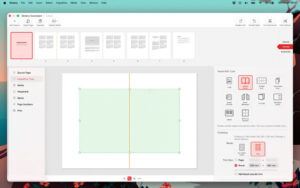
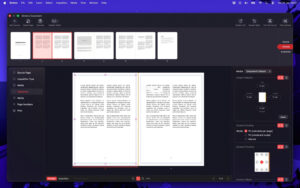
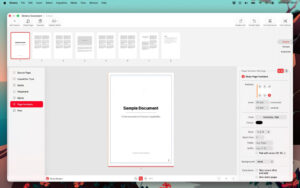
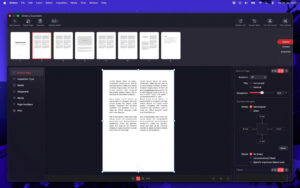
Software Screenshot:
|




Ratings & reviews
No rating
Let’s rate it.