

Lite Color Wheel Pro for Mac v8.9 Chinese Activation Download
Color Wheel Pro is a lightweight and efficient professional color tool designed for the Mac platform, featuring multiple digital, classic, abstract, and non-digital color wheel modes. It supports the generation of smart color schemes, image color sampling, paint mixing simulation, and WCAG contrast detection, among other features. It provides one-click export of color codes in HEX, RGB, and CMYK formats, making it a must-have color pairing assistant for designers, painters, and photographers.
### Features:
1. **Multiple Professional Color Wheel Modes**
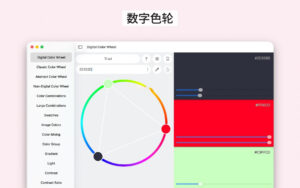
– **Digital Color Wheel**: A unique tool tailored for graphic designers, based on modern digital color theory.
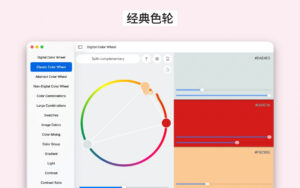
– **Classic Color Wheel**: A traditional version of the RYB color model, suitable for traditional painting and basic color theory learning.
– **Abstract Color Wheel**: A simplified color scheme tool optimized for abstract painting.
– **Non-Digital Color Wheel**: A color wheel mode that simulates the effect of mixing traditional paints.
2. **Smart Color Scheme Generation**
– Supports multiple classic color schemes: complementary colors, split complementary colors, triadic colors, tetradic colors, and analogous colors.
– Real-time preview of color scheme effects, allowing you to adjust all related colors by dragging control points on the color wheel.
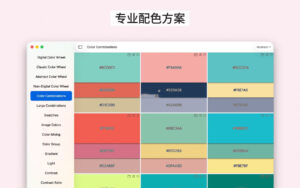
– Provides a large number of preset professional palettes suitable for digital design and abstract art fields.
– Supports saving color schemes to folders for easy management and retrieval.
3. **Rich Color Toolset**
– **Color Samples**: A color library categorized by season, mood, and style, including oil paint color palettes.
– **Lighting Tools**: Simulates the effects of different types of light (daylight, lighting, shadows, etc.) on colors.
– **Color Groups**: Quick creation and management of large color collections.
– **Value Separator**: Separates images into clear levels of brightness to simplify the creative process for beginners.
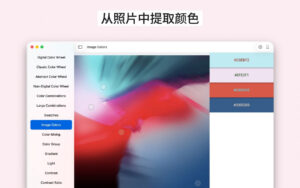
– **Image Colors**: Extracts the main color and auxiliary color from imported images to generate a complete color palette.
– **Mixing Tools**: Simulates the effect of mixing paints, allowing you to save the mixed color.
– **Gradient Tools**: Creates multi-color gradient transitions, supports exporting gradients as image files.
– **Contrast Tools**: Calculates the contrast ratio between two colors to ensure designs meet WCAG accessibility standards.
– **Work Area Tools**: Creates and edits complex color combinations, supports working with multiple palettes simultaneously.
4. **Precise Color Control and Export**
– Supports multiple color formats: HEX, RGB, HSL, CMYK, Swift, Java, etc.
– One-click copy of color codes, allowing direct pasting into design software or code.
– Precise adjustment of hue, saturation, and brightness parameters.
– Supports multiple color output formats to meet different design and development needs.
Version 8.9 Update Highlights:
– Added support for more color output formats.
– Now you can easily copy and paste color combinations within the application.
Software Screenshot:
This resource requires login to download
Log in
Things 3 for Mac v3.12.3 Chinese Activation Version Download
Downloads:769 | 2026-10-27

VideoSolo Blu-ray Player for Mac v1.1.22 Chinese Version Download and Activation Version
Downloads:2788 | 2026-10-24

Reflex Studio for Mac v3.1: Reflecting Water Surface Imitation Activation Download
Downloads:1430 | 2026-10-21

Geekbench AI for Mac v1.4.0 Activation Download
Downloads:2786 | 2026-10-18


Ratings & reviews
No rating
Let’s rate it.