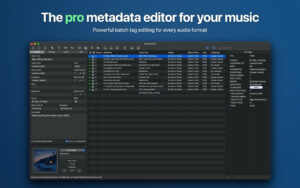
| Metadatics is a powerful and user-friendly macOS audio metadata editor. You can batch modify tags for your entire music library, search for missing audio information online, rename files based on tags, and organize metadata with a variety of built-in tools. All these operations can be completed within this smooth native software.
Whether it’s a single song or thousands of audio files, Metadatics handles batch processing speed and precise customization. The software supports reading and writing mainstream tag formats, allows multiple content entries for a single field, and supports storing multiple cover images for a single file. With a complete undo/redo feature, you can freely debug and modify.
## Supported Formats
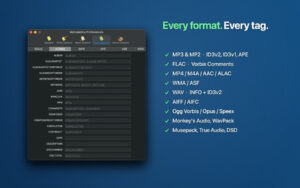
MP3, M4A/MP4, AIFF, WAV, FLAC, Ogg (Vorbis, Opus, Speex), APE, WavPack, Musepack, DSD, WMA; and supports reading and writing ID3v1, ID3v2, MP4, Vorbis, APE, ASF tags.
## Core Features
### Batch Editing
Process hundreds or even thousands of audio files at once, and apply a unified tag change with a single click.
### Practical Editing Tools
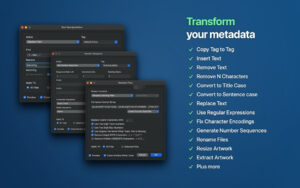
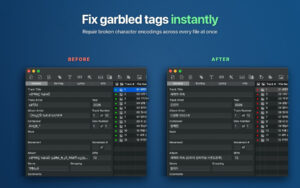
Includes text find and replace, trimming characters at the beginning and end of tags, generating numeric sequences, cross-tag content copy, and converting text encodings, among other editing functions.
### Online Information Retrieval
Connects to MusicBrainz to retrieve complete track and album metadata, searches for high-resolution album covers from iTunes and Discogs.
### Album Cover Management
Single files support multiple cover images; you can add, extract, resize, and convert covers individually or in bulk. Compatible with various standard cover formats.
### File Renaming
Automatically rename files based on metadata, or extract information from existing filenames and write it into tags.
### Original Tag Viewing and Editing
View and edit the underlying original tags through the “All Tags” panel, including multi-value fields and some lesser-known tags found in most other software.
### Lyrics and Sorting Tags
The interface is clean and organized, allowing you to edit lyrics, sort fields, and standard audio tags.
### Preview Function
Preview the effects of all selected files’ changes before applying them, ensuring accuracy before applying changes.
### Import/Export
Supports importing and exporting audio metadata in CSV and XML formats.
Version 1.7.2 Update Content:
### New Features
– Adds support for MP2 (.mp2) audio file formats.
– Adds a real-time prefix filter in the tag name input box of the “Add/Edit Tags” window.
### Function Improvements
– Improves the accuracy of iTunes online album cover search results.
– Upgrades TagLib to version 2.2.1, enhancing tag read/write stability.
– Speeds up rapid operations by not flashing the progress panel during extreme operations.
### Bug Fixes
– Fixes silent file renaming failures when granting read-only permissions to the target folder in sandbox mode.
– Fixes the issue where the “Add/Edit Tags” window directly overwrites existing tag content instead of appending it.
– Fixes the truncation of iTunes directory IDs (cnID) exceeding 32 bits.
– Fixes the issue where the album cover panel shrinks below its minimum size when resizing the window.
– Fixes issues with reading/writing ASF/WMA format album covers and group tags (GRP1).
– Fixes the MusicBrainz search window to adapt to the current MusicBrainz API interface.
– Fixes program crashes caused by file permissions requests during reading/writing files.
– Fixes the software freezing issue when using the “Remove File” function, and improves the speed of deleting large numbers of files.
– Fixes the “Cannot read” error when opening a large number of files.
– Fixes occasional incorrect display of the status bar cover image count.
Software Screenshots:

|






Ratings & reviews
No rating
Let’s rate it.