

Advanced File Search Tool ProFind for Mac v1.39 Activation Download

  • Introduction
Download
Download now
Join VIP Free download

Description

ProFind is a highly efficient file search tool designed specifically for macOS, aiming to provide powerful search features and a simple interface to help users quickly locate files.

Most file search applications directly search macOS’s metadata database or disk. This often results in incomplete search results, unnecessary items, or slow execution speed.

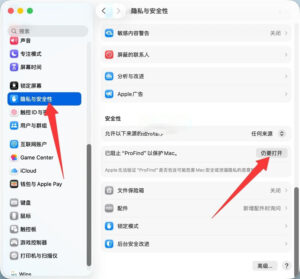
Note: If you first open the software, you may see a warning about it being damaged. Please check the Privacy & Security settings in System Settings, and ensure that the “Open Anyway” option is selected under Security, as shown in the image below.

With support for innovative natural language queries, application launch, space disk browsing, hash generation, Finder integration, search saving, history, scripts, and more, it is your only necessary search application.

Complete feature list:

Natural language search queries.
Infinite search results.
Search in hidden folders and packages.
Search any disk type: Mac, Windows, servers, etc.
Supported search locations: Home, Mac disk, local disk, servers, single disk, open Finder folders.
Search saving and history.
Search by: name, creation date, modification date, file extension, tags, parent folder, type, regular expressions, wildcards, and spotlight metadata.
Exclude.
Hash: md4, md5, sha1, sha224, sha256, sha384, sha512 (display advanced information).
Auto-complete application names, command names, and keywords.
Clear, non-blurry, display file paths with path differences highlighted.
Large icon view of one or two search results.
Space disk browsing (save window position, size, scroll position, etc.).
Support executing shell and AppleScripts on found items.
Highlighted words.
Sidebar features: saved searches, history, bookmarks, recent projects, built-in search, and recent changed files.
Context menu: share, service, open in Finder, get info, copy path.
Quickly access bookmarked folders.
QuickLook preview.
Supports dark mode.
Drag-and-drop applications.
Menu bar icon on/off.
Fully configurable system-wide hotkeys.

Version 1.39 Update:

1. Added the “Open Anyway” option in the right-click menu for files.
2. Clicking the View icon in the toolbar now allows you to preview and view file details. Please let me know which content you would like to display in the panel; this feature is only compatible with macOS 14 and above.
3. When sorting by size, the program now calculates the total volume occupied by all folders in the search results.
4. Adding “: locked” or “: not locked” to search queries allows you to filter locked or unlocked items.
5. Passing a complete path to the inside command limits the search results to this directory. Example: “: inside /Volumes/DiskName/.”
6. Fixed defects in grouped search.

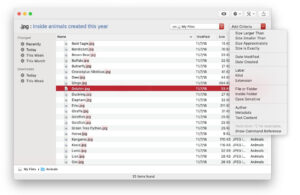
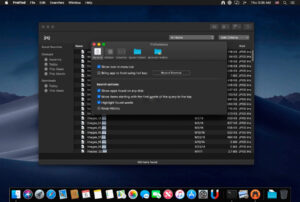
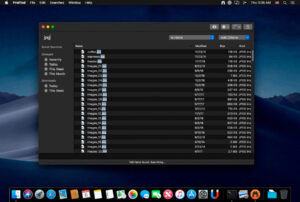
Software Screenshots:


Download info

This resource requires login to download

Log in
Note: This resource is for informational purposes. By using this resource, you agree that you accept full responsibility to the copyright holder. For questions, please contact us.

Ratings & reviews

No rating

Let’s rate it.

  • 5 stars
  • 4 stars
  • 3 stars
  • 2 stars
  • 1 stars

You may also like

More
×
Advanced File Search Tool ProFind for Mac v1.39 Activation Download
iMac — One-stop Mac Software Download Platform
Social login
captcha
Social login