

Wolfram Mathematica for Mac v15.0 Scientific Computing Software Chinese Activated Version Download
Wolfram Mathematica is the world’s leading modern technical computing system. After nearly four decades of technological iteration, it provides a unified, integrated computing environment for scientific research, education, engineering development, data analysis, and other fields.
Installation and cracking method:
1. After the software download is complete, open the downloaded dmg format software package as shown above, and drag the software “Wolfram” to Applications to install.
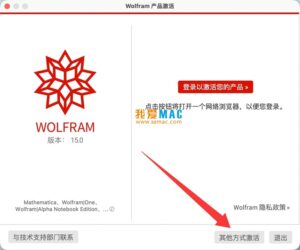
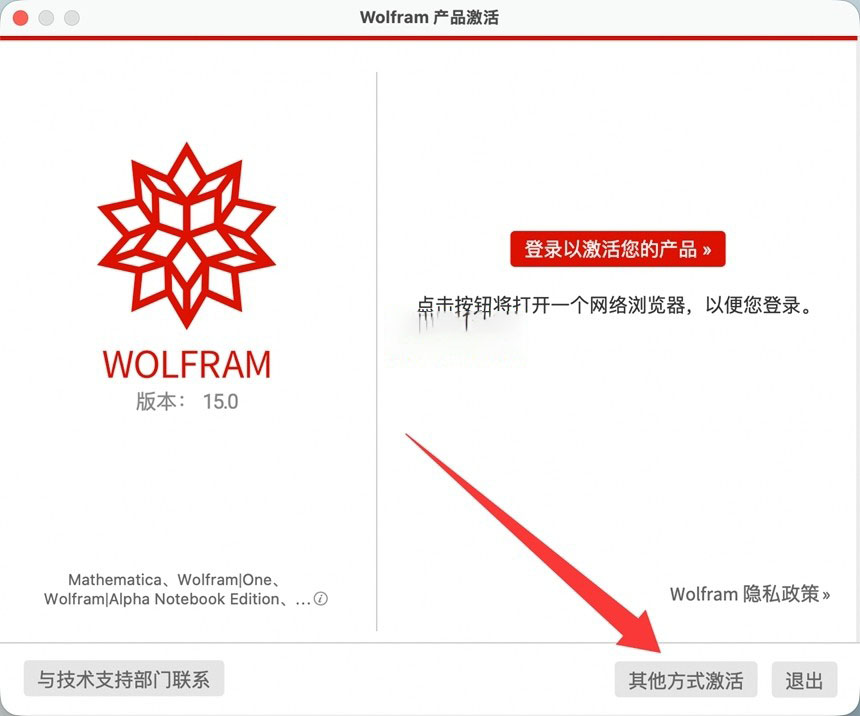
2. After completion, open the software “Wolfram”, it will prompt to enter the activation key, as shown below, click the second button below “Activate through other methods”.
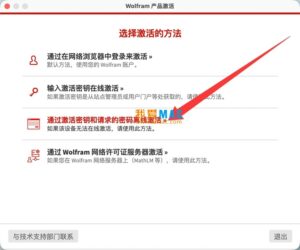
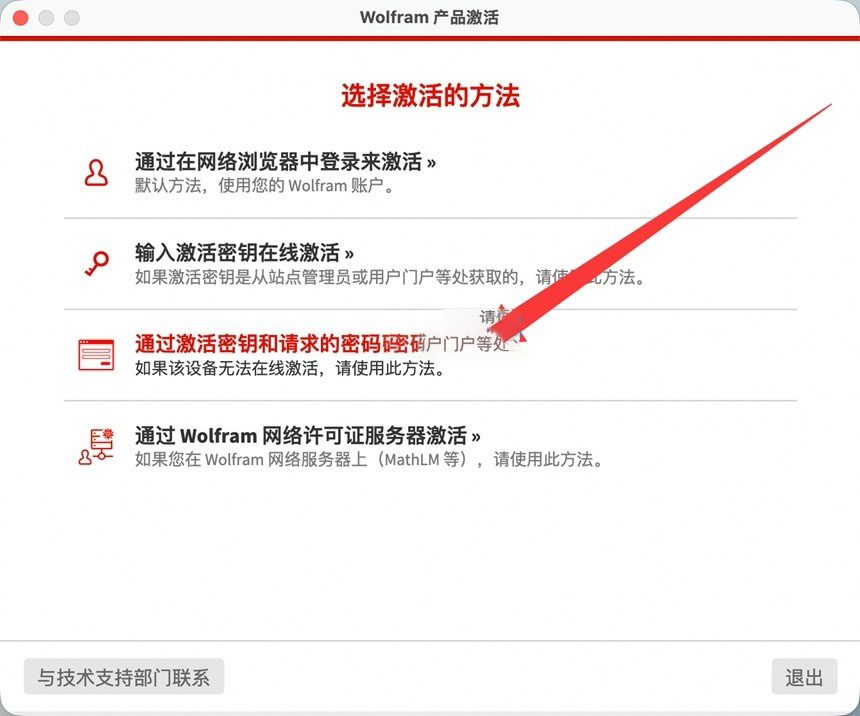
3. Next, click “Activate offline through activation key and requested password”, as shown below:
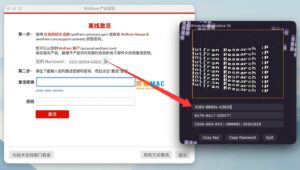
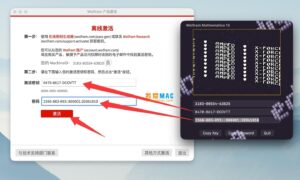
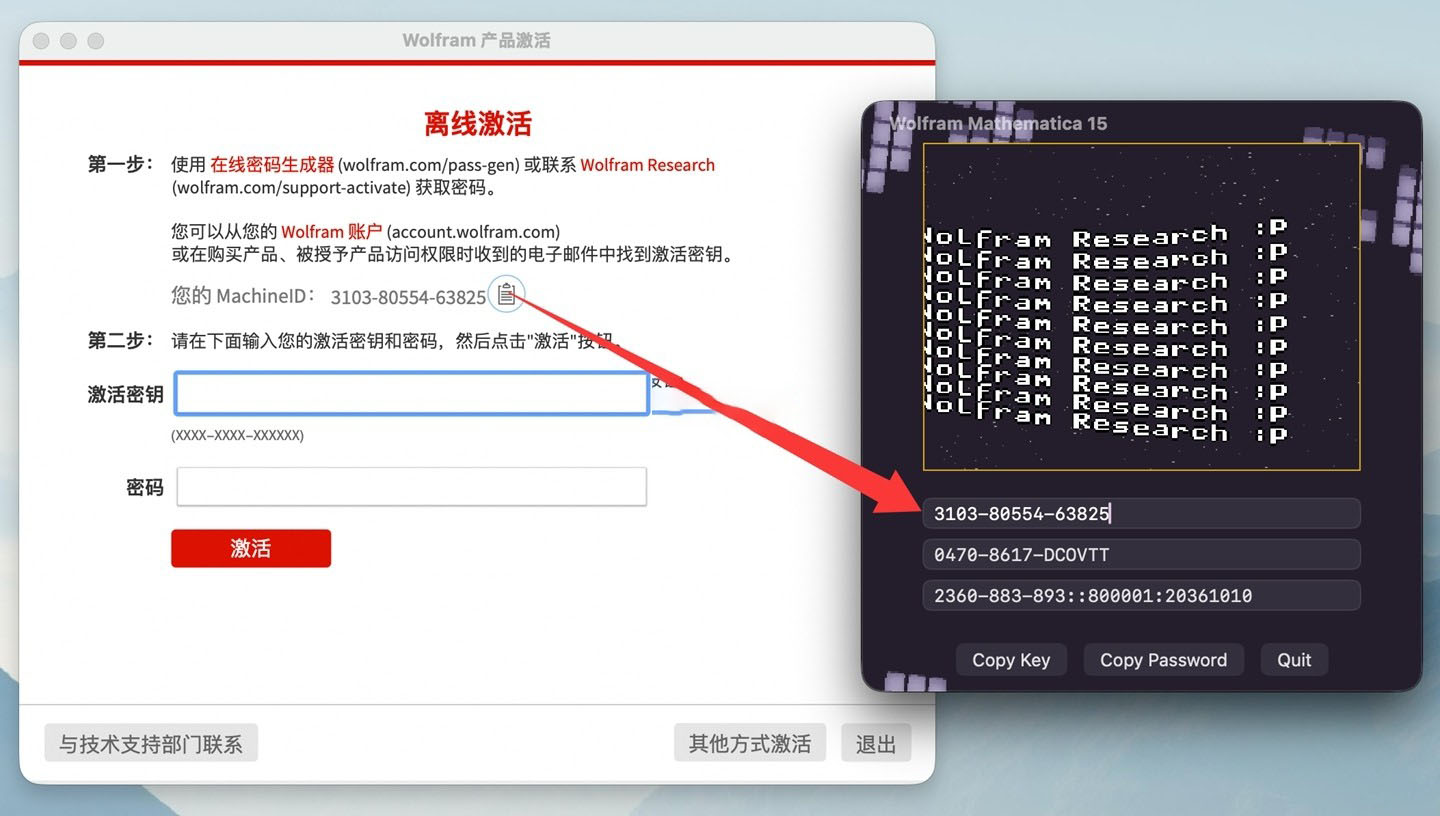
4. Then the activation window will pop up, as shown below. We need the Math ID given on the software registration page. There is a small icon after the Math ID; click it to copy the Math ID.
Go back to the downloaded software package, open the keygen inside, paste the copied Math ID into the first box of the keygen, and the key and password will be automatically generated, as shown below.
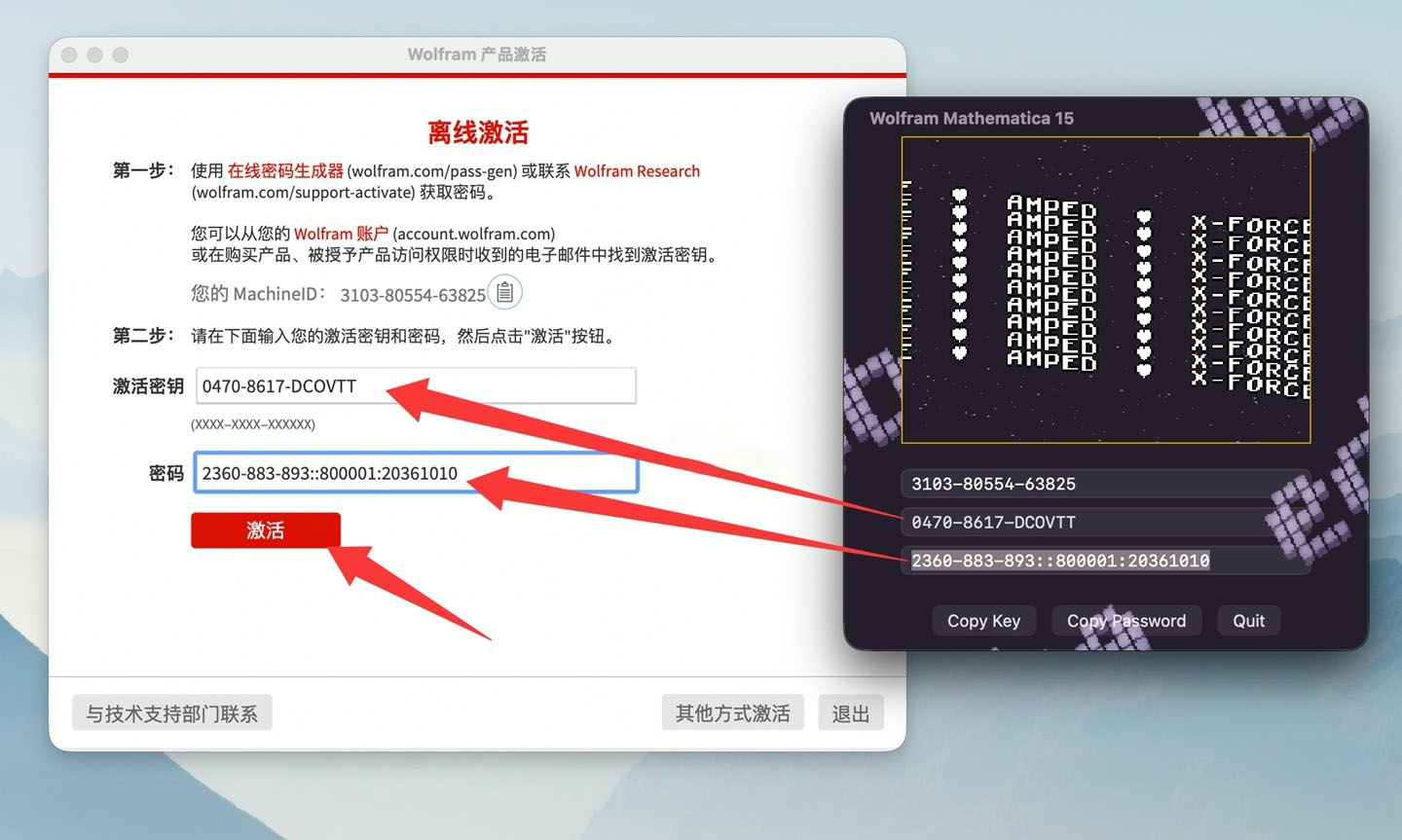
5. Copy and paste the generated key from the keygen into the activation key field in the software. Copy and paste the Password from the line below into the password box in the software, and click the activate button, as indicated by the arrow below.
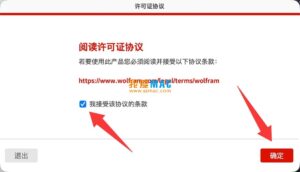
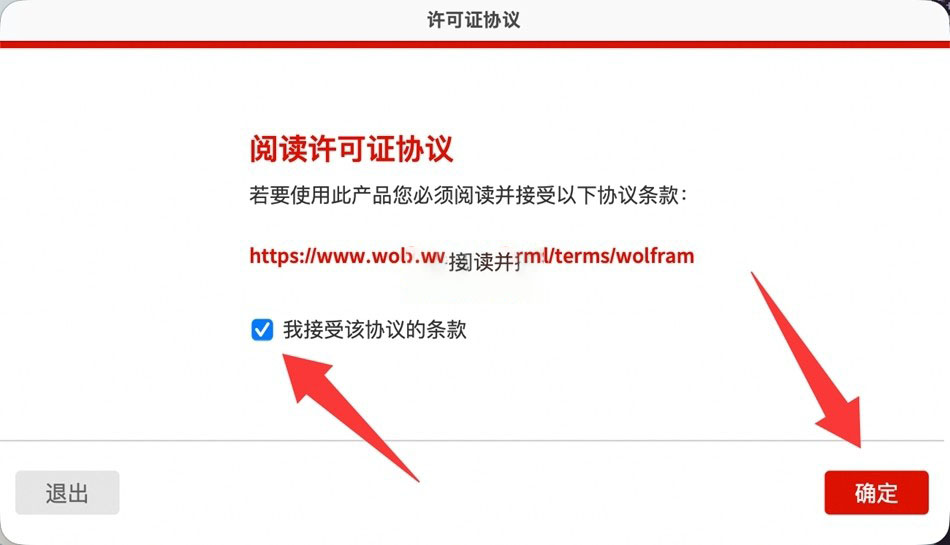
6. Check the terms and click the OK button, as shown.
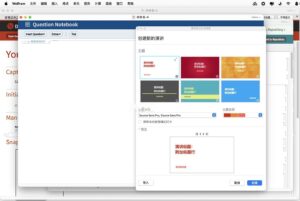
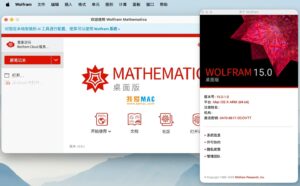
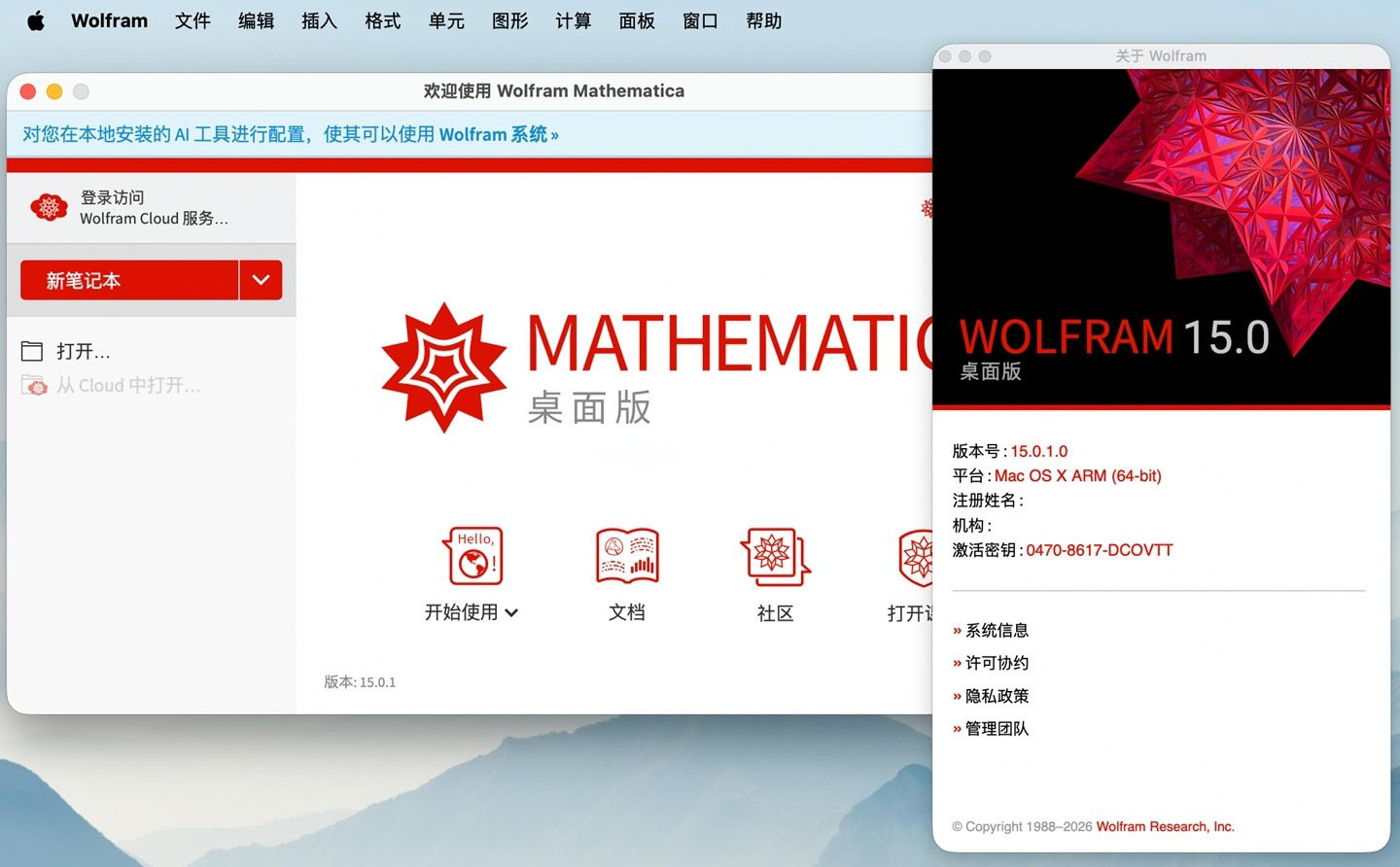
7. Finally, the software opens successfully, activation is complete, enjoy.
—————————————————————–[Divider]———————————————————————–
### 1. All-domain integrated computing system
Built-in nearly 7000 deeply optimized built-in functions, covering pure mathematics, data science, machine learning, engineering modeling, visualization, financial computing, geographic information, and all other technical computing fields. All functions and data structures are natively unified in design, requiring no additional plug-ins to achieve cross-domain collaborative computing.
### 2. Industry-leading computing power
– **Symbolic computation**: Supports complete algebraic operations, calculus, equation solving, number theory, abstract algebra, and other high-precision symbolic operations, and is a global benchmark in the field of symbolic computation.
– **Numerical computation**: Provides arbitrary-precision numerical computation capabilities, built-in a large number of Wolfram-original efficient algorithms, supports large-scale parallel computing and GPU-accelerated computing, and can handle ultra-large engineering and scientific research problems.
– **Meta-algorithm framework**: Provides automation capabilities at the superfunction and meta-algorithm levels, automatically selects the optimal algorithm path, and greatly improves work efficiency.
### 3. Interactive computable notebook
Adopts the original notebook document interface, supporting code, natural language, mathematical formulas, visual graphics, interactive controls, and dynamic animations mixed in the same document. Calculation results are rendered in real time, and it supports creating interactive technical reports, lecture notes, and presentation documents, realizing “the document is executable”.
### 4. Deep integration of AI and large models
Built-in Wolfram AI assistant, deeply adapted to computing scenarios, supports directly generating code, completing analysis tasks, and explaining calculation results through natural language; supports the MCP protocol, allowing external large language models to directly call Mathematica’s computing and knowledge base capabilities, achieving precise computing enhancement for large models.
### 5. Complete data science workflow
Provides a new generation of time series, event series, tabular data, and categorical data processing frameworks, supporting the entire process of missing value handling, data cleaning, feature extraction, model fitting, and evaluation. Built-in dozens of statistical models and machine learning algorithms, supports neural network training and deployment, and is compatible with import and export of mainstream data formats.
### 6. Rich professional domain tools
Covers dozens of professional fields such as physics, mechanics, heat transfer, electromagnetics, chemistry, molecular biology, astronomy, geographic information, control engineering, financial analysis, etc., providing domain-specific computing functions, model libraries, and entity data, without the need to build a computing framework from scratch.
### 7. Publication-quality high-quality visualization
Built-in hundreds of visualization functions, supporting everything from basic statistical charts, 2D/3D function graphs, to professional domain visualizations such as geography, molecules, and flow fields. Provides a complete style customization system, supports interactive controls and animation generation, and can directly output high-definition vector graphics and bitmaps that meet publication standards.
### 8. Highly extensible and ecosystem-compatible
Based on the complete Wolfram programming language, supports custom functions, package development, and modular project management. Provides external language interfaces, supports seamless switching between local computing, cloud computing, and batch supercomputing, and can be deeply integrated into enterprise-level workflows and production environments.
Version 15.0 updates:
## I. AI and notebook experience upgrades
1. **Built-in AI assistant**: Wolfram AI Assistant is natively integrated into all notebooks, providing chat-style code generation, calculation explanation, and problem solving through a sidebar interface.
2. **MCP protocol support**: Added MCP framework, supporting external AI clients such as Claude and ChatGPT to directly call Wolfram’s computing capabilities and knowledge base.
3. **Large file support**: Notebook files support ultra-large files exceeding 2GB, with optimized read/write performance and stability.
4. **Interface and themes**: Added multiple visual themes, optimized sidebar interaction, and redesigned the global find-and-replace experience.
5. **Chat notebook**: Added a chat bar interface, allowing direct creation of chat input cells and execution of calculations.
## II. Core language and programming capability enhancements
1. Added `SubValuesHoldAll` attribute, supporting functions to hold subvalue arguments from evaluation.
2. Functions such as `GatherBy` and `SplitBy` have added operator forms, making code writing more concise.
3. Added incremental object system: `IncrementalObject`, `NextValue`, supporting the creation of iterable incremental computation instances.
4. Enhanced exception handling system: Added structured exception throwing and catching mechanisms, optimizing error handling for large code bases.
5. Compiler upgrade: Updated to LLVM 20, optimizing native compilation performance.
6. Data structure optimization: Multi-core parallel performance of data structures such as HashSet, HashTable, and BitVector has been greatly improved.
## III. Comprehensive upgrade of data science and sequence processing
1. **New generation time/event series framework**: Supports missing data handling, faster computation speed, supports named and typed components, and can directly interface with tabular objects.
2. Added `EventSeries` event series type, supporting lookup, accumulation, and analysis of discrete events.
3. **Tabular data enhancement**: `Tabular` objects now support column types (categorical, ordinal, etc.), can be saved directly in notebooks, and support efficient conversion to and from Pandas dataframes.
4. **Categorical data support**: Added `Nominal` (unordered categorical) and `Ordinal` (ordered categorical) data objects, improving statistics and visualization of categorical data.
5. **Model fitting enhancement**: `ModelFit` supports more model types and automatic model selection, and visualization functions can directly embed model fits.
## IV. Mathematics and algorithm expansion
1. **Non-commutative algebra**: Added support for special non-commutative algebras such as Clifford algebra, Grassmann algebra, and Weyl algebra.
2. **Matrix decomposition**: Added various matrix decomposition methods such as rank decomposition, LDL decomposition, Bunch-Kaufman decomposition, ordered Schur decomposition, polar decomposition, and Popov decomposition.
3. **Special functions**: Added multivariate special functions such as multiple zeta functions, multiple polylogarithm functions, and multiple harmonic numbers.
4. **Differential equations**: Greatly improved the exact solving capabilities for nonlinear ordinary differential equations and Fuchsian systems.
5. **PDE and engineering computation**: Expanded PDE component functions in fields such as fluid mechanics, solid mechanics, and heat transfer, supporting more scenarios such as rotating flow, plasticity modeling, and spring-damper boundaries.
## V. Visualization and graphics capabilities
1. Added `BezierSurface` Bezier surface primitive, improving 3D geometric graphics support.
2. Statistical visualization enhancement: Added new chart types such as categorical histograms, bubble histograms, and distribution charts.
3. Multi-panel plotting: Added `PlotGrid` function, supporting multi-panel visualization layouts with shared axes.
4. Style system upgrade: All plotting functions uniformly support `PlotStyle`, `PlotLegends`, and `PlotLabels` key-value style settings.
5. Graph network visualization: Added various vertex and edge styles, supporting highlight effects such as glow and shadow.
## VI. New features in professional domains
1. **Computational music**: Added a complete symbolic music computation framework, supporting representation, transformation, and visualization of notes, chords, and scores, and supporting MIDI import and export.
2. **Chemistry and molecules**: Added molecular substructure search and molecular fingerprint functions, optimizing molecular property calculation and modification.
3. **Control engineering**: Added Q-learning-based regulator training function, supporting optimization of control systems through reinforcement learning.
4. **Geography and astronomy**: Day-night hemisphere function supports all celestial bodies in the solar system, added solar and lunar eclipse query functions, and improved orbital element calculations.
5. **System modeling**: Added CTESN surrogate model training, supporting fast approximate evaluation of complex system models.
## VII. Performance and accelerated computing
1. **GPU acceleration enhancement**: Added CPU+GPU hybrid acceleration modes for linear algebra, graph centrality computation, etc.
2. `GPUArray` supports more array operation functions, further improving parallel computing capabilities.
3. Performance of core algorithms such as polynomial reduction, matrix functions, and special functions has been greatly optimized.
## VIII. Import/export and compatibility
1. Added native import and export support for TOML and YAML configuration formats.
2. Added support for AVIF and HEIF image formats, optimizing image metadata processing.
3. Supports import and export of VS Code notebooks and Jupyter notebooks.
4. Enhanced import and export capabilities for dozens of data formats (CSV, Parquet, Excel, etc.), supporting column-name-based import selection.
5. Added Markdown document import support, capable of recognizing images, tables, and hyperlinks.
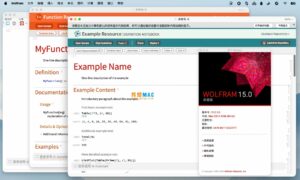
Software screenshots:

iA Writer for Mac v7.0.3 专业的写作应用 中文激活版下载 | 爱上MAC
下载次数:350 | 2026-01-13

Smultron 12 for Mac v12.4.4 文字编辑器 中文激活版下载 | 爱上MAC
下载次数:235 | 2026-01-13

GoLand for Mac v2019.3.1 Go语言开发环境 中文汉化激活版下载 | 爱上MAC
下载次数:1706 | 2026-01-13

Sublime Text for Mac v3.1.1 Build 3176 代码编辑器 中文汉化激活版_Sublime Textmac下载 | 爱上MAC
下载次数:1593 | 2026-01-13


评分及评论
4.9
(满分5, 共69用户评价)
来评个分数吧