



Dropover for Mac v5.2.3 Chinese Activation Version Download

  • Introduction
Download
Download now
Join VIP Free download

Description

Dropover for Mac is a drag-and-drop tool that allows you to easily collect, organize, share, and process files through a floating window.

Its clean and intuitive interface makes Dropover feel natural and smooth on macOS, and it can significantly enhance your productivity. With millions of users worldwide, it is the perfect companion for your efficient work.

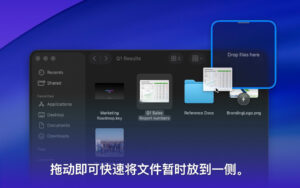
You can quickly activate the window by shaking your mouse. Dropover also offers customizable keyboard shortcuts or access from the menu bar. To make content collection and organization more convenient, you can drag items into slots.

⁕ Supports all content
Drag files, folders, documents, images, URLs, and text snippets into the floating window. Dropover can handle all draggable content on macOS.

⁕ File Management
Easily view, manage, and organize individual files. Arrange, rename, and delete items directly within the window to keep your workspace tidy and organized.

⁕ Powerful Window
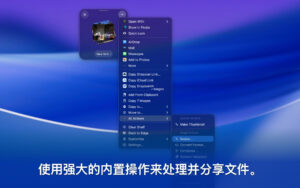
A simple yet powerful window for collecting, organizing, sharing, and processing files. Execute operations like AirDrop, email, or message sharing, adjust image sizes, or extract text with a single click.

⁕ Cloud Integration
Generate sharing links with a single click. Dropover includes Dropover Cloud service and supports integration with iCloud Drive, Amazon AWS S3, Dropbox, Google Drive, Microsoft OneDrive, and Imgur, allowing you to choose your preferred cloud storage service.

⁕ Customization
Personalize Dropover according to your workflow. Name and tag windows for organization, create custom actions, and customize settings to suit your needs.

Version 5.2.3 Update Highlights:

– Updated the built-in Alfred workflow.
– Fixed a localization issue that caused incorrect display of some titles in the “Settings” section.
– Fixed the issue where Dropover might stop responding to events from extensions, including widgets.
– Fixed abnormal behavior when dragging files with special characters in their names.
– Improved stability when handling files with special characters in their names.
– Fixed a crash issue during Dropover startup.
– Improved stability when sharing projects and displaying menus.
– Fixed layout issues in the shared window.
– Fixed an incorrect status display for “Auto-start on login” in the “Settings” section.

Software Screenshots:


Download info

This resource requires login to download

Log in
Note: This resource is for informational purposes. By using this resource, you agree that you accept full responsibility to the copyright holder. For questions, please contact us.

Ratings & reviews

No rating

Let’s rate it.

  • 5 stars
  • 4 stars
  • 3 stars
  • 2 stars
  • 1 stars

You may also like

More
×
Dropover for Mac v5.2.3 Chinese Activation Version Download
iMac — One-stop Mac Software Download Platform
Social login
captcha
Social login