| Microsoft Office for Mac is a professional office suite developed by Microsoft specifically for the macOS platform, the world’s most widely used productivity toolset. The core of the suite includes Word, Excel, PowerPoint, Outlook, and OneNote, covering all aspects of office work, including document writing, data processing, presentation creation, email management, and knowledge recording.
### 1. Native Architecture for Apple Silicon
Microsoft Office for Mac has been restructured and optimized at the core for Apple Silicon (M1/M2/M3 series) chips, completely ending the Rosetta translation era. Application startup speed has significantly improved, even when handling hundreds of megabytes of large documents, complex data tables, or high-definition presentations, scrolling, formula calculations, and animation rendering remain smooth and fluent, fully leveraging the multi-core performance and energy efficiency advantages of Apple chips.
### 2. System-Level Features Integration
– **Visual Adaptation**: Perfectly supports macOS dark mode and light mode automatic switching, the interface adopts Fluent Design design language, and is highly unified with the system visual style; fully supports Retina high-definition displays, with fine and sharp text and graphics rendering.
– **Touch Interaction**: Fully compatible with Force Touch trackpads, supporting pinch-to-zoom views, swiping between slide/document tags with three fingers, and native light taps for dictionary lookups; providing quick function key customization support for MacBook Pros with Touch Bars.
– **Ecosystem Integration**: Integrates with macOS native notification center, sharing extensions, and quick view features, supporting Handoff seamless switching to continue editing the same document across Mac, iPhone, and iPad.
– **Gesture Operations**: Components like Outlook support custom swipe gestures, which can be combined with Magic Mouse and Magic Keyboard for efficient email management.
### 3. Interface and Experience Optimization
The “Clean Mode” can hide unnecessary interface elements with a single click, reducing visual interference and improving focus. The operation logic has been adjusted to meet the habits of macOS users, with menus, shortcuts, and system interaction methods conforming to macOS usage standards, reducing the learning cost for cross-platform users.
Core component features:
### 1. Word — Professional Document Processing
– **Strong Layout Capabilities**: Supports multi-level heading styles, two-column layout, headers/footers, automatic table of contents generation, footnotes/endnotes, fully meeting the formatting requirements of academic papers, business reports, and book publications.
– **Rich Media Editing**: Supports inserting images, shapes, SmartArt graphics, charts, text boxes, and artistic text, allowing for fine adjustments of text and graphics layout.
– **Advanced Review Tools**: Includes revision mode, commenting features, word count statistics, and document comparison tools, supporting collaborative editing and commenting, making it convenient for team reviews and opinion aggregation.
– **Smart Writing Assistance**: Integrates Microsoft editor, providing spell check, grammar correction, style suggestions, and synonym recommendations, supporting multi-language proofreading.
– **Document Recovery Mechanism**: Automatic saving and automatic recovery features, allowing users to customize save intervals, preventing accidental crashes from causing content loss.
### 2. Excel — Professional Data Analysis
– **Massive Data Processing**: Supports processing up to millions of rows of data, with 400+ built-in functions and formulas covering all categories of calculations, including mathematics, statistics, finance, logic, and text.
– **Advanced Analysis Features**: Supports data pivot tables, conditional formatting, data validation, simulation analysis, and planning solve tools, allowing users to create reusable complex formulas with LAMBDA functions.
– **Visual Charts**: Offers dozens of standard chart types and combined chart options, supporting dynamic array charts, which automatically update charts when data source ranges change, without manual adjustments.
– **Innovative Features**: The IMAGE function allows direct insertion of images from network URLs into cells, supporting sorting, filtering, and batch management of images, greatly facilitating scenarios such as product catalogs and information ledgers.
– **Automation Scripts**: Supports Office Scripts for recording, writing, and sharing repetitive operations, enhancing data processing efficiency.
### 3. PowerPoint — Professional Presentation Creation
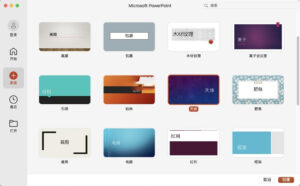
– **Rich Design Resources**: Comes with a vast library of professional templates and theme styles, offering advanced visual effects such as smooth transitions, Morph transformations, and 3D model animations, allowing for the creation of high-quality presentations quickly.
– **Cameo Camera Integration**: Allows real-time camera footage to be embedded into slides, supporting the addition of borders, shape masks, and transition effects, making remote presentations and online courses more immersive and interactive.
– **Recording Studio Features**: Integrates features like voiceover recording, ink annotations, laser pointers, and animation capture, allowing for the generation of annotated presentation videos with a single click, suitable for recording lectures, product presentations, and content creation.
– **Speaker View**: Supports dual-screen display, allowing speakers to view notes, previews of the next slide, and timing tools, while viewers see only the presentation.
– **Real-Time Collaboration**: Multiple users can simultaneously edit the same presentation, supporting comments, interactions, and likes, enhancing team collaboration efficiency.
### 4. Outlook — Email and Calendar Management Center
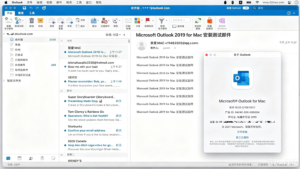
– **Unified Account Management**: Supports adding enterprise email accounts, personal email accounts (Outlook, Gmail, iCloud, etc.), and unified receipt and management of emails, with direct opening and import of .msg format files.
– **Smart Email Processing**: Offers features like automatic classification, important inbox, spam filtering, and quick search, allowing users to customize swipe gestures for archiving, deleting, or marking emails.
– **Calendar and Meeting Management**: Provides complete scheduling features, supporting meeting invitations, availability checking, and room reservations, allowing updates to work locations directly from the calendar view, and meeting details can be embedded into Teams chat windows.
– **Contacts and Tasks**: Integrates contact management and task features, supporting reminders and periodic settings, achieving integrated management of emails, calendars, and tasks.
– **Modern Settings Interface**: Uses a modern unified settings panel, making account configuration and preference management more intuitive and user-friendly.
### 5. OneNote — Free Digital Notebook
– **Infinite Hierarchical Structure**: Supports notebooks, sections, and pages for multi-level organization, allowing the insertion of text, images, tables, audio, file attachments, and handwritten ink, with flexible structures that are not limited.
– **Enhanced Ink Experience**: Optimizes pen input, supporting full-screen pen focus views, providing a writing experience close to real paper, suitable for sketching, classroom notes, and brainstorming.
– **Full-Text Search and Tags**: Powerful search features allow the retrieval of text and handwritten content within images, with a tagging system for quick classification and positioning of notes.
– **Cross-Device Synchronization**: Notes automatically synchronize to the cloud across Mac, phone, and tablet, supporting collaborative editing and sharing among multiple users.
Version 16.110.1 Update Content:
### Function Updates
1. **PowerPoint**
– **Copilot Free Edit Capability**: Powerpoint’s Copilot supports creating, editing, and optimizing presentations for users without a Copilot business license, allowing the generation of slides from scratch, updating content, adjusting layouts, and optimizing designs, while retaining original formats, structures, and brand styles.
– **Data Loss Prevention (DLP)**: Adds data loss prevention capabilities, detecting and preventing accidental sharing of sensitive information, ensuring the security of enterprise documents, and complying with organizational compliance policies.
2. **Outlook**
– **Update Work Location in Calendar View**: When using Microsoft 365 enterprise accounts, users can directly view and update their personal work locations in the calendar grid view, synchronizing team schedule states.
### Security Updates
– **Office Suite**: Fixes security vulnerabilities CVE-2026-40358.
### Fixed Issues
– **PowerPoint**: Quality and performance improvements.
– **Outlook**: Multiple known issues resolved and experience optimizations.
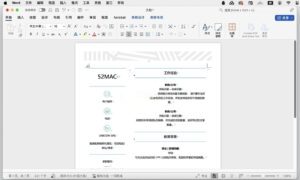
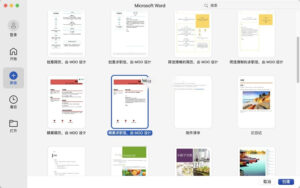
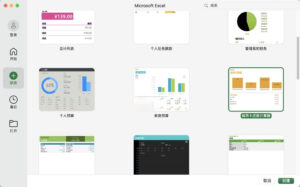
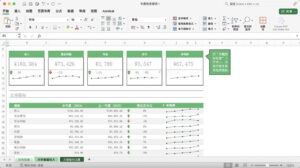
Software Screenshot:
      |




Ratings & reviews
No rating
Let’s rate it.