

FSNotes for Mac v7.2.2 High-Efficiency Note Management Tool Chinese Activation Version Download
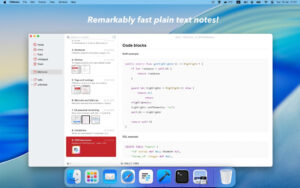
FSNotes is a free and open-source note management tool tailored for macOS and iOS platforms, centered around the core concept of storing notes in plain text. It natively supports the Markdown syntax, with full compatibility for GitHub Flavored Markdown (GFM) standards. It supports a wide range of Markdown features including headings, lists, tables, task lists, strikethroughs, and inline code blocks. It also includes support for code syntax highlighting, Mermaid diagrams, and MathJax for mathematical expressions, catering to various professional writing needs such as technical documentation, code snippets, and academic writing.
### Features:
#### 一、专业的 Markdown 编辑与内容创作能力
The software adopts a Markdown-first design philosophy, fully compatible with the GitHub Flavored Markdown (GFM) standard. It supports a wide range of Markdown features, including headings, lists, tables, task lists, strikethroughs, and inline code blocks. It provides real-time preview rendering, allowing for the synchronization of editing and layout effects.
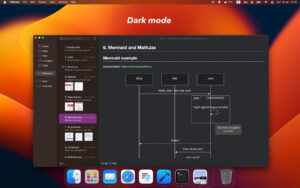
It includes a built-in code syntax highlighting engine, covering general formats like JSON and XML, as well as over a hundred programming languages. This allows for clear syntax highlighting of code snippets and technical documents. It also supports Mermaid diagrams and MathJax for mathematical expressions, catering to professional writing needs such as academic writing, architecture diagrams, and logical visualization.
Content storage supports the TextBundle container format, allowing text and embedded images and attachments to be encapsulated within a single file, preventing resource dispersion and loss. It also supports inline image insertion for a more intuitive layout.
#### 二、灵活的笔记组织与极速检索体系
The interface employs a flexible dual-pane view design, supporting vertical and horizontal layout switching, with customizable split ratios. It also supports simultaneous opening of multiple windows, allowing for separate display of an individual note’s editing state and preview state, accommodating different workflow preferences.
Note management supports hierarchical storage in multiple folders, enabling independent categorization of notes by project, theme, or scenario. A tagging system is used to quickly group similar content, facilitating multi-dimensional content organization. It supports bidirectional link syntax (“[[double brackets]]“), allowing for link creation between different notes, building a networked knowledge structure.
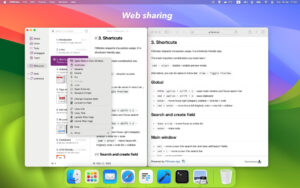
Search capabilities emphasize rapid response, with global search supporting full-text searches of titles and content, and the ability to search within selected directories or preview mode. It also features keyboard navigation logic inspired by Notational Velocity, enabling quick navigation and switching of notes through keyboard shortcuts, without the need for a mouse. It also supports pinning important notes to the top of the list, ensuring frequent content is always accessible.
#### 三、数据同步、版本控制与安全加密
The software natively supports iCloud Drive synchronization, allowing for seamless data synchronization between macOS and iOS devices. Changes are updated in real-time across devices.
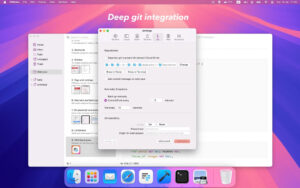
It integrates deeply with Git version control, supporting both automatic snapshots and manual commits, allowing for the recording and tracking of every content modification. It supports viewing historical versions, comparing differences, and rolling back to previous versions, providing professional-level version control for important documents and project notes.
Security is ensured through AES-256 encryption, allowing for the encryption and decryption of individual notes or entire folders. It also supports Touch ID for quick unlocking, ensuring sensitive content is securely stored. All notes are saved in plain text format locally, without any proprietary formats or database locks. Data is permanently readable and can be freely migrated, and it is compatible with any external editor, with changes being updated in real-time within the software.
#### 四、键盘驱动的效率优化与拓展能力
The software prioritizes keyboard operations, featuring a comprehensive set of global and editing shortcuts, including quick access, note creation, line content movement, and batch deletion of completed tasks. This significantly reduces the reliance on a mouse, enhancing input and organization efficiency.
Version 7.2.2 Update Highlights:
– Added JSON/XML syntax highlighting functionality
– Fixed cursor position restoration issue
– Fixed issues with keyboard shortcuts documentation
– Fixed Alt+` combination key handling logic
– Fixed scanning functionality for the “天城文” text tag
– Fixed online note deletion issues
– Fixed abnormal behavior of the “MaxChildDirs” variable
Software Screenshots:
This resource requires login to download
Log in
Video Cut & Crop & Join for Mac v3.0:闪电视频剪切&合并激活版下载
Downloads:3478 | 2026-10-24

Adobe After Effects 2023 for Mac v23.5 Crack Edition Download
Downloads:2186 | 2026-10-24

Mac Video Converter Ultimate with Chinese Activation Download
Downloads:2847 | 2026-10-24

App Cleaner & Uninstaller Pro for Mac v7.6 Uninstaller Software Chinese Activated Version Download
Downloads:2522 | 2026-10-17


Ratings & reviews
No rating
Let’s rate it.