

Note and File Manager for Mac v2.8.10 Activation Download

  • Introduction
Download
Download now
Join VIP Free download

Description

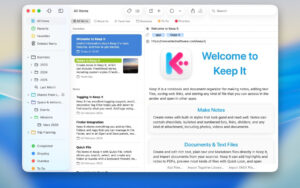
Keep It for Mac is a notepad, clipboard, and organizer that’s perfect for writing notes, saving web links, storing documents, images, or any type of file, and finding them again later.

Tip: If you encounter a crash issue, please disable SIP.

Keep It is your destination for all the things you want to keep, and you’ll likely find them again in the future.

Create, edit, view, and save:

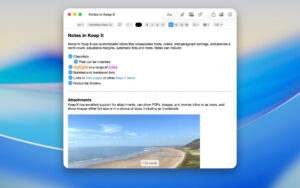
– Notes with styles, lists, and attachments, looking good on all your devices
– Real-time previews of web links, or save as PDF or web archives for offline viewing
– Rich text files and plain text files
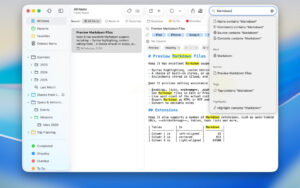
– Markdown documents with multiple styles and syntax highlighting
– Highlights and annotations for PDF documents
– Add any other type of file and view previews for most images, documents, and web pages
– View summaries and thumbnails for most file lists
– Browse items using icon view
– View recently added or viewed items in the “Recent” list
– Share folders and projects with other Keep It users using iCloud
– Encrypt files with a password

Organize:

– Folders to organize things hierarchically — choose a folder to see all the contents it contains
– Bundles to group items together — items can be placed in multiple bundles
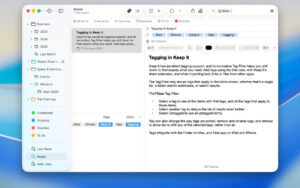
– Tags to color-code items for quick visual recognition
– Add searchable tags and comments
– Mark items as favorites and drag lists to the favorites bar for quick access

Search and filter:

– Search all content in Keep It: names, tags, file contents, dates, types, etc.
– Text recognition for documents and images
– Suggestions to easily create complex searches
– Save searches for future use
– Use keywords and natural language as dates
– Filter by tags to view all items with tags and any other relevant tags; choose another tag to go deeper

Use Keep It with other apps:

– Simplified mode reduces the app to a single column, perfect for using with other apps
– Drag anything to keep it in place
– Copy clickable links to Keep It items and lists
– Share extensions can add links, text, images, and other files, and attach text to notes in other apps
– Save files to the Keep It folder to automatically add them to the Library
– Use bookmarks to add links from browsers not using share extensions
– Use AppleScript, Automator, or shortcuts to automate tasks

Version 2.8.10 Update:

– Fixed an anomaly when generating names from text containing emojis
– Fixed issues with saving web links as PDF pages, printing unsaved web links, and printing rendered Markdown files with repeated headers and footers on macOS 12.6 and above
– Fixed the system share extension not following the setting to include headers and footers when saving web links as PDF pages
– Fixed issues with saving related changes to iCloud when extracting information from files
– Fixed issues with importing from the Library
– Fixed the issue of not being able to multi-select items in icon view mode when holding Shift
– Fixed issues with program crashes when loading thumbnails

Screenshots:


Download info

This resource requires login to download

Log in
Note: This resource is for informational purposes. By using this resource, you agree that you accept full responsibility to the copyright holder. For questions, please contact us.

Ratings & reviews

No rating

Let’s rate it.

  • 5 stars
  • 4 stars
  • 3 stars
  • 2 stars
  • 1 stars

You may also like

More
×
Note and File Manager for Mac v2.8.10 Activation Download
iMac — One-stop Mac Software Download Platform
Social login
captcha
Social login