| OmniPlan Pro is a professional project management tool that provides end-to-end planning, control, and analysis capabilities for complex projects, covering scenarios such as task scheduling, resource allocation, cost tracking, and risk prediction.
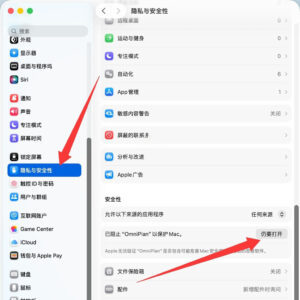
Tip: If the software opens and prompts a damaged file, please check the following settings in System Settings -> Privacy & Security -> Under the Security tab, make sure to check the box “Open Anyway”, as shown in the image below.
Installation and activation instructions: After the first launch, wait for a few seconds, as shown in the image below. The software will automatically activate, and you can then use the software normally.

## Precise Project Planning and Scheduling
– Supports hierarchical task structures, allowing the setting of various task dependencies such as start-to-complete, complete-to-complete, and more, to adapt to project processes ranging from simple to complex. Special task types like hammock tasks and split tasks are provided to flexibly handle schedule adjustments and temporary resource changes.
– Supports scheduling granularities from days, hours, minutes, to seconds, meeting high-precision project scheduling needs. Projects with undefined start and end dates can be arranged using relative timelines, and the project can be quickly adapted to actual schedules after the start date is set.
– The built-in intelligent resource balancing function automatically optimizes task scheduling to ensure that all resources are not overloaded, maximizing resource utilization efficiency and ensuring optimal project schedules.
– Automatically detects logical conflicts, resource overloads, and other violations in the scheduling, providing solution suggestions and allowing for immediate correction of scheduling anomalies to maintain project plan rationality.
## Resource and Cost Precision Management
– Manages personnel, equipment, and materials as unified project resources, allowing for customized available working hours, vacation periods, and unit costs for each resource, matching real-world project resource configurations.
– The resource view intuitively displays the allocation and time load of each resource, supporting drag-and-drop operations to quickly assign tasks and resources, and providing real-time insights into resource availability and overloading.
– The built-in professional Earned Value Analysis (EVA) system allows for setting project baselines and real-time calculation of cost deviations, progress deviations, and cost performance indices, enabling precise quantification of project health and supporting cost and progress management.
## Multi-Dimensional Views and Visualization
– **Gantt Task View**: Combines the left task outline with the right Gantt chart to clearly display task levels, durations, dependencies, and critical points, supporting direct drag-and-drop adjustments to task times, sequences, and levels.
– **Resource Time View**: Breaks down the project timeline by resource dimensions, providing a clear presentation of each member and device’s work schedule, enabling quick identification of idle and overloaded resources.
– **Calendar View**: Presents project schedules in a grid format, allowing viewing of task distributions by day, week, or month, aligning with daily office viewing habits.
– **Global Overview Navigation**: Provides a concise view of the entire project, allowing for quick dragging and positioning to any project stage, significantly enhancing the efficiency of browsing and editing large, long-cycle projects.
## Professional Analysis and Forecasting
– Monte Carlo Simulation Analysis: Through multiple probability calculations, predicts the likelihood of milestone nodes and project completion, identifying potential project delays and providing data support for resource allocation and risk management.
– Automatic Task Estimation: For tasks without clearly defined workload, the software can automatically estimate the duration based on project logic and data from similar tasks, quickly completing initial project scheduling.
– Automatic Identification of Critical Path: Real-time identification of the key task chain that determines the project’s total duration, facilitating focused management of core project components and ensuring timely project delivery.
## Collaboration and Format Compatibility
– Native support for importing and exporting Microsoft Project files, preserving task structures, resource information, and scheduling logic, ensuring seamless collaboration across platforms.
– Supports project publishing and subscribing for collaboration, allowing team members to synchronize project updates, and supports collaborative maintenance of project plans, meeting the needs of team-level project management.
– Supports multi-version baseline management for projects, enabling comparison of plan differences across different stages, and recording project change history, supporting change tracing and project audits.
## Efficient Operations and Experience
– Batch progress updates: Allows for the immediate marking of all tasks before a specified date as completed, or the batch reassignment of all unfinished tasks’ start and end times, responding quickly to project changes.
– Customizable fields and intelligent filters, allowing for the addition of project-specific information fields, enabling quick identification and targeting of tasks and resources, and supporting personalized project management processes.
– Optimized for large and complex projects, the software can smoothly handle thousands of tasks and large amounts of resource data, ensuring stable and smooth operation, and maintaining high efficiency in large-scale project management.
Version 4.11 Update Content:
Operating System Compatibility: OmniPlan has been updated to support new versions of macOS.
Performance: Improved task editing performance when allocating large amounts of resources. |







Ratings & reviews
No rating
Let’s rate it.