


Professional Disk Space Analyzer Tool: DaisyDisk for Mac v4.34 Chinese Activation Download
DaisyDisk is a disk space analysis and cleanup tool designed specifically for macOS, boasting core advantages of intuitive Sunburst Map visualization and lightning-fast scanning performance, helping users quickly identify and clean up large files and redundant data.
Features:
Interactive Sunburst Map Visualization:
Presenting disk usage with a color-coded concentric sector diagram, where the area of each sector is proportional to the space occupied by files or folders. Hovering the mouse over a sector reveals the name, size, and path, and clicking allows users to delve into the file structure layer by layer, making it clear at a glance where space is being used.
Superfast Scanning and Parallel Processing:
Utilizing underlying disk access, parallelization technology, and deep optimization, scanning speeds are up to 6-32 times faster than other software, typically scanning an entire startup disk in just a few seconds, and supports parallel scanning of multiple disks/folders without disrupting the workflow.
Comprehensive Storage Device Support:
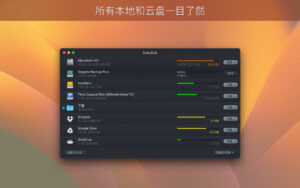
Compatible with local hard drives, external storage, network drives, and mainstream cloud storage, DaisyDisk displays the usage status of all mounted volumes in real-time, helping users keep track of their overall storage situation.
Safe and Efficient Cleanup Workflow:
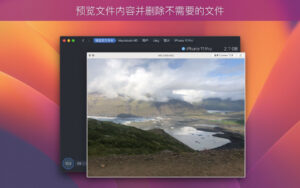
Using a “Collector” mechanism, it supports drag-and-drop collection of files to be deleted, integrates QuickLook preview functionality, allowing users to confirm the content before deletion; system files are protected, and only the user can decide to delete objects, avoiding accidental deletion of critical data.
Deep Space Analysis Capabilities:
It can scan hidden space, removable space, and APFS snapshots, supporting scans of restricted folders with administrator privileges, revealing the space occupied by system and hidden files that other tools often overlook.
Convenient Operations and Native Experience:
Fully compatible with macOS design language, supporting drag-and-drop operations, Retina display optimization, keyboard shortcuts, and multi-touch gestures, DaisyDisk updates disk usage data in real-time, allowing users to always know if their storage space is sufficient.
Version 4.34 Update Highlights:
* Added support for APFS clone files, improving storage space calculation accuracy.
This update now recognizes and counts APFS clone files. Similar to hard links, DaisyDisk only counts the first entity file of each clone file, marking the virtual occupied size of the other clone copies as 0 bytes, ensuring the total calculation result of disk space usage is accurate and error-free.
APFS clone files are a common feature of macOS’s APFS file system: they allow pointing to the same original file in multiple different folders, appearing as independent copies, but do not occupy additional disk storage space. Compared to the previous hard link feature, APFS clone files offer higher flexibility and stability.
Software Screenshots:
This resource requires login to download
Log in
Hookshot for Mac v1.17.1 Window Management Tool Activation Download
Downloads:2986 | 2026-10-27

Mac Video Converter Ultimate with Chinese Activation Download v3.6.4
Downloads:1895 | 2026-10-24

2Do for Mac v2.6.17 Simplified Task Manager with Chinese Activation Download
Downloads:999 | 2026-10-20

Live Wallpaper for Mac v20.0 Hanami Ultra HD 4K Dynamic Wallpaper Activated Version Download
Downloads:1453 | 2026-10-17


Ratings & reviews
No rating
Let’s rate it.