


Enhanced Clipboard Tool for Mac v2026.7.1 Chinese Activation Version Download
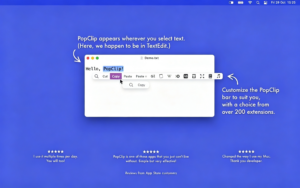
PopClip is a renowned global clipboard productivity tool for macOS, allowing users to instantly access a floating operation panel above the cursor whenever they select text within any application, eliminating the need for right-click menus and switching windows, and enabling text manipulation with a single selection. It is a must-have productivity software for text editors, developers, and researchers.
Note: This version requires disabling SIP on macOS to function properly.
Core Features:
1. **Smart Word Selection Triggering**
– Automatically triggers the operation panel by dragging the mouse over selected text; long-pressing the touchpad or mouse button allows for direct panel access without selecting text, executing paste.
– Supports setting a blacklist to automatically disable panels within specified applications, preventing interference.
2. **Native Built-in Basic Operations**
– Includes cut, copy, paste, spelling check, dictionary lookup, and web search functions. It automatically recognizes text links, email addresses, and file paths, allowing for direct opening.
– Supports pasting with Option key held down to paste plain text without formatting.
3. **Context-Sensitive Intelligent Recognition**
– Dynamically displays relevant functions based on the selected text; links display open buttons, incorrect words offer spelling corrections, and the menu remains clean and uncluttered.
## New Features (2026 Latest Version)
**Unlimited Customization of System Operations**
– No limit on the number of operations; a single extension can create multiple instances, each with its own name, icon, parameters, and position.
– Supports creating folders and separators to organize operations; folders appear as sub-menus in the PopClip toolbar.
– Allows renaming any operation and freely switching between icon/text display modes.
– New icon selector supports searching for open-source icons, creating custom text icons, and importing SVG/PNG icons.
**Enhanced Extension Management**
– Official extension library plugins support automatic updates.
– Adds an extension information panel and unified extension management list, enabling viewing of source code and signature information for debugging custom extensions.
**Optimized Settings Panel**
– Supports multi-line text input boxes, password display in plain text, and clickable link explanations.
– Supports custom input for multi-select options and “none” option, adapting to various APIs and prompt configurations.
## Extensive Extension Ecosystem (Core Features)
**Extensive Free Extensions for All Scenarios**
– Text Processing: Case conversion, Simplified to Traditional conversion, Removal of extra spaces, Text sorting, Encoding conversion, CamelCase conversion.
– Translation Tools: DeepL, Google Translate, Bing Translate, Oxford Dictionary, etc.
– Office Integration: One-click text push to Notion, Evernote, Notes, To-Do lists.
– Developer Tools: Base64 encoding/decoding, Dash document search, URL encoding, Viewing Bundle ID.
– Utility Tools: Text-to-speech, Generate short links, Unit conversion, QR code generation, Search selected content.
– Custom Extensions: Supports user-written custom extensions to create personalized workflows.
## Detailed Improvements and Experience
– Floating panel width adjusts to screen size.
– Overflow buttons display pagination information.
– Hover animations for buttons are smooth.
– After pasting, the clipboard content is automatically restored.
– Built-in operations support deletion and restoration, and function buttons can be freely dragged and reordered.
– Built-in search tool supports custom search engines, with Option held down to automatically add double quotes to search keywords for precise results.
Version 2026.7.1 Update Content:
# New Features: Comprehensive Reorganization of Operation Lists
– No limit on the number of installed extensions and configurations.
– Multiple instances support for a single extension, each with its own name, icon, settings, and position within the toolbar.
– Support for folders and separators to organize operations; folders appear as sub-menus in the PopClip toolbar.
– Allows renaming any operation and setting custom display modes (icons only or icons with text).
– New icon selector supports searching for open-source icons, creating custom text icons, and importing SVG/PNG icons.
– Supports creating new operations based on existing configurations.
– Quick search feature via ⌘F.
– Adds sub-menus to extensions, allowing placement of secondary functions.
# Enhanced Extension Management
– Automatic updates for official extension library plugins.
– New extension information panel displays source, version, and signature status.
– Unified extension management panel lists installed extensions (sortable by name or installation date), and manages updates.
– Adds “View Source Code” to directly browse any extension’s source code.
# Improved Settings Panel
– Displays the current account name after logging into an extension.
– Supports multi-line text input boxes for long texts (e.g., prompts).
– Supports “other (custom input)” and “none” options for multi-select options.
– Links in settings explanations are clickable.
– Password boxes include a button to display in plain text.
# Detailed Improvements
– Widens the PopClip toolbar to occupy more horizontal space.
– Displays pagination information for overflow buttons (“Page n of m”).
– Smooth hover animations for buttons.
– Automatically restores clipboard content after pasting operations.
– Supports deletion of built-in operations, allowing recovery in the extension list.
– Spell check operations support drag-and-drop sorting.
– Built-in search feature supports pre-set search engines and custom search engines.
# Problem Fixes
– Recognizes Ecosia as the standard browser.
– Fixes issues with the message extension on macOS 13.7.
Software Screenshots:
This resource requires login to download
Log in
Jump Desktop for Mac v10.15.42 远程桌面应用程序 激活版下载
Downloads:3227 | 2026-10-29

Elmedia Video Player Pro for Mac v7.12 Chinese Activation Download
Downloads:1944 | 2026-10-24

Live Home 3D Pro for Mac v3.8 Chinese Activation Edition Download
Downloads:1376 | 2026-10-23

Vellum for Mac v3.4 E-Book Generator Activation Download
Downloads:2675 | 2026-10-20


Ratings & reviews
No rating
Let’s rate it.