

Live Home 3D Pro for Mac v4.12.1 Chinese Activation Version Download
Live Home 3D Pro for Mac is a software for interior design and home planning. It provides a wealth of features and tools to help users create, visualize, and arrange interior designs on their computers easily.
Plans, buildings, and landscapes:
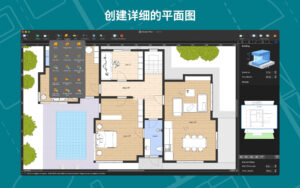
– Create detailed 2D floor plans layouts.
– View wall, ceiling, and floor dimensions in real-time within the 2D floor plan view.
– Infinite floors: Create multi-level buildings, even skyscrapers.
– Design from scratch or use existing house and interior design samples (such as kitchens, bathrooms, living rooms, etc.).
– Use landscape design tools to create complex landscapes, lay out roads and driveways, and plan your garden or backyard.
– Choose from existing roof templates (12 roof types and 16 skylight types), or create any form and complexity of roof by editing its individual segments.
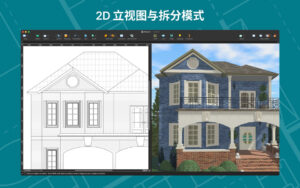
– Provide 2D perspective views of walls and roofs for perfect handling of openings, alcoves, and wall panels.
– Use the multi-purpose building block tool to create porches, custom columns, beams, and even furniture.
Objects and materials:
– Add and move furniture and other objects (over 2,400 items) and apply solid materials (over 2,100 materials).
– Access thousands of free models from Trimble 3D Warehouse.
– Import 3D models from other applications in the most popular formats (Trimble SketchUp™, COLLADA, FBX, OBJ, USDZ, 3DS, etc.).
– Use the material editor to create complex custom materials, control their texture and luminescence properties.
Lighting settings:
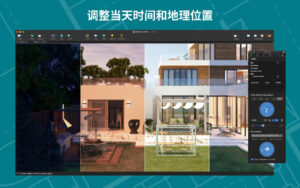
– Set real geographical location, time of day, and cloud cover for natural lighting.
– Adjust lighting for the entire house for realistic lighting scenarios.
– Create custom lights or achieve optimal lighting using the light editor for your project.
View and share projects:
– Panoramic your 3D interior designs.
– Create overview videos and 3D renderings from different angles.
– Share your projects seamlessly across macOS, iOS, visionOS, iPadOS, or Windows devices.
Export:
– Export the 2D floor plans of your project as PDF.
– Export the 3D views of your project at high resolution images.
– Export the entire house design or multiple objects in USDZ, glTF, SCN, SCNZ, FBX, or OBJ formats.
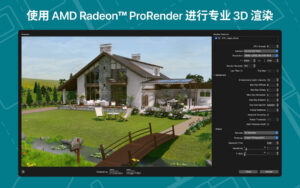
– Use offline, driven by AMD Radeon™ ProRender or Cycles, for real-looking design views (unlimited rendering).
– Obtain ultra-high quality video export for films and high-resolution 360° panoramic photos for static images (16,000 x 16,000).
– Create stereoscopic 3D videos, 360° videos, stereoscopic 3D 360° videos, and 360° panoramic JPEG images.
Version 4.12.1 Update Content:
– Added Polish language translation for the application interface.
– Added Japanese, Portuguese, Russian, Ukrainian, Polish, and Chinese translations for the help documentation.
– Improved Collada (.dae) import.
– Fixed some roof materials.
– Fixed some errors and improved stability.
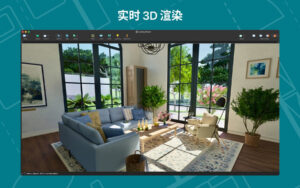
Software Screenshots:
This resource requires login to download
Log in
All-in-One Video Processing Software VideoProc for Mac v3.3 Chinese Activation Download
Downloads:1017 | 2026-10-24

Grit and Valor for Mac: A Real-Time Strategy Roguelite Game
Downloads:1927 | 2026-10-23

Adobe Illustrator 2025 for Mac v29.1 Ai2025 Chinese Activation Version Download
Downloads:3227 | 2026-10-21

MacBooster 7 for Mac v7.2.6 Maintenance and Optimization Tool Chinese Activated Version Download
Downloads:1782 | 2026-10-17


Ratings & reviews
No rating
Let’s rate it.