

EazyDraw for Mac v12.6.0 Vector Drawing Software Chinese Activation Download
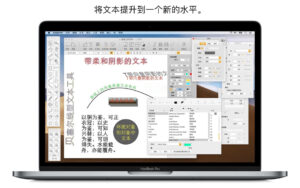
EazyDraw helps you express ideas visually. Words alone often fail to convey concepts clearly, and diagrams, symbols, and drawings make information more直观. EazyDraw combines vector drawing, structured text, and symbols to allow you to precisely express knowledge and creativity.
Supports all Apple devices
EazyDraw is part of a native app family that supports Mac, iPad, iPhone, and Vision Pro. Work seamlessly across devices with Handoff, cross-device copy-paste, drag-and-drop, and iCloud sync. Start drawing on a Mac and continue on a mobile device.
Designed for efficient computer-aided drawing
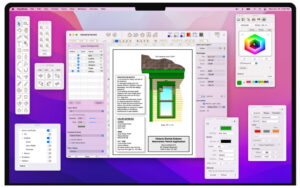
EazyDraw’s integrated interface keeps tools, property inspectors, and symbol libraries always within reach, allowing you to focus on drawing rather than managing windows. Customizable keyboards integrate text input, color selection, property inspectors, and drawing tools into a compact workspace.
Native support for SVG and PDF vector graphics
EazyDraw offers full native support for SVG (scalable vector graphics). Import, edit, and export SVG files, and import and edit vector content in PDFs. Support exporting to SVG, PDF, JPG, TIFF, website icons, Keynote graphics, and more formats.
Powerful vector drawing tools
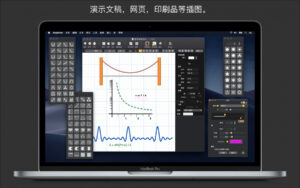
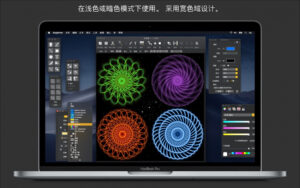
Use gradients, shadows, arrows, dashed lines, textures, and vector grids to enhance drawings. Precisely select and choose colors with eight built-in color selectors.
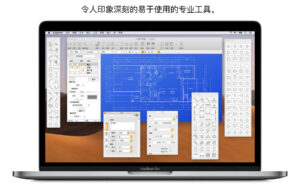
Create proportional technical drawings with automatic dimensioning, grids, reference lines, rulers, and snap tools. Build flowcharts and structural diagrams with automatic connection lines and formatted text.
Flexible export and sharing
Supports exporting to PDF, PNG, JPG, or TIFF, and sharing with other apps.
Version 12.6.0 Update:
EazyDraw 12.6.0 brings a major update, officially launching EazyDraw’s Automation API (Automation API) – this new feature allows you to drive EazyDraw through your custom scripts, tools, and AI workflows.
EazyDraw Automation API
Now offers lightweight, secure web services to programmatically drive EazyDraw. Ideal for batch production, AI-assisted creation, and connecting EazyDraw to external agents (Agents). Supports writing scripts in Python, Shell, or any language capable of sending network requests to perform the following:
– Control drawings: Open, close, and read the full document structure (layers, graphics, zoom levels).
– Automatic layout: Precisely place, position, and adjust the size of library elements.
– Apply styles: Programmatically apply fill colors, gradients, vector grids, dashed lines, and arrows to any graphics.
– Instant export: Seamlessly export entire drawings, layers, or individual graphics as SVG, PDF, PNG, or JPEG formats.
– Secure and local: Runs entirely on your Mac, protected by a private access token, and follows the editor’s standard undo/redo state. You can easily manage this service through the new automation API settings panel.
Smarter drawing properties and AI-ready
The “Drawing Properties” panel has been completely reworked to support external Python parsing and AI agents for drawing inspection:
– Flat serialization format (Flat): Choose the new “Flat” format for a fully parsed, machine-readable layout where each graphic includes its complete set of attributes, making it effortless for AI agents to read and write.
– Persistent UUIDs: Assign stable, globally unique identifiers (UUIDs) to objects, layers, and libraries so automation scripts can reliably reference specific elements across sessions.
– Default metadata: Set convenient default values for titles, authors, organizations, and projects, which will automatically apply to new drawings.
Smooth iPadOS 26 collaborative work
– Seamless special copy and paste across devices: Work seamlessly between Mac and iPad with EazyDraw for iOS (v4.2.0) for attribute groups (colors, styles, gradients, arrows, dashed lines).
Independent mobile and size locking
Updated “Format > Lock” sub-menu for more granular control over graphics protection:
– Lock movement: Fix the position of graphics while allowing you to adjust their size and shape.
– Lock size: Freeze the size and shape of graphics while allowing you to reposition them.
– Visual state: Selecting handles changes the style (empty circle for movement lock, gray for size lock), making the status clear at a glance.
Other improvements
– Improved handling of angle symbols for degrees.
– Optimized general performance and fixed known issues.
Software Screenshot:
This resource requires login to download
Log in
Proxyman for Mac v6.14.0 Professional HTTP Sniffer with Chinese Activation Download
Downloads:0 | 2026-10-27

Red Giant VFX Suite for Mac v1.0.2 Activation Download
Downloads:1435 | 2026-10-24

Rhino 7 for Mac v7.6.21124 3D Modeling Software Chinese Activation Version Download
Downloads:515 | 2026-10-23

DxO PhotoLab 5 for Mac v5.5 Chinese Activation Edition Download
Downloads:1165 | 2026-10-21


Ratings & reviews
No rating
Let’s rate it.